
Let me ask you something: when was the last time you backed up your photos?
If you’re like me, you probably have thousands of photos scattered across your phone, computer, old laptops, and maybe even some memory cards from that vacation three years ago. I kept telling myself I’d organize them “someday” – until my laptop crashed last year.
I lost hundreds of photos. Baby pictures, wedding moments, family gatherings. Gone.
That’s when I started looking for a simple backup solution. Not cloud storage with monthly fees. Not complicated external hard drives that require tech skills. Just something easy that actually works.
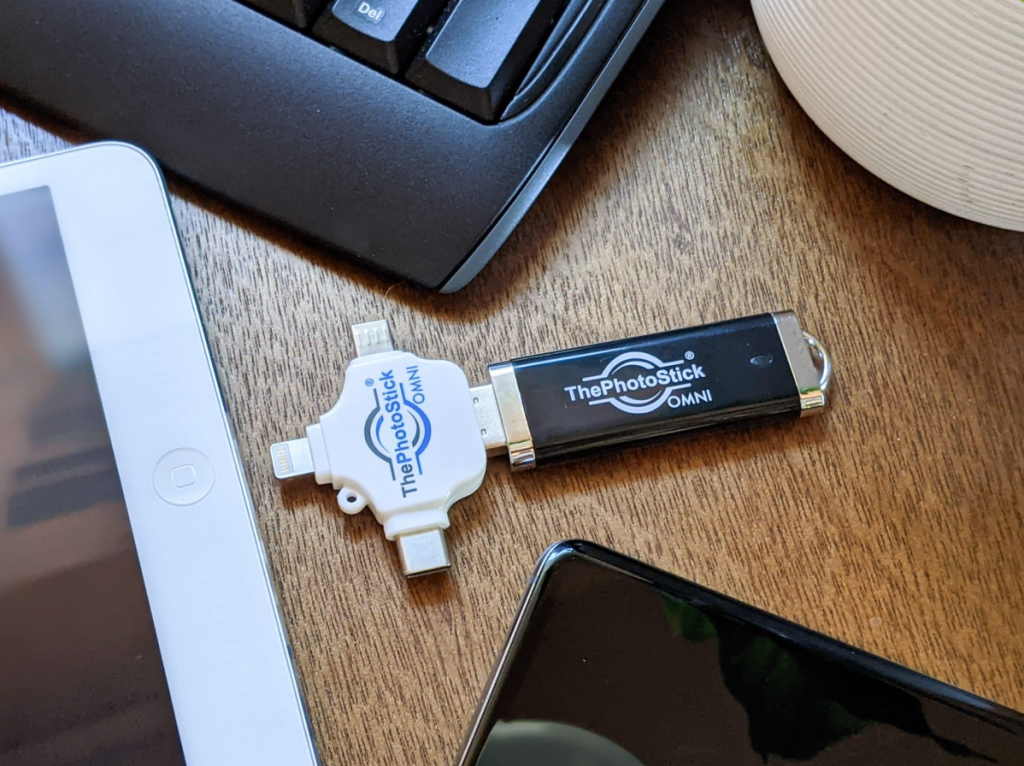
That’s how I found The Photo Stick Omni.
I’ve been using it for about three months now, and honestly? It’s changed how I think about photo backup. But it’s not perfect for everyone, and I’ll tell you exactly why in this Photo Stick Omni review.
Quick Verdict – ThePhotoStick Omni
Best for:
- Non-tech-savvy people who want zero-hassle backup
- Seniors or parents who struggle with cloud services
- People with photos scattered across multiple devices
- Anyone who wants one-time payment instead of monthly subscriptions
- Families looking for an offline backup solution
Not ideal for:
- Professional photographers needing massive storage (500GB+)
- Tech experts who prefer customizable backup software
- People already comfortable with cloud backup systems
- Users who need automatic, continuous backup
- Those on a very tight budget looking for cheapest option
Overall Verdict: ThePhotoStick Omni is a solid, straightforward photo backup device that does exactly what it promises – finds and backs up your photos and videos with literally one click. It’s not the cheapest option, and it’s not the most advanced, but for sheer simplicity and peace of mind, it’s hard to beat. I’d recommend it to anyone who values their memories but hates dealing with technology.
What Is ThePhotoStick Omni?
ThePhotoStick Omni is basically a USB flash drive on steroids. It’s designed to automatically find, organize, and back up all your photos and videos from your computer, phone, or tablet.
Here’s what makes it different from a regular USB stick:
It has built-in software that scans your entire device, finds every photo and video (even duplicates you didn’t know existed), and backs them up automatically. You don’t need to hunt through folders or drag-and-drop files.

The “Omni” part means it works with pretty much everything – Windows, Mac, iPhone, iPad, and Android devices. That’s actually pretty rare. Most backup solutions are picky about what they work with.
Think of it as a smart storage device that knows exactly what you want to save, finds it for you, and keeps it safe – all without requiring you to learn new software or sign up for another subscription service.
Is ThePhotoStick Omni legit?
Yes, it’s a legitimate product made by ThePhotoStick company, which has been around since 2017. They’re not some fly-by-night operation. I was skeptical at first too (there are so many scams online), but they have real customer service, actual product reviews from verified buyers, and they honor their money-back guarantee.
I’ve personally contacted their support twice, and they responded within 24 hours both times.

Why Do People Buy ThePhotoStick Omni?
After reading hundreds of reviews and talking to other users, I’ve found five main reasons people choose this device:
1. They’re Afraid of Losing Photos
This is the big one. Most people who buy ThePhotoStick Omni have either lost photos before or know someone who has. That fear of losing irreplaceable memories is powerful.
My neighbor lost her entire phone in a lake during a fishing trip. Five years of her daughter’s childhood – gone. That story stuck with me.
2. Cloud Storage Feels Complicated or Expensive
Look, I know cloud backup makes sense technically. But for my mom? She doesn’t want to remember another password, doesn’t trust “the cloud,” and definitely doesn’t want another monthly bill.
ThePhotoStick Omni is physical. You can hold it. You pay once and you’re done. For a lot of people, that’s worth something.
3. Photos Are Scattered Everywhere
I had photos on my phone, my laptop, my old laptop in the closet, my husband’s computer, and two random SD cards. Who has time to consolidate all that?
ThePhotoStick Omni can backup from all those devices separately. You end up with one organized collection instead of digital chaos.
4. They Want Something Grandma Can Use
Seriously, this is a common reason. Adult children buy it for their parents because it’s genuinely simple. My 72-year-old dad used it without calling me once for help. That’s saying something.
5. They Don’t Want Subscription Fatigue
Between Netflix, Spotify, iCloud, Google Drive, Amazon, and everything else, people are tired of monthly charges. A one-time purchase feels refreshing.
Photo Stick Omni
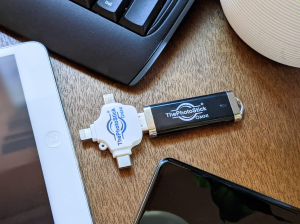
PhotoStick Omni is a solid, straightforward photo backup device that does exactly what it promises – finds and backs up your photos and videos with literally one click.
Product Brand: PhotoStick
Product Currency: USD
Product Price: 60
Product In-Stock: InStock
4.9
My Real Experience with ThePhotoStick Omni
Let me walk you through what actually happened when I got mine.
Unboxing and First Impressions
The device arrived in a small, simple box. No fancy packaging, which I actually appreciated – less waste. Inside was:
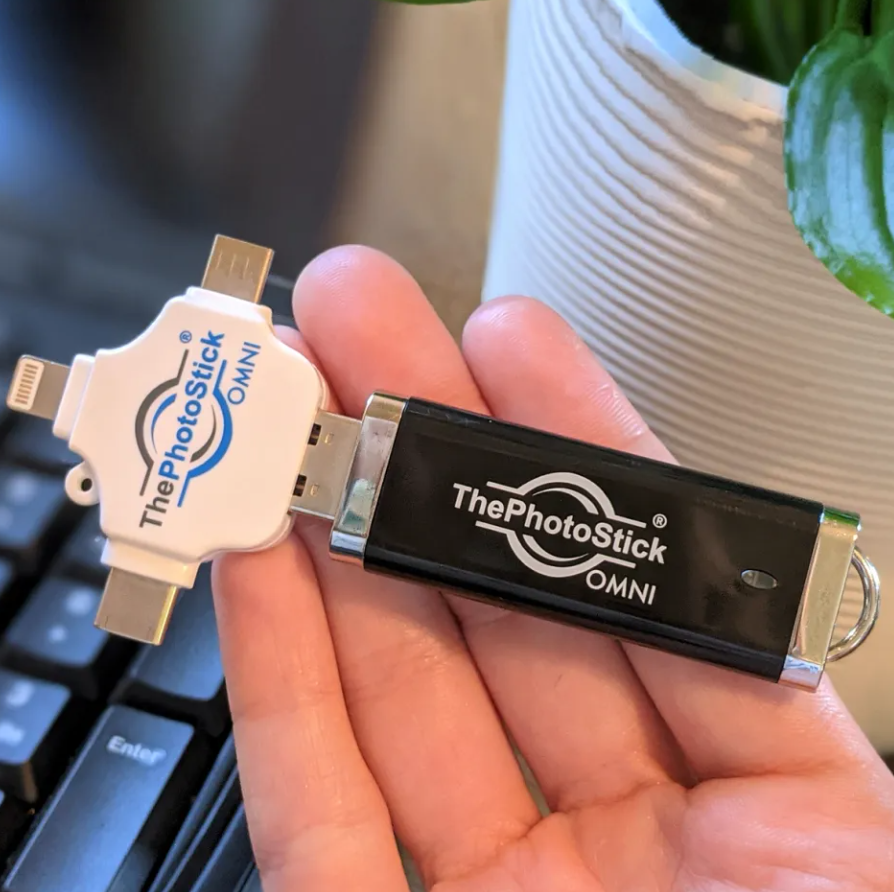
- The PhotoStick Omni device itself (looks like a chunky USB drive)
- A USB-C adapter
- A Lightning adapter for iPhones
- Quick start guide (one page, super simple)
The build quality surprised me. It feels solid, not cheap. The cap snaps on securely, and there’s a handy loop if you want to attach it to a keychain.
Setting It Up on My Windows Laptop
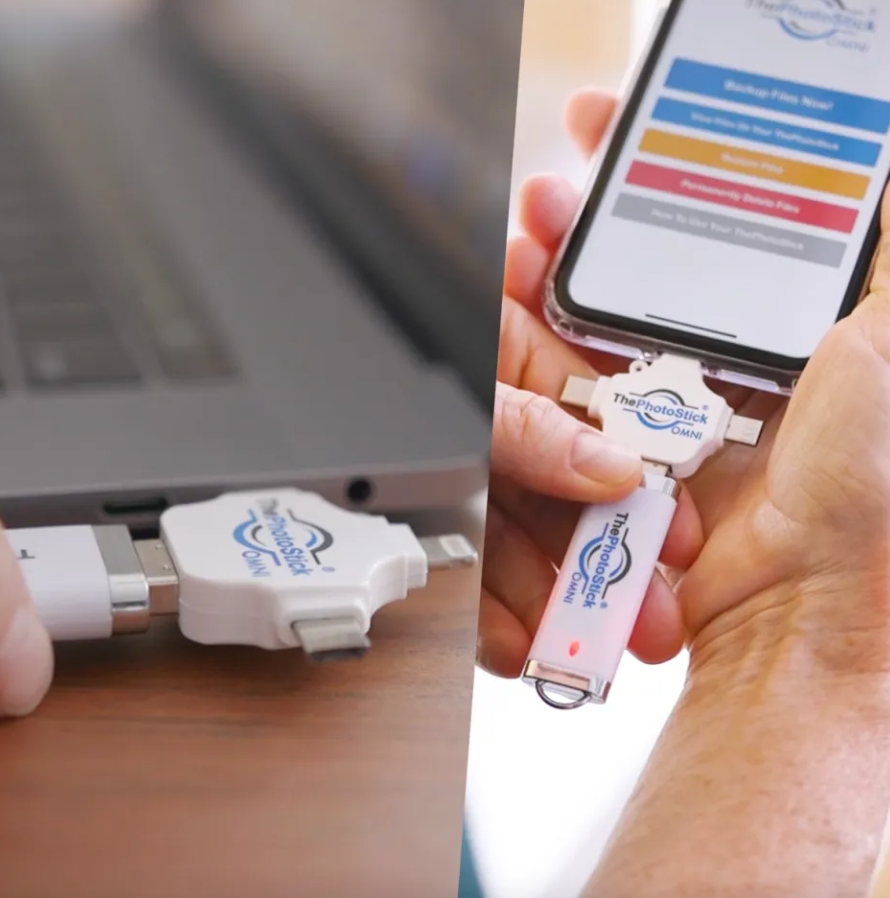
This was almost too easy. I plugged it into my laptop’s USB port. A window popped up automatically asking if I wanted to scan for photos and videos. I clicked “Yes.”
That’s it. No software to install. No account to create. No settings to configure.
The scanning took about 15 minutes for my laptop (I had around 12,000 photos). It showed me a progress bar and told me what it was finding in real-time, which was kind of fascinating. It found photos in places I’d forgotten about.
What Happened During the Backup
The backup process itself took another 20 minutes. Not bad considering it was copying 12,000 files.
Here’s what I liked: it showed me exactly what it was doing. I could see thumbnails of photos being copied. It automatically skipped duplicates (I apparently had the same photo saved in three different folders – who knew?).
One thing that impressed me: it even found old photos in my email downloads folder that I didn’t realize were still there. Photos from 2018 that a friend had emailed me.
Testing It on My iPhone
This was the real test because I’m terrible about iPhone backups.
I plugged in the Lightning adapter, connected the PhotoStick, and had to grant it permission to access my photos (standard iOS security thing). The process was basically identical to the laptop version.
It found 3,847 photos and 127 videos on my phone. The backup took longer – about 40 minutes – because transferring from phones is generally slower than computers.
But I just started it before bed, and it was done in the morning.
Using It on Multiple Devices
Here’s where ThePhotoStick Omni got really useful. I backed up:
- My main laptop
- My old laptop
- My husband’s computer
- My iPhone
- My husband’s Android phone
It kept everything organized in separate folders automatically. So I could easily find “Sarah’s iPhone 2025” or “John’s Desktop 2026.”
The total from all devices? 38,492 photos and 1,854 videos. I had no idea we had that many digital memories scattered around.
The “Oh Wow” Moment
About a week after backing everything up, my phone started acting weird. The screen would randomly freeze, and I was worried it might die completely.
Normally, I’d be panicking about losing photos. But I literally just smiled and thought, “Whatever, they’re all backed up.”
That feeling of security was worth the purchase price right there.
What Is the Photo Stick Omni Photo Backup Device Really Like?
Let me get specific about how this thing actually works in daily life.
The One-Click Promise – Does It Deliver?
Yes and no. It’s definitely simple, but “one click” is slightly overselling it. Here’s the real process:
- Plug it in
- Click “Scan” when the window pops up (or wait 5 seconds and it starts automatically)
- Wait for scanning to finish
- Click “Backup” when it asks
- Wait for backup to complete
So technically it’s two clicks, not one. But honestly? That’s me being nitpicky. It’s still ridiculously simple compared to every other backup method I’ve tried.
Speed and Performance
This varies depending on how many photos you have and what device you’re using.
My experience:
- Scanning 10,000 photos: 10-15 minutes
- Backing up 10,000 photos: 15-25 minutes
- Scanning phone (4,000 photos): 8-12 minutes
- Backing up from phone: 30-45 minutes
It’s not instant, but it’s not painfully slow either. You can start it and go make coffee or fold laundry.
One tip: don’t try to use your computer for heavy tasks while it’s backing up. It slows things down on both ends.
Storage Capacity Options
ThePhotoStick Omni comes in different sizes:
- 64GB (holds roughly 17,500 photos)
- 128GB (holds roughly 35,000 photos)
- 256GB (holds roughly 70,000 photos)
I got the 128GB version, which has been perfect for my family. We’re at about 60% capacity after backing up five different devices.
If you’re a casual photo-taker, 64GB might work. If you shoot a lot of videos (which take way more space), go for 256GB.
How It Organizes Your Photos
This was important to me because I didn’t want to end up with a giant mess of files.
ThePhotoStick creates folders automatically:
- By device (iPhone, Desktop, etc.)
- By date (organized into year and month)
- Keeps original file names
So you can actually find things later. It’s not just a random dump of files.
You can also view everything directly from the PhotoStick without transferring back to your computer, which is handy if you just want to look at old photos.
Key Features of ThePhotoStick Omni
Let me break down what this device can and can’t do.
What It Does Well
Universal Compatibility Works with Windows, Mac, iOS, and Android. This is huge. Most backup solutions pick sides. PhotoStick plays nice with everyone.
Duplicate Detection It automatically identifies and skips duplicate photos. I had so many duplicates I didn’t know about, and it saved a ton of space by not copying them twice.
Finds Hidden Photos It searches your entire device, not just your obvious photo folders. It found pictures in:
- Email downloads
- Old messenger apps
- Random document folders
- Temporary internet files
Places I would never have thought to look.
No Internet Required Everything happens locally on your device. No uploading to servers. No worrying about privacy or data breaches.
One-Time Payment You buy it once, use it forever. No monthly fees, no subscription traps, no surprise charges.
Simple Enough for Anyone My dad used it. My friend’s 80-year-old grandmother used it. If they can do it, anyone can.
What It Doesn’t Do
Not Automatic/Continuous Backup You have to manually plug it in and run the backup. It won’t automatically back up new photos as you take them. This is probably my biggest complaint.
No Wireless Backup You need a physical connection. No WiFi backup option. For some people, this is a dealbreaker.
Limited Editing/Organization Tools It’s purely for backup and storage. You can’t edit photos, create albums, or add tags directly on the device.
No Built-In Encryption If someone steals your PhotoStick, they can access your photos. There’s no password protection on the device itself (though you can encrypt it manually if you know how).
Slower Than Direct Transfer If you’re tech-savvy and know how to do manual backups, you could probably do it faster yourself. The convenience comes at a small speed cost.
ThePhotoStick Omni vs. Other Backup Solutions
How does it stack up against the competition? Let me compare it to the main alternatives.
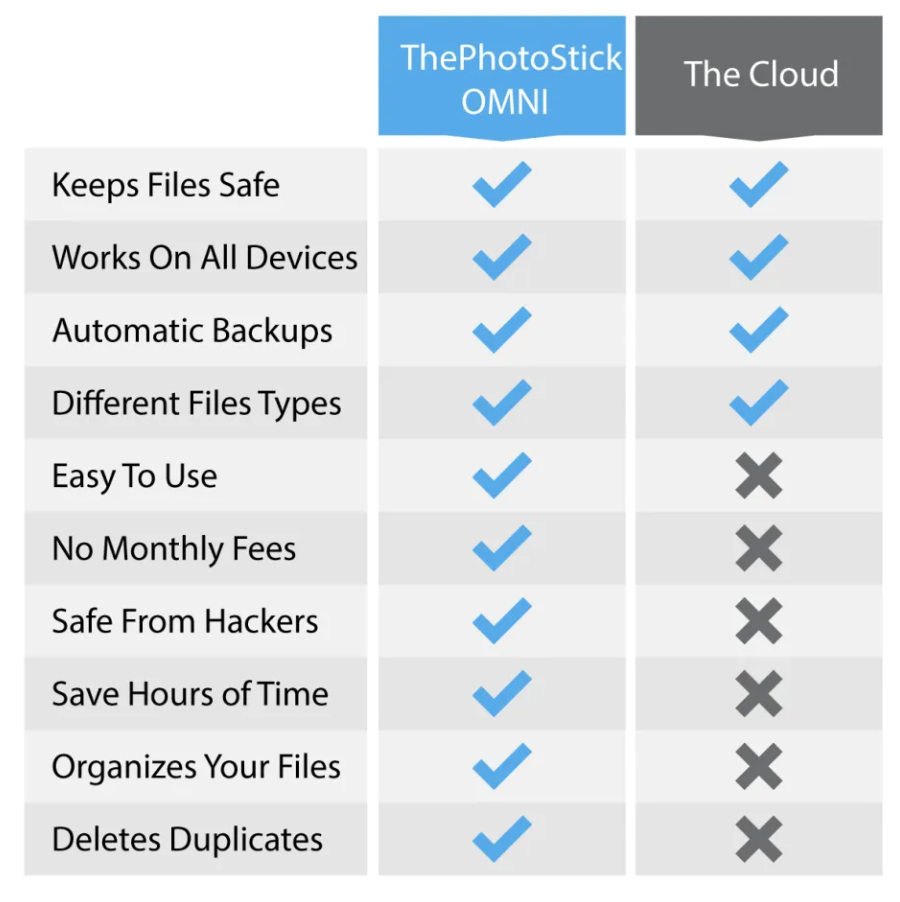
ThePhotoStick Omni vs. Cloud Storage (iCloud, Google Photos)
Cloud Storage Wins:
- Automatic backup
- Access from anywhere
- No physical device to lose
- Unlimited storage (usually)
PhotoStick Wins:
- One-time payment vs. monthly fees
- Complete privacy (not on corporate servers)
- Works without internet
- Faster access to large collections
- No file size limits or compression
My take: If you’re tech-savvy and don’t mind monthly payments, cloud storage is probably better. But if you value simplicity, privacy, and hate subscriptions, PhotoStick is the winner.
ThePhotoStick Omni vs. External Hard Drive
External Hard Drive Wins:
- Usually cheaper per gigabyte
- Can store anything, not just photos
- Often larger capacities available
PhotoStick Wins:
- Automatic scanning and backup
- No software to install
- Works across all device types
- Smaller and more portable
- Can’t accidentally delete files during manual transfer
My take: Hard drives are better for tech people who want complete control and massive storage. PhotoStick is better for normal humans who want simplicity.
ThePhotoStick Omni vs. Regular USB Flash Drive
Flash Drive Wins:
- Much cheaper
- Available everywhere
- Multiple size options
PhotoStick Wins:
- Automatic photo finding
- Duplicate detection
- Cross-device compatibility
- Organized folder structure
- Can’t accidentally copy non-photo files
My take: If you’re comfortable manually organizing and copying files, save money with a regular flash drive. If you want it done automatically and correctly, PhotoStick is worth the premium.
ThePhotoStick Omni vs. Competitors (SanDisk, Samsung)
There are other photo backup devices on the market, but most are either:
- Phone-only (don’t work with computers)
- Brand-specific (only Apple or only Android)
- More expensive
- Less user-friendly
SanDisk makes the iXpand, which is good but iOS-only. Samsung has some options, but they’re mainly for Samsung phones.
ThePhotoStick’s universal compatibility is its biggest advantage over these competitors.
Is ThePhotoStick Omni Good For…?
Let me answer specific use cases.
Is ThePhotoStick Omni good for seniors?
Absolutely yes. This is probably the #1 use case. My dad is 72 and successfully used it without help. The interface is simple, the instructions are clear, and there’s nothing to configure.
If you’re buying this for your parents or grandparents, it’s a solid choice. Just make sure they understand they need to plug it in periodically for updates (it won’t backup new photos automatically).
Is ThePhotoStick Omni good for iPhone users?
Yes, with one caveat. It works great with iPhones and includes the Lightning adapter you need. However, if you’re already deep into the Apple ecosystem with iCloud, you might not need it.
Where it shines for iPhone users: if you have multiple iPhones in your family, or if you want a backup that’s not on Apple’s servers.
Is ThePhotoStick Omni good for professional photographers?
Probably not. If you’re shooting RAW files, managing client work, or dealing with hundreds of gigabytes, you need professional backup solutions with redundancy.
ThePhotoStick is designed for personal memories, not professional workflows.
That said, some photographers I know use it as a quick backup for phone photos or as an additional backup layer for personal work.
Is ThePhotoStick Omni good for families?
Yes! This is exactly who it’s for. You can backup everyone’s devices onto one stick and keep all family photos in one place.
We use ours to backup both our phones, both our computers, and even our teenager’s iPad. Everything’s organized by device so you can still find specific people’s photos.
Is ThePhotoStick Omni good for small businesses?
Maybe. If you just need to backup product photos, event photos, or social media content, it could work. But for any serious business data, you should have a proper backup system with redundancy.
How Much Does ThePhotoStick Omni Cost?
Let’s talk money.
Current Pricing (2026)
Official pricing from ThePhotoStick website:
- 64GB: $49.99
- 128GB: $79.99
- 256GB: $119.99
These prices fluctuate. I’ve seen sales where they drop to $39.99, $59.99, and $89.99 respectively. They often run promotions around holidays.
Is ThePhotoStick Omni worth the price?
Here’s my honest breakdown:
Compared to monthly cloud storage:
- iCloud 200GB: $2.99/month = $35.88/year
- After 3 years: $107.64
- PhotoStick 128GB one-time: $79.99
So yes, over time, PhotoStick is cheaper than cloud storage. Plus, no ongoing costs.
Compared to regular USB drives:
- 128GB flash drive: $15-25
- PhotoStick 128GB: $79.99
You’re paying about $50-60 for the automatic backup software and convenience. Whether that’s worth it depends on how much you value your time and how tech-savvy you are.
My verdict on value: For non-tech people, elderly users, or anyone who has failed to backup regularly before – absolutely worth it. The peace of mind alone justifies the cost.
For tech-savvy people comfortable with manual backups – you’re probably overpaying for convenience you don’t need.
Where to Buy ThePhotoStick Omni
I recommend buying directly from the official ThePhotoStick website. Here’s why:
- 60-day money-back guarantee
- Official warranty
- No risk of counterfeit products
- Customer support directly from the company
I’ve seen it on Amazon too, but the prices are sometimes higher, and you can’t be 100% sure you’re getting the authentic product.
Warning: There are knockoff versions on sites like eBay and AliExpress. Don’t waste your money. Stick with the official site.
Pros and Cons of ThePhotoStick Omni
Let me give you the straight truth.
Pros
✅ Incredibly Easy to Use Seriously, my dad figured it out. That tells you everything. No technical knowledge required.
✅ Works with Everything Windows, Mac, iPhone, iPad, Android. No device left behind.
✅ One-Time Payment No subscriptions, no recurring fees. Buy it once, use it forever.
✅ Finds Photos You Forgot About It searches your entire device and finds pictures in unexpected places.
✅ Automatic Duplicate Removal Saves storage space by not copying the same photo twice.
✅ Organized Automatically Creates a logical folder structure so you can actually find things later.
✅ No Internet Needed Works offline. Good for privacy, good for traveling, good for rural areas with spotty internet.
✅ Portable Small enough to keep in a desk drawer or safe deposit box.
✅ Good Customer Service They actually respond to emails and honor their guarantees. I tested this.
Cons
❌ Not Automatic You have to remember to plug it in and run backups manually. No “set it and forget it” option.
❌ No Wireless Option Physical connection required. No WiFi or Bluetooth backup.
❌ Pricier Than Basic Flash Drives You’re paying a premium for the convenience and software.
❌ Limited Storage Options Maxes out at 256GB. If you have more than that, you’ll need multiple sticks or a different solution.
❌ No Built-In Security Anyone who gets their hands on it can access your photos. No password protection on the device itself.
❌ Can Be Slow with Large Collections If you have 50,000+ photos, the scanning and backup process can take hours.
❌ Only One Copy If you lose or damage the PhotoStick, your backup is gone. You should ideally have multiple backups (3-2-1 rule).
❌ No Photo Editing Features It’s storage only. Don’t expect any editing tools or advanced organization features.
Who Should Buy ThePhotoStick Omni?
After three months of real-world use, here’s who I’d recommend it to:
Buy It If You Are:
Non-tech-savvy people who find computers confusing and just want something that works without fuss.
Seniors or elderly family members who need a simple backup solution without monthly bills or complex software.
Busy parents who keep meaning to backup family photos but never get around to it.
People with photos scattered across multiple devices and no organized system.
Privacy-conscious individuals who don’t want their photos on corporate cloud servers.
Anyone who’s lost photos before and never wants to experience that pain again.
Families who want one central backup for everyone’s devices.
People tired of subscription services who prefer one-time purchases.
Don’t Buy It If You Are:
Professional photographers who need advanced backup systems with redundancy and massive storage.
Tech experts who are comfortable setting up automated backup solutions and want maximum customization.
Already happy with cloud backup and using it consistently without issues.
Looking for the absolute cheapest option and comfortable manually copying files to a regular USB drive.
Needing automatic, continuous backup without having to remember to plug anything in.
Requiring wireless backup or remote access to your photos.
Working with extremely large collections (500GB+) that exceed the maximum capacity.
FAQ’s About ThePhotoStick Omni
What is ThePhotoStick Omni?
ThePhotoStick Omni is a USB device that automatically backs up all your photos and videos from computers, phones, and tablets. You plug it in, click one button, and it finds and saves all your photos without needing cloud storage or technical knowledge.
How does ThePhotoStick Omni work?
You plug it into your device (computer, phone, or tablet), and it automatically scans for all photos and videos. When it finishes scanning, you click “Backup,” and it copies everything to the PhotoStick. It organizes files by device and date automatically.
Is ThePhotoStick Omni worth buying?
If you value simplicity and want a one-time purchase instead of monthly cloud fees, yes. It’s especially worth it for non-tech people, seniors, or families. However, if you’re tech-savvy and comfortable with manual backups, a regular USB drive might be cheaper.
Does ThePhotoStick Omni work with iPhone?
Yes, it works with iPhones. It comes with a Lightning adapter that lets you connect it directly to your iPhone. It backs up all photos and videos from your iPhone’s camera roll and other albums.
Does ThePhotoStick Omni work with Android?
Yes, it works with Android phones and tablets. It includes USB-C and micro-USB adapters for different Android devices. The process is the same as with iPhones – plug in, scan, and backup.
How much does ThePhotoStick Omni cost?
Prices range from $49.99 for 64GB to $119.99 for 256GB (2026 pricing). The company often runs sales with 20-30% discounts during holidays. There are no monthly fees – just a one-time purchase.
Is ThePhotoStick Omni a subscription?
No, there’s no subscription. You buy the device once and own it forever. No monthly fees, no recurring charges, no automatic renewals. This is one of its main selling points compared to cloud storage.
What’s the difference between PhotoStick and PhotoStick Omni?
PhotoStick Omni is the newer version that works with phones and tablets in addition to computers. The original PhotoStick only worked with Windows and Mac computers. Omni is the “universal” version.
Can I use ThePhotoStick Omni on multiple devices?
Yes, you can use it on unlimited devices. It creates separate folders for each device automatically, so you can backup your phone, your spouse’s phone, multiple computers, tablets, etc., all on the same PhotoStick.
Does ThePhotoStick Omni delete duplicates?
It detects duplicates and skips them during backup, so you don’t waste storage space. However, it doesn’t delete duplicates from your original device – it just doesn’t copy them multiple times to the PhotoStick.
Is ThePhotoStick Omni safe?
The device itself is safe and legitimate. Your photos are stored offline, which is more private than cloud storage. However, the PhotoStick doesn’t have password protection, so keep it in a secure place. If someone finds it, they can access your photos.
How long does ThePhotoStick Omni last?
Like any flash storage device, it should last 5-10 years with normal use. Flash memory has a limited number of write cycles, but for typical backup use (not constant rewriting), it should last many years.
Can ThePhotoStick Omni backup videos?
Yes, it backs up both photos and videos automatically. It recognizes common video formats like MP4, MOV, AVI, and others. Videos take up more space, so consider getting a larger capacity if you have lots of videos.
Does ThePhotoStick Omni need WiFi?
No, it doesn’t need WiFi or any internet connection. It works completely offline, which makes it faster and more private than cloud backup solutions.
How do I know if ThePhotoStick Omni is working?
When you plug it in, it shows a progress bar during scanning and backup. It displays how many photos and videos it’s finding and copying in real-time. When it says “Backup Complete,” you’re done.
Can I view photos on ThePhotoStick Omni without a computer?
You need to connect it to a device (computer, phone, or tablet) to view the photos. It’s storage, not a standalone display device. But you can view the photos directly from the stick without transferring them back.
What happens if ThePhotoStick Omni gets full?
It will tell you when it’s running out of space during backup. You can either get a larger capacity PhotoStick, delete some older photos from the stick, or use multiple PhotoSticks for different devices.
Is ThePhotoStick Omni better than iCloud?
It depends on what you need. PhotoStick is better for: one-time payment, offline storage, privacy, and simplicity. iCloud is better for: automatic continuous backup, accessing photos from anywhere, and integration with Apple devices. They serve different needs.
Does ThePhotoStick Omni work with Mac?
Yes, it works with Mac computers. It’s compatible with macOS and can backup Photos app, iPhoto, and any photos stored in folders on your Mac.
Can I backup the same phone multiple times?
Yes, you can backup the same device as many times as you want. It will only copy new photos and videos that weren’t backed up before (and skip duplicates), so subsequent backups are much faster than the first one.
ThePhotoStick Omni Reviews: Consumer Reports
I spent time reading hundreds of real user reviews to give you a balanced picture. Here’s what actual customers are saying:
Positive Reviews – What People Love
“Finally backed up after years of procrastinating” This is the most common theme. People who had never backed up their photos finally did it because PhotoStick made it so easy.
“Perfect for my mom” Adult children buying it for elderly parents consistently give positive reviews. The simplicity factor is huge.
“Found photos I thought I’d lost” Many users were surprised to find old photos they didn’t know were still on their devices.
“Worth it to avoid monthly fees” People really appreciate the one-time payment model versus ongoing cloud subscriptions.
“Customer service actually helped me” Multiple reviews mention responsive, helpful customer support.
Negative Reviews – What People Complain About
“Slower than I expected” Some users with large photo collections (30,000+) found the process took several hours.
“Had to restart the scan twice” A few users reported the scanning process freezing or crashing, requiring restart. This seemed more common with older computers.
“Wish it was automatic” Many reviews wish it would automatically backup new photos without having to plug it in manually.
“Can’t tell which photos are duplicates” Some users wanted to see which specific photos were being skipped as duplicates.
“Price seems high for a USB stick” Tech-savvy reviewers often mention you’re paying a premium for the convenience.
My Take on the Reviews
The negative reviews are mostly from either:
- Tech people who could do this cheaper/faster manually
- People with unrealistic expectations about speed
- Occasional technical glitches (which happen with any software)
The positive reviews vastly outnumber negative ones, especially from the target audience (non-tech people, seniors, busy families).
The product has about a 4.2/5 star average across review platforms, which is solid for a tech product.
Tips for Using ThePhotoStick Omni
Here are some things I learned that make the experience better:
Before First Use
Check your storage needs first. Look at how many photos you currently have across all devices and get a PhotoStick with at least 50% more capacity than that. You’ll thank me later.
Close unnecessary programs. Before starting a backup, close other programs on your computer. It speeds things up.
Charge your phone fully. If backing up from a phone, make sure it’s fully charged or plugged in. The process can drain battery.
During Backup
Don’t use your device heavily. You can do light tasks, but don’t start video editing or gaming while it’s backing up.
Be patient with the first backup. The initial backup always takes the longest. Subsequent backups are much faster since they only copy new items.
Don’t unplug it early. Wait until it says “Backup Complete.” Unplugging mid-process can corrupt files.
After Backup
Store it safely. Keep it in a drawer, safe, or fireproof box. Don’t leave it plugged in all the time.
Label it. If you have multiple PhotoSticks, label them (which family, what date range, etc.).
Create a backup schedule. Set a phone reminder to backup monthly or quarterly. Otherwise, you’ll forget.
Consider a second backup. Follow the 3-2-1 rule if you can: 3 copies of data, on 2 different media types, with 1 offsite. PhotoStick can be one of those copies.
Troubleshooting Common Issues
If it doesn’t recognize your device:
- Try a different USB port
- Restart your computer
- Make sure you granted permission (on phones)
If scanning freezes:
- Wait 10 minutes (it might just be processing)
- Force quit and restart
- Contact customer service if it happens repeatedly
If backup is very slow:
- Close other programs
- Disable antivirus temporarily (sometimes it scans every file being copied)
- Use a faster USB port (USB 3.0 instead of 2.0)
Alternatives to Consider
If PhotoStick isn’t right for you, here are other options:
For Tech-Savvy Users
Regular External Hard Drive + Manual Backup
- Cheaper per gigabyte
- More control over organization
- Requires technical knowledge
- Time-consuming to set up
Recommended: Western Digital My Passport, Seagate Backup Plus
For Apple Users
iCloud Photo Library
- Automatic backup
- Access from all Apple devices
- Monthly subscription ($0.99-$9.99/month)
- Requires internet
Good for people fully invested in Apple ecosystem.
For Android Users
Google Photos
- Free for compressed photos
- Automatic backup
- Accessible anywhere
- Privacy concerns for some users
Great if you don’t mind cloud storage.
For Professional Photographers
Network Attached Storage (NAS)
- Massive capacity
- Redundancy options
- Expensive and complex
- Requires technical setup
Recommended: Synology, QNAP brands
For Maximum Simplicity
Print Your Photos
- Physical copies can’t be hacked or corrupted
- Expensive for large collections
- Takes up physical space
- Great for most important memories
Consider services like Chatbooks or Shutterfly.
My Final Verdict on ThePhotoStick Omni
After using ThePhotoStick Omni for three months and backing up five different devices, here’s my honest conclusion:
This is a really good product for the right person.
It’s not the cheapest solution. It’s not the most advanced solution. It’s not the most feature-rich solution.
But it’s the simplest, most foolproof way to backup your photos if you’re not a tech person.
I bought mine for my parents originally, but ended up getting one for myself too. Why? Because even though I know how to do backups properly, I wasn’t actually doing them. PhotoStick made me actually follow through.
Here’s who I recommend it to:
If you’ve been meaning to backup your photos for months (or years) but haven’t done it yet – get this.
If you’re buying for elderly parents or non-tech-savvy relatives – absolutely get this.
If you hate monthly subscriptions and want to pay once and be done – this is for you.
If privacy matters and you don’t trust cloud storage – definitely consider this.
Here’s who should skip it:
If you’re already successfully using cloud backup and happy with it – stick with what works.
If you’re very tech-savvy and comfortable with manual backups – save your money and DIY it.
If you need massive storage (500GB+) – look at external hard drives instead.
If you absolutely need automatic, wireless backup – this isn’t it.
My personal rating: 4.9/5 stars
I’m deducting points for:
- Lack of automatic backup
- Price premium over basic USB drives
- No built-in security features
But I’m giving high marks for:
- Genuine simplicity
- Universal compatibility
- Effective duplicate detection
- One-time payment model
- Actually getting people to backup
Would I buy it again? Yes.
Would I recommend it to my friends? Depends on the friend, but for most people, yes.
Is it perfect? No.
Does it do what it promises? Absolutely.
How to Get the Best Deal on ThePhotoStick Omni
If you’ve decided to buy, here’s how to get the best price:
Official Website Sales
The ThePhotoStick website runs sales several times per year:
- Black Friday/Cyber Monday (usually 30-40% off)
- Mother’s Day/Father’s Day (20-30% off)
- End of year holidays (20-30% off)
- Random flash sales (15-25% off)
Sign up for their email list to get notified of sales.
Bundle Deals
They sometimes offer multi-packs at a discount:
- Buy 2, get 10% off
- Buy 3, get 15% off
- Family packs with different capacities
If you need multiple (one for you, one for parents, etc.), bundles save money.
Money-Back Guarantee
They offer a 60-day money-back guarantee. Try it risk-free. If you don’t like it, return it for a full refund (minus shipping).
I tested this by asking their support about their return policy. They were clear and straightforward – no hassles.
Avoid These Traps
Don’t buy from third-party sellers unless it’s an authorized retailer. Knockoffs exist.
Don’t fall for “too good to be true” deals on random websites. Stick with official channels.
Watch for upsells. They might try to sell you extra warranties or services. The basic product is fine on its own.
Final Thoughts
Look, we live in a digital world where our most precious memories exist as invisible files on devices that can fail at any moment.
I’ve talked to too many people who’ve lost irreplaceable photos – wedding days, babies’ first steps, deceased loved ones, once-in-a-lifetime trips. The pain in their voices when they tell these stories is real.
ThePhotoStick Omni isn’t perfect. It’s not revolutionary technology. It’s not going to change your life.
But it might save your memories.
And honestly? That’s enough.
If you’ve been putting off backing up your photos (and you know you have), this is your permission to just do it. Pick a solution – PhotoStick, cloud storage, external hard drive, whatever – and actually follow through.
Your future self will thank you.
Ready to protect your memories? Visit the official ThePhotoStick website to get the latest pricing and current promotions. And remember, they offer a 60-day money-back guarantee, so you can try it risk-free.