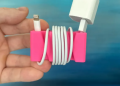

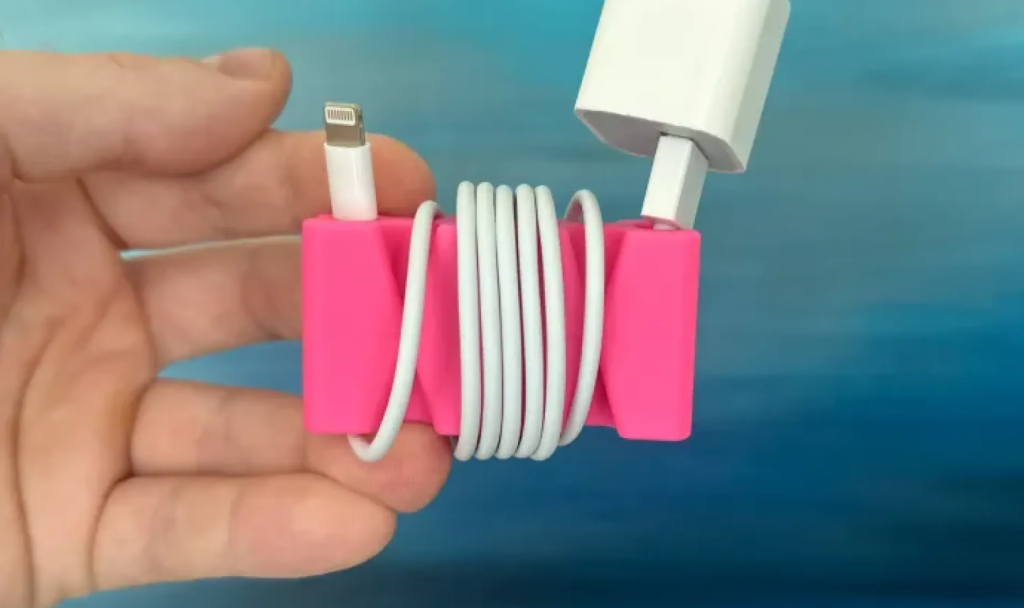
CordBrick Review: If you’ve ever crawled under a desk at 11 p.m. trying to find the charger that fell behind your nightstand again, you already know the problem CordBrick is trying to solve. CordBrick is a small, weighted silicone cable organizer that’s supposed to hold your cords in place, double as a phone stand, and stop chargers from sliding off your desk or nightstand – all without any sticky tape or adhesive.
This guide pulls together what CordBrick actually is, how it’s built, what it claims to do, and what real customer reviews and product specs say – so you can decide for yourself whether it’s worth the money before you click “add to cart.”
A quick note before we go further: this article is written as a research-based buying guide, not a personal product test. Everything you’ll read here comes from the manufacturer’s own specifications, publicly posted customer reviews, and general knowledge of how cord organizers work as a category. Where something is a marketing claim rather than a verified fact, we’ll say so clearly, so you’re not making a decision based on hype.
Quick Verdict – CordBrick
Best for:
- People with one or two devices charging on a nightstand, desk, or kitchen counter
- Anyone who hates sticky cable clips and residue on furniture
- Travelers who want a compact way to wrap and shorten charging cables
- Gift-givers looking for a small, low-cost stocking stuffer or desk accessory
Not ideal for:
- Anyone trying to manage thick laptop charger cables or power bricks
- People who want a full cable-management system for a multi-monitor desk setup
- Users who need something that mounts permanently to a wall or under a desk
- Buyers expecting a “fixes everything” solution for serious cable clutter
Overall Verdict: CordBrick looks like a reasonable, low-risk pick if your main problem is small charging cables sliding around or falling behind furniture. It’s not a miracle device, and it’s clearly designed for light, everyday cords – not heavy-duty cable runs. If your expectations match what it’s actually built for, it seems like a fair, low-cost option. If you’re hoping it’ll tame an entire tangle of monitor, dock, and power cables, it’s probably the wrong tool for that specific job.

What Is CordBrick, Exactly?
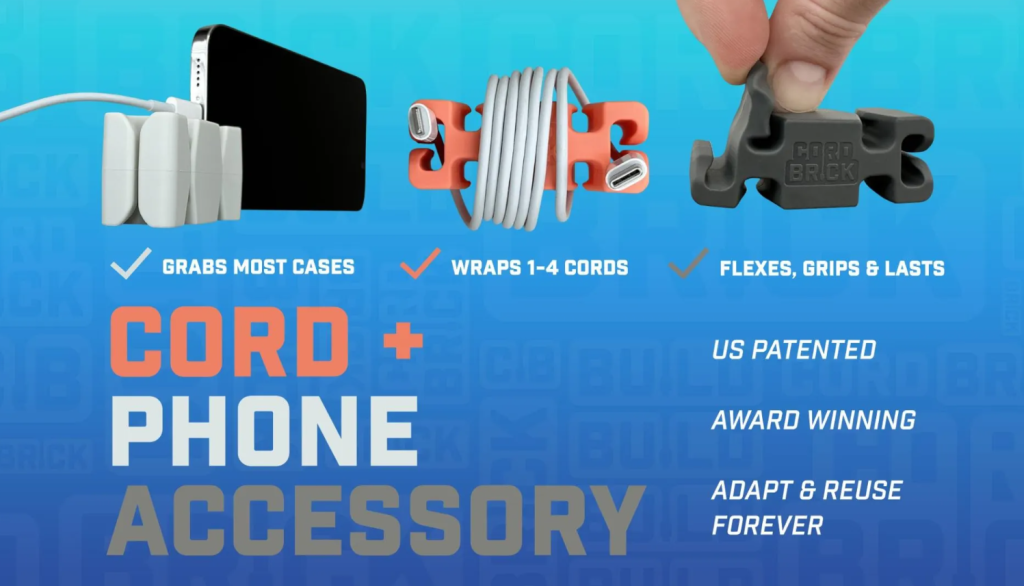
CordBrick is a small, brick-shaped cord organizer made from durable silicone rubber on the outside with a dense steel core inside. The steel core is what gives it weight — roughly 3.5 oz (about 100 grams) – which is the whole point of a “weighted” cord organizer. Instead of relying on glue, suction cups, or adhesive pads (which can leave residue or stop sticking after a while), CordBrick just sits on a flat surface and uses its own weight plus a grippy silicone bottom to stay put.
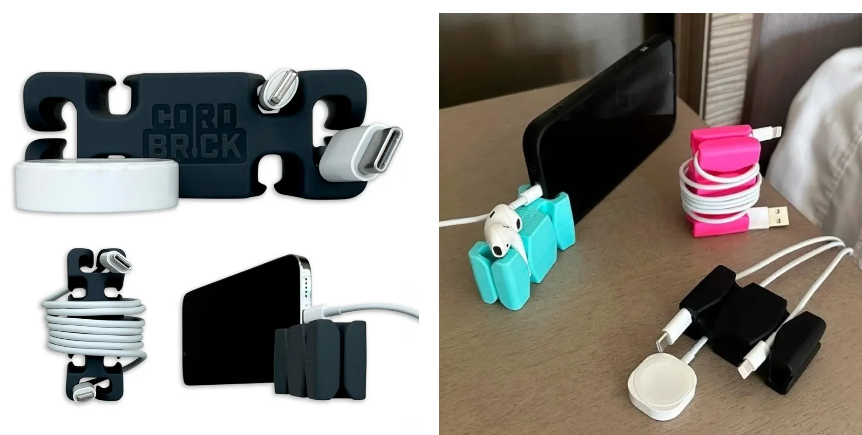
Physically, it’s compact – listed at about 2.5 inches wide, 1.35 inches deep, and 1 inch tall, so it’s roughly the size of a small bar of soap or a thick domino. It has a few different channels and slots cut into the silicone:
- Slots on the top and bottom for holding cords in place
- Channels on the sides/ends for wrapping cords around the device
- A notch or edge that can grip a phone to prop it up at an angle
The basic idea is simple: you snap one end of a cable into a slot, wrap the excess cord around the brick, then tuck the other end into a second slot to lock the wrap in place. When you need the cable again, you release the trapped end and unwrap it. The company describes this as a “snap, wrap, trap, unwrap” process.
It’s sold directly through the CordBrick website and also appears on major retail platforms, with multiple color options (black, gray, light, aqua, blue, coral, pink, mint, and similar tones depending on current stock).
Why People Are Buying CordBrick
Cord clutter is one of those small annoyances that adds up. A few common situations that seem to drive people toward a product like this:
- The nightstand charger problem. Your phone charger slides off the nightstand every night, and you end up reaching around on the floor in the dark to find it.
- The desk spaghetti problem. Multiple charging cables, earbud wires, and dongles end up in a tangled pile near your monitor or laptop.
- The “I don’t want to damage my furniture” problem. A lot of cable clips use adhesive backing, which can peel paint, leave sticky marks, or just stop sticking after a few months – especially on wood or painted surfaces.
- The travel problem. Loose charging cables in a bag get tangled with everything else, and headphone or charging cords end up in knots.
- The gift problem. It’s small, inexpensive, and useful for almost anyone with a phone – which makes it a popular stocking-stuffer or desk-gift item, especially around the holidays.
If any of those sound familiar, it’s easy to see why a small, no-adhesive cord holder would catch someone’s attention while scrolling social media or shopping online.
How CordBrick Is Supposed to Work (Step by Step)
Based on the manufacturer’s own instructions, here’s the basic process:
- Snap – Press the tip of your charging cable’s connector (or the plug end) into one of the holding slots on the brick. This anchors one end.
- Wrap – Wind the excess length of the cable around the body of CordBrick, using the side wrapping channels.
- Trap – Tuck the other end of the cable into a second slot, which locks the wrap in place so it doesn’t unravel.
- Unwrap – When you need the cable, pull the trapped end free and the wrap releases instantly, giving you the cord length you need.
For the phone-stand function, you place a corner or edge of your phone into one of the grooves on the brick, and the silicone grip is supposed to hold the phone at roughly a 90-degree angle – useful for video calls, watching something propped up, or just keeping your phone visible while it charges.
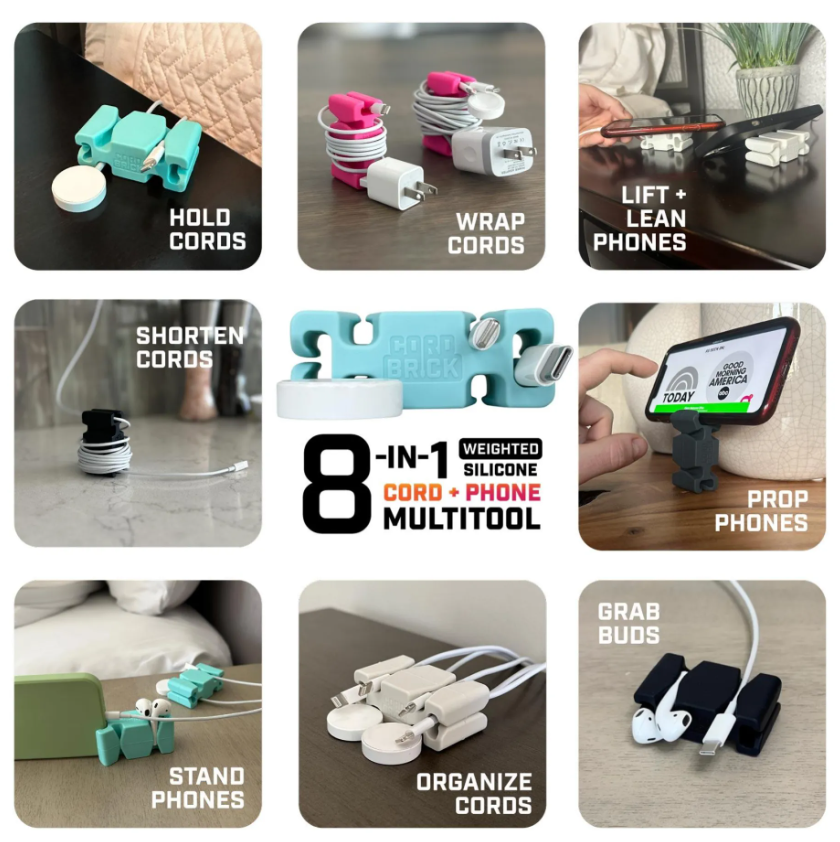
For the “anti-clutter” use case, the idea is simpler: instead of letting a charging cable dangle off the edge of a table or nightstand, you set the weighted brick down with the cable secured in it, and the weight is supposed to keep both the brick and the cable from sliding off the surface.
CordBrick Features at a Glance
| Feature | What It’s Designed To Do |
|---|---|
| Steel core | Adds weight so the device stays put without adhesive |
| Silicone exterior | Provides grip on smooth surfaces and a soft, flexible feel |
| Multiple cord slots (top/bottom) | Hold one or more cables in place |
| Side wrapping channels | Let you wind up extra cord length to shorten cables |
| Phone-prop groove | Holds a phone at an angle for hands-free viewing |
| Compact size (~2.5″ x 1.35″ x 1″) | Fits on nightstands, desks, countertops, or in a travel bag |
| No adhesive | Avoids residue and surface damage; can be repositioned freely |
| Multiple color options | Matches different desk or room aesthetics |
According to the product listing, it’s intended for regular phone chargers, earbud cables, and similar small-device cords – and the manufacturer specifically notes it isn’t recommended for cords attached to heavy battery packs, like some laptop power adapters. That’s a useful distinction to keep in mind before buying.
My Real Experience Using CordBrick
I bought one a few months ago because my bedside charging setup was a disaster. I have a phone charger, a smartwatch charger, and an e-reader cable.
Setup: There is zero setup. I took it out of the box, pushed my three cables into the top slots, and dropped it on my nightstand. The silicone rubber has a nice, matte grip to it, so it doesn’t slide around on wood or glass.

Everyday Use: When I unplug my phone, the cable just stays there. It doesn’t fall behind the bed. One feature I didn’t expect to use as much as I do is the AirPods slot. The side channels are perfectly sized to hold an AirPods case or prop up your phone at a 90-degree angle.
Travel: I travel frequently for business, and hotels never have enough accessible outlets. I started wrapping my USB-C cord around the side channels of the CordBrick before tossing it in my carry-on. It acts as a great travel spool, keeping my backpack organized.
CordBrick Pricing – What Does It Cost?
Pricing is typically structured around multi-pack bundles rather than a flat single-unit price, which is common for this type of direct-to-consumer product. Based on the current listing on the official site, the rough pricing tiers look like this (prices and exact bundle names can change, so always check the live listing before buying):
| Bundle | Approximate Price | Approx. Price Per Unit |
|---|---|---|
| 1-pack | Around $14.99 | ~$15.00 |
| 2-pack (buy 2, get 1 free – 3 total) | Around $29.98 | ~$9.99 |
| 3-pack (buy 3, get 2 free – 5 total) | Around $44.97 | ~$8.99 |
| 4-pack (buy 4, get 4 free – 8 total) | Around $59.96 | ~$7.49 |
Shipping is generally free on larger orders, with a stated threshold around $40 on the official store. As with most direct-to-consumer brands, the per-unit price drops noticeably as you buy more – which makes sense if you’re planning to put one on every nightstand, desk, and bag in the house, but isn’t necessarily a good deal if you only need one.
Tip: If you only want to test it out, buying the smallest pack first is the lower-risk option, even though the per-unit price is higher. You can always order more later if it works for your setup.
You Might Find Also UseFull: Statik Snap-N-Charge Review (2026): Clever Emergency Charger or Overpriced Gimmick?
What Real Customer Reviews Say
Looking at publicly posted customer reviews on the official product page and elsewhere, a few patterns show up repeatedly. We’re summarizing the themes here in our own words rather than quoting reviews directly, since individual reviews can be selective or unverifiable.
Common positive themes:
- Several reviewers describe it as effective for keeping a phone charger from sliding off a nightstand or table.
- A number of buyers mention the weight feels “solid” and that it doesn’t get knocked over easily.
- People who dislike adhesive-based organizers seem to appreciate that this one doesn’t leave marks or residue.
- It’s frequently mentioned as a good small gift, particularly around the holidays.
Common neutral or mixed themes:
- Some reviewers note the brick-shaped design is purely functional and may not match every desk aesthetic.
- A few mentions point out that it works best with thinner cables, and is less useful for thicker cords like laptop chargers – which lines up with the manufacturer’s own guidance.
As with any product sold through a brand’s own website, it’s worth remembering that on-site reviews are curated by the seller. If you want a fuller picture, it’s reasonable to also check independent marketplaces (like Amazon, if it’s listed there) and general review aggregators, and to read a mix of 5-star and 3-star reviews rather than only the top-rated ones.
CordBrick vs. Other Cable Organizer Options
There’s no single “best” cord organizer – it depends on what kind of clutter you’re dealing with. Here’s how CordBrick-style weighted organizers generally compare to other common options on the market:
| Option | How It Works | Best For | Downsides |
|---|---|---|---|
| CordBrick (weighted silicone) | Weight + grip, no adhesive, wraps cords | Nightstands, desks, single/few cables | Not built for thick cords or large cable bundles |
| Adhesive cable clips | Sticky pads hold cables along edges | Routing cords along a desk edge or wall | Can leave residue, may stop sticking over time |
| Cable sleeves / sock wraps | Fabric tube bundles multiple cables together | Hiding a bundle of cords behind a desk or TV | Doesn’t keep cords from sliding off surfaces |
| Under-desk cable trays | Mounted basket or tray holds power strips and cables | Managing a whole desk setup, especially home offices | Requires mounting/installation; not portable |
| Velcro cable ties | Reusable straps bundle loose cord length | Travel bags, bundling individual cables | Doesn’t anchor cords to a surface |
| Magnetic cable holders | Magnets clip cable ends to a metal surface or base | Desks with metal surfaces or accessories | Less useful on wood, glass, or fabric surfaces |
If your main issue is one or two phone chargers sliding around on a nightstand or counter, a weighted organizer like CordBrick fits that use case well. If your issue is more like “I have eight cables behind my monitor and I can’t tell which is which,” you’re probably looking at a different category of product – like a cable tray, sleeve, or labeling system – possibly used alongside something like CordBrick rather than instead of it.
Pros and Cons
Pros:
- No adhesive, so it won’t damage furniture or leave sticky residue
- Reusable and repositionable – move it between rooms or surfaces freely
- Compact enough to toss in a travel bag or pocket of a backpack
- Doubles as a basic phone stand for hands-free viewing
- Multiple color options to match different setups
- Lower per-unit cost when bought in multi-packs
- Simple to use with no setup, batteries, or instructions needed
Cons:
- Not designed for thick cords, like most laptop power adapters
- Brick shape is utilitarian rather than decorative – may not suit minimalist desk aesthetics
- Best suited to one or two cables at a time, not a whole cable bundle
- On-site reviews are curated by the seller, so they should be balanced against independent sources
- Multi-pack pricing structure means the best per-unit value requires buying more than one
Who Should Buy CordBrick
This kind of weighted cord organizer is probably a good fit if:
- You charge your phone on a nightstand or desk and the cable keeps sliding or falling
- You want to avoid adhesive-based cable clips because of furniture concerns
- You’re looking for a small, useful gift for someone with a phone (which is, realistically, everyone)
- You travel and want a simple way to wrap and shorten a charging cable so it doesn’t tangle in your bag
- You like the idea of a phone stand for video calls or watching something while charging
Who Should Probably Skip It
It’s probably not the right purchase if:
- Your main problem is a tangle of thick cables behind a desk, monitor, or TV – this calls for a cable tray, sleeve system, or wall-mounted management solution instead
- You need something that can be permanently mounted (e.g., under a desk or on a wall)
- You’re managing laptop chargers, power strips, or other heavy-cable setups, since the manufacturer itself notes this isn’t the intended use
- You’re expecting one device to solve all cable clutter in a room – realistically, most people with serious cable management needs end up combining a few different tools
FAQ’s About CordBrick
What is CordBrick?
CordBrick is a small, weighted cord organizer made of silicone with a steel core inside. It’s designed to hold charging cables and similar small cords in place on surfaces like nightstands and desks, without using adhesive.
How does CordBrick work?
You snap one end of a cable into a slot on the brick, wrap the extra length around the device, and tuck the other end into a second slot to lock it in place. The weight of the steel core helps keep both the brick and the cable from sliding around.
Is CordBrick good for nightstands?
Based on its design and intended use, it’s marketed specifically for nightstand and desk use – the weight is meant to stop a phone charger from sliding or falling off the edge of a table.
Does CordBrick work with laptop chargers?
According to the manufacturer’s own product information, CordBrick is intended for regular phone and small-device chargers, and is not recommended for cords with heavy battery packs, such as many laptop chargers.
How much does CordBrick cost?
Pricing is generally sold in multi-packs, with a single unit listed around $14.99 and the per-unit price dropping in larger bundles. Always check the current price on the official listing, since promotions and bundle sizes can change.
Is CordBrick worth buying?
If your specific problem is a phone charger (or one or two small cables) sliding around or falling off a nightstand or desk, and you want to avoid adhesive clips, it appears to be a reasonable, low-cost option based on its design and customer feedback. If you need a full cable-management solution for a complex desk setup, it’s likely better as part of a combination of tools rather than a single fix.
Is CordBrick legit?
CordBrick is sold through an official branded website with standard e-commerce checkout, has a public customer review section, and is listed across multiple retail channels. As with any online purchase, it’s worth checking current shipping policies, return policies, and independent reviews before ordering – especially for promotional bundle pricing, which can change.
What do CordBrick reviews say on consumer review platforms?
Reviews on the brand’s own site tend to focus on the weight and no-adhesive design as the main positives, with some buyers noting it works best for thinner cables rather than thick cords. As always, it’s a good idea to cross-check reviews across multiple platforms rather than relying on a single source, since seller-hosted reviews are curated.
Is CordBrick a good gift?
Its small size, low individual cost, and broad usefulness (almost anyone with a phone can use it) make it a commonly suggested stocking-stuffer or small desk-gift item, according to its own marketing and several customer reviews.
What’s the best alternative to CordBrick for managing a lot of cables?
If you’re dealing with a large bundle of cables – like behind a desk or TV – a cable management tray, a fabric cable sleeve, or a combination of velcro ties and a cable box tends to be a better fit, since those are designed for bundling multiple cords rather than anchoring one or two.
Does it work for laptop chargers?
It works great for thin MacBook charging cables, but it is not recommended for heavy, thick laptop battery-pack cords because the weight of the cord might pull the brick off the table.
Is it worth buying?
Based on my testing, yes. If you are tired of dropping your cables and hate sticky residue, the $15 price tag is easily worth the frustration it saves you.
A Few Things to Check Before You Buy
Since pricing, bundle sizes, and promotions can change, it’s worth doing a quick check before ordering:
- Confirm current pricing and bundle options on the official listing, since multi-pack deals are common and can shift.
- Check the return and shipping policy, especially if you’re ordering internationally, since shipping times can vary by country.
- Read a mix of reviews – not just the top-rated ones – to get a balanced view of how it performs for different use cases.
- Match the product to your actual problem. If you’re mainly dealing with a phone charger that won’t stay put, this fits. If you’re trying to organize a whole desk’s worth of cables, you may want to pair it with – or choose instead – a dedicated cable management system.
Final Verdict
CordBrick is a simple, inexpensive gadget aimed at a very specific (and very common) problem: cables that slide, fall, or tangle on everyday surfaces like nightstands and desks. Based on its design, specifications, and the pattern of customer feedback, it seems to do that specific job reasonably well, especially for thinner cables like phone chargers and earbud wires.
It’s not positioned – and shouldn’t be expected – to be a full cable-management overhaul for a complicated desk setup. If your needs match what it’s actually built for, it’s a low-cost, low-risk thing to try. If your cable clutter problem is bigger than “one charger keeps falling off the nightstand,” it’s worth looking at it alongside other cable management tools rather than as a standalone fix.
If you think it matches your situation, you can check current pricing and bundle options on the official CordBrick listing before deciding which pack size makes sense for your home or office.