
Dead battery at the worst possible moment? You’re not alone. With smartphones, tablets, and wireless earbuds constantly demanding power, a reliable portable charger has become as essential as your phone itself.
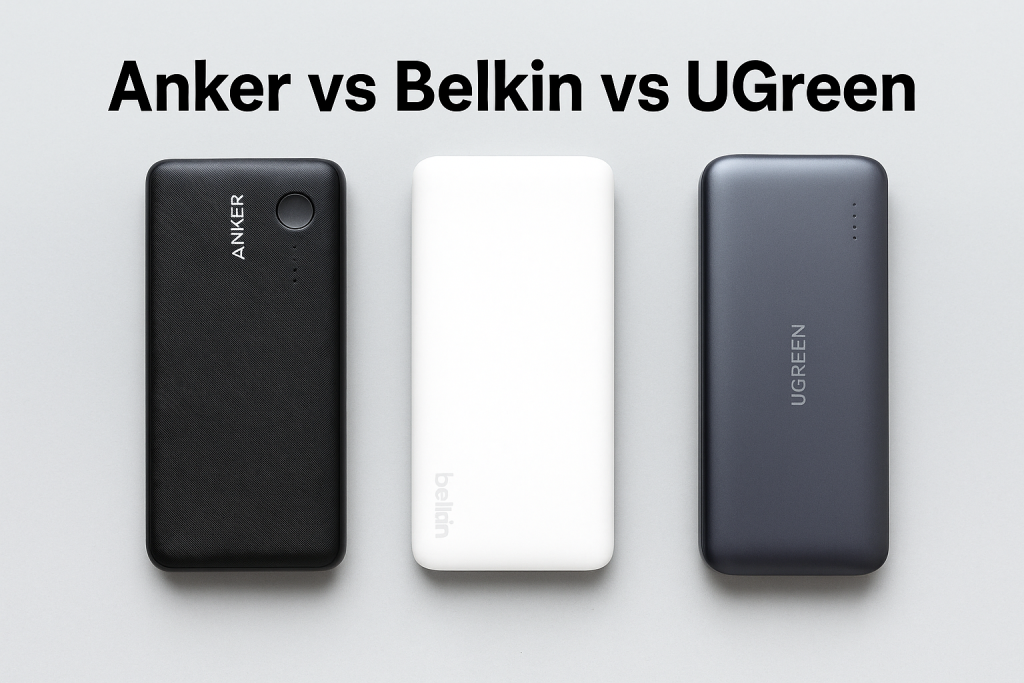
But here’s the challenge: the power bank market is flooded with options, and three brands consistently dominate the conversation: Anker, Belkin, and UGreen. Each promises fast charging, high capacity, and durability, but which one actually delivers the best value for your money?
In this comprehensive guide, we’ll compare these top power bank brands across every metric that matters: charging speed, battery capacity, build quality, price, and real-world performance. By the end, you’ll know exactly which brand deserves a spot in your bag.
Understanding Power Banks: What Makes a Quality Portable Charger?
Before diving into brand comparisons, let’s establish what makes a power bank worth buying in 2026.
Key Features to Consider
Battery Capacity (mAh): The higher the milliampere-hour rating, the more charges you get. A 10,000mAh power bank typically charges a smartphone 2-3 times, while 20,000mAh models offer 4-5 full charges.
Charging Speed (Watts): Modern power banks support fast charging protocols like Power Delivery (PD) and Quick Charge (QC). Look for at least 18W output for standard fast charging, or 30W-100W for laptops and tablets.
Port Configuration: Multiple USB-A and USB-C ports allow simultaneous charging of several devices. USB-C ports offer both input and output capabilities.
Safety Features: Overcharge protection, temperature control, and short-circuit prevention are essential for device safety and longevity.
Portability: Weight and size matter. A 10,000mAh power bank should weigh around 200-250 grams for comfortable daily carry.
Understanding Power Bank Basics: What You Need to Know Before Buying
Before diving into brand comparisons, let’s establish the fundamental knowledge you need to choose wisely.
Battery Capacity Explained (mAh)
Milliampere-hours (mAh) measure how much charge a power bank stores. Here’s what different capacities mean for your devices:
- 5,000-10,000 mAh: Charges smartphones 1-2 times, perfect for daily carry
- 10,000-20,000 mAh: Charges phones 2-4 times, ideal for weekend trips
- 20,000-30,000 mAh: Charges phones 4-6 times, suitable for long travel
- 30,000+ mAh: Charges multiple devices several times, great for power users
Keep in mind that actual charging capacity is lower than advertised due to energy conversion loss (typically 60-70% efficiency).
Charging Speed and Power Output (Watts)
Charging speed depends on wattage output. Here’s the breakdown:
- 5-10W: Standard charging (slow, outdated)
- 18-20W: Fast charging for smartphones
- 30-45W: Quick charging for phones and tablets
- 60-100W: Charges laptops and high-power devices
- 100W+: Premium fast charging for multiple devices simultaneously
Look for Power Delivery (PD) and Quick Charge (QC) technology for optimal charging speeds.
Essential Safety Features
Quality power banks include multiple protection systems:
- Overcharge protection
- Short circuit protection
- Temperature control
- Voltage regulation
- Foreign object detection
These features prevent device damage and ensure safe operation.
Anker Power Banks: The Market Leader’s Strengths and Weaknesses
Anker has dominated the portable charging market since 2011, earning a reputation for innovation and reliability.
What Makes Anker Stand Out
Anker pioneered many technologies we now take for granted in power banks. Their PowerIQ and VoltageBoost technologies optimize charging speed for connected devices automatically.
The brand offers an extensive product range from compact 5,000mAh pocket chargers to massive 25,000mAh powerhouses capable of charging laptops. Their flagship PowerCore and Prime series consistently receive top ratings from tech reviewers worldwide.
Anker’s Top Power Bank Models
Anker 737 Power Bank (24,000mAh): This premium option delivers 140W output, enough to fast-charge a MacBook Pro while simultaneously powering two smartphones. The digital display shows remaining battery percentage and charging wattage in real-time.
Anker PowerCore 10K (10,000mAh): A bestseller for good reason, this ultra-slim model weighs just 195 grams and fits in any pocket. With 12W output, it charges smartphones at standard speeds while maintaining portability.
Anker Prime 20K (20,000mAh): Featuring 200W total output and three ports, this model targets power users who need maximum versatility. It can charge a laptop at 100W while powering two phones simultaneously.
Advantages of Choosing Anker
- Proven Track Record: Over a decade of consistent quality and innovation
- Wide Selection: Models for every use case, from ultra-portable to high-capacity
- Advanced Safety: MultiProtect system includes surge protection, temperature control, and current regulation
- Strong Warranty: 18-month warranty standard, with some models offering 24 months
- Smart Charging: PowerIQ 3.0 automatically detects and delivers optimal charging speed
Potential Drawbacks
- Premium Pricing: Anker products typically cost 10-30% more than competitors
- Heavier Build: Some models prioritize capacity over portability
- Limited Budget Options: Fewer entry-level choices compared to UGreen
Belkin Power Banks: Apple’s Trusted Partner
Belkin has built its reputation on premium design and seamless integration with Apple’s ecosystem, though their products work excellently with all devices.
The Belkin Advantage
Founded in 1983, Belkin brings decades of electronics expertise to portable charging. Their partnership with Apple means many Belkin power banks receive official certification and appear in Apple Stores worldwide.
Belkin focuses on design aesthetics without compromising functionality. Their power banks feature premium materials, minimalist styling, and exceptional build quality that justifies the higher price point.
Featured Belkin Power Bank Models
Belkin BoostCharge Pro 20K (20,000mAh): Designed specifically for Apple users, this power bank supports fast charging for iPhone, iPad, and Apple Watch simultaneously. The integrated USB-C cable eliminates the need to carry separate cables.
Belkin BoostCharge 10K (10,000mAh): This slim profile model includes both Lightning and USB-C integrated cables, making it perfect for mixed-device households. The 20W output provides fast charging for recent iPhones.
Belkin Magnetic Wireless Power Bank (10,000mAh): Featuring MagSafe-compatible magnetic attachment, this innovative design snaps directly to iPhone 12 and newer models for wireless charging on the go.
Why Choose Belkin?
- Apple Ecosystem Integration: Optimized for iPhone, iPad, and Apple Watch
- Premium Build Quality: Durable materials and excellent craftsmanship
- MagSafe Compatibility: Wireless charging options for compatible iPhones
- Integrated Cables: No need to carry extra charging cables
- Connected Equipment Warranty: Up to $2,500 coverage for connected devices
Considerations Before Buying Belkin
- Higher Price Point: Among the most expensive power banks available
- Limited Capacity Options: Fewer high-capacity models than Anker
- Apple Focus: Features optimized for Apple users may be unnecessary for Android-only households
- Availability: Less widely available than Anker or UGreen
UGreen Power Banks: The Value Champion Rising in Popularity
UGreen has rapidly gained market share by offering feature-rich power banks at competitive prices, making premium technology accessible to budget-conscious consumers.
Understanding UGreen’s Market Position
Founded in 2012, UGreen initially focused on cables and adapters before expanding into power banks. Their strategy combines solid engineering with aggressive pricing, typically offering similar specifications to Anker at 20-40% lower cost.
While less established than Anker or Belkin, UGreen has earned positive reviews for reliability and value. The brand particularly appeals to users who want modern features without premium branding costs.
Popular UGreen Power Bank Models
UGreen Nexode 20,000mAh 130W: This flagship model competes directly with Anker’s premium offerings. With 130W total output and fast recharge capability, it handles laptops and multiple devices efficiently. The digital display provides detailed charging information.
UGreen 10,000mAh 20W: An affordable option for smartphone users, offering fast charging for most phones in a compact form factor. The dual USB-C ports provide flexibility for charging and recharging.
UGreen 25,000mAh 145W: One of the most powerful options available, designed for heavy users who need maximum capacity. It can charge a MacBook Pro multiple times and includes TSA-approved capacity for air travel.
UGreen’s Competitive Advantages
- Exceptional Value: Best price-to-performance ratio in the market
- Modern Features: Fast charging, multiple ports, and digital displays at competitive prices
- Growing Reputation: Increasing positive reviews and brand recognition
- Wide Availability: Sold through major online retailers globally
- Generous Capacity Options: More high-capacity models than Belkin
Potential Concerns with UGreen
- Newer Brand: Less established history than Anker or Belkin
- Variable Quality Control: Some users report inconsistent experiences
- Limited Physical Retail Presence: Primarily online sales
- Shorter Warranty: Typically 12-18 months compared to competitors
- Less Premium Feel: Plastic construction versus Anker’s metal builds
Head-to-Head Comparison: Anker vs Belkin vs UGreen
Let’s compare these brands across critical factors to help you decide which best matches your priorities.
Price Comparison by Capacity
| Capacity | Anker | Belkin | UGreen |
|---|---|---|---|
| 5,000 mAh | $20-$25 | $20-$30 | $15-$20 |
| 10,000 mAh | $25-$40 | $35-$50 | $18-$30 |
| 20,000 mAh | $50-$80 | $60-$90 | $40-$70 |
| 25,000+ mAh | $90-$150 | $80-$120 | $60-$100 |
Value Winner: UGreen offers 20-35% lower prices across all capacity ranges while maintaining comparable features.
Charging Speed Comparison
Fastest Charging: UGreen and Anker tie with models offering 130-145W output, ideal for high-power laptops.
Best for iPhones: Belkin’s MagSafe integration provides the most convenient iPhone charging experience.
Most Versatile: Anker offers the widest range of charging speeds across different models, from basic 12W to 140W.
Build Quality and Durability
Premium Feel: Belkin wins with aircraft-grade aluminum and scratch-resistant finishes that look new after years of use.
Reliable Performance: Anker provides the most consistent build quality across its entire product range with minimal variance.
Improving Quality: UGreen has significantly improved manufacturing quality in recent models, though some budget options feel less premium.
Safety and Certification
All three brands include essential safety features, but with different approaches:
Anker: MultiProtect 12-point safety system, UL certified, FCC compliant Belkin: Connected Equipment Warranty backing safety claims, extensive testing protocols UGreen: CE, FCC, RoHS certified, temperature control across all models
Safety Winner: Anker’s MultiProtect system and extensive certification history provide the most confidence.
Warranty and Customer Support
| Brand | Standard Warranty | Extended Options | Support Quality |
|---|---|---|---|
| Anker | 18 months | Up to 30 months | Excellent (24hr response) |
| Belkin | 24 months | Connected Equipment Warranty | Very Good (retail support) |
| UGreen | 12 months | Limited extensions | Good (48-72hr response) |
Support Winner: Anker offers the best combination of warranty length and responsive customer service.
Real-World Performance Testing
Based on independent testing and user experiences:
Actual Capacity (vs Advertised):
- Anker: 85-90% efficiency (industry-leading accuracy)
- Belkin: 80-85% efficiency (reliable performance)
- UGreen: 75-82% efficiency (good but occasionally variable)
Charging Cycles Before Degradation:
- Anker: 500-800 cycles (2-3 years typical use)
- Belkin: 450-700 cycles (2-3 years typical use)
- UGreen: 400-600 cycles (1.5-2.5 years typical use)
Temperature Management: All three brands handle heat well, though Anker and Belkin run slightly cooler during maximum output charging.
Which Power Bank Brand Should You Choose?
The “best” brand depends entirely on your specific needs, budget, and priorities. Here’s who should choose which brand:
Choose Anker If You Want:
- The most reliable and consistent performance
- Industry-leading warranty and customer support
- Proven track record with millions of satisfied customers
- Wide selection across all price points and capacities
- Peace of mind knowing you’re buying the market leader
- Best resale value if you upgrade later
Ideal User Profile: Tech enthusiasts, frequent travelers, professionals who can’t afford charging failures, anyone wanting the safest bet.
Choose Belkin If You Want:
- Premium design that matches Apple products
- Perfect iPhone integration (especially MagSafe models)
- Connected Equipment Warranty for added protection
- Easy in-store warranty support at Apple and major retailers
- High-end build quality that looks great for years
- Wireless charging convenience
Ideal User Profile: Apple ecosystem users, design-conscious consumers, people who value aesthetics alongside function, shoppers wanting retail accessibility.
Choose UGreen If You Want:
- Maximum features per dollar spent
- Latest charging technology without premium prices
- High-capacity laptop charging on a budget
- Modern designs with innovative features (displays, transparency)
- Excellent specifications at mid-range prices
- Good performance without brand name premiums
Ideal User Profile: Budget-conscious shoppers, students, value seekers, tech-savvy buyers comfortable with newer brands, laptop users wanting affordable high-wattage charging.
Common Mistakes to Avoid When Buying Power Banks
Don’t fall into these common traps that lead to disappointment:
Mistake 1: Choosing Capacity Alone
Many buyers focus solely on mAh ratings without considering actual charging efficiency. A 20,000 mAh power bank won’t deliver 20,000 mAh to your devices due to energy conversion loss.
Better Approach: Calculate actual available charge by multiplying capacity by 0.7 (70% efficiency). A 20,000 mAh power bank delivers roughly 14,000 mAh usable power.
Mistake 2: Ignoring Output Wattage
High capacity means nothing if output wattage can’t charge your devices quickly. A 30,000 mAh power bank with only 10W output charges slower than a 10,000 mAh model with 45W output.
Better Approach: Match output wattage to your device needs. Check your device’s maximum charging speed and choose a power bank that meets or exceeds it.
Mistake 3: Buying Based on Price Alone
Ultra-cheap power banks from unknown brands often use inferior cells that degrade quickly, lack safety features, or advertise false capacities.
Better Approach: Stick with established brands like Anker, Belkin, or UGreen. The small price premium ensures reliability and safety.
Mistake 4: Overlooking Portability Needs
A 30,000 mAh power bank sounds great until you realize it weighs over 600g and won’t fit in your bag comfortably.
Better Approach: Honestly assess your daily carry habits. Most people are better served by a 10,000-15,000 mAh model they’ll actually carry versus a massive unit left at home.
Mistake 5: Forgetting Cable Compatibility
Your power bank is useless if you don’t have the right cables. Many buyers overlook checking whether they need USB-A to Lightning, USB-C to USB-C, or other cable combinations.
Better Approach: Consider models with integrated cables like Belkin’s BoostCharge series, or budget for quality cables from the same manufacturer.
Power Bank Care and Maintenance Tips
Extend your power bank’s lifespan with these proven maintenance practices:
Optimal Storage and Charging Habits
Maintain 40-80% Charge: Avoid completely draining or fully charging your power bank for storage. The ideal storage charge is around 50-60%.
Store in Cool, Dry Places: Heat degrades lithium batteries faster than any other factor. Keep your power bank away from direct sunlight, hot cars, and radiators.
Charge Every 3 Months: Even when not in use, charge your power bank every 90 days to prevent deep discharge that can damage battery cells.
Usage Best Practices
Avoid Extreme Temperatures: Don’t charge or use power banks in temperatures below 0°C (32°F) or above 40°C (104°F).
Use Quality Cables: Cheap cables cause voltage drops that make your power bank work harder, generating excess heat and reducing lifespan.
Disconnect When Full: While modern power banks have overcharge protection, disconnecting devices once charged minimizes unnecessary stress on the battery.
Recognizing When to Replace
Replace your power bank when you notice:
- Significantly reduced charging capacity (charges fewer times)
- Excessive heat during normal use
- Swelling or physical deformation
- Charging cycles taking much longer than normal
- Random shutdowns or failure to charge devices
Traveling with Power Banks: TSA Rules and International Regulations
Understanding aviation rules helps avoid confiscation and travel delays.
TSA and FAA Guidelines (United States)
Carry-On Only: Power banks must be in carry-on luggage, never checked baggage. This rule applies to all lithium battery devices.
Capacity Limits:
- Under 100Wh (approximately 27,000 mAh): No airline approval needed
- 100-160Wh (27,000-43,000 mAh): Airline approval required
- Over 160Wh: Prohibited on passenger aircraft
Calculation Formula: Wh = (mAh ÷ 1,000) × Voltage (typically 3.7V)
Example: 20,000 mAh power bank = (20,000 ÷ 1,000) × 3.7 = 74Wh (allowed)
International Travel Considerations
European Union: Similar rules to TSA, with 100Wh limit for unrestricted carry-on
Asia-Pacific: Most countries follow IATA guidelines matching TSA rules, though enforcement varies
Middle East: Stricter enforcement with mandatory capacity checks at some airports
Pro Tip: Keep your power bank easily accessible during security screening. Remove it from bags like laptops to speed up the process.
Environmental Impact and Sustainable Choices
Making environmentally conscious power bank decisions matters more than ever.
Battery Disposal and Recycling
Never Trash Lithium Batteries: Lithium batteries in landfills can cause fires and leak toxic materials into soil and water.
Recycling Programs:
- Best Buy: Accepts power banks at all stores for free recycling
- Call2Recycle: Drop-off locations throughout North America
- Manufacturer Programs: Anker and Belkin offer mail-back recycling programs
Extending Product Life Reduces Waste
The most sustainable power bank is the one you already own. Following maintenance tips extends lifespan by 50-100%, significantly reducing electronic waste.
Brand Sustainability Efforts
Anker: Committed to using recycled materials in packaging and has reduced plastic by 40% since 2020
Belkin: Carbon neutral shipping program and recyclable packaging across product lines
UGreen: Implementing eco-friendly packaging and extended producer responsibility programs
Sustainable Choice: Buying quality power banks from responsible manufacturers reduces replacement frequency and overall environmental impact.
Future of Power Bank Technology
The portable charging landscape is evolving rapidly. Here’s what’s coming:
Emerging Technologies
Graphene Batteries: Next-generation batteries promise 3x faster charging speeds and longer lifespans, expected mainstream adoption by 2026-2027.
Solar Integration: Improved solar panel efficiency is making solar-charging power banks practical for outdoor enthusiasts.
Wireless Charging Evolution: Qi2 standard (MagSafe for Android) will standardize wireless charging across all devices.
GaN Charger Integration: Combined wall charger and power bank units are becoming more efficient and compact.
What to Expect in 2025-2026
- Higher Capacities in Smaller Sizes: 30,000 mAh in packages smaller than current 20,000 mAh models
- Universal Fast Charging: 100W+ becoming standard even on mid-range models
- Smart Battery Management: AI-powered charging that learns device patterns and optimizes power delivery
- Longer Warranties: Competition driving 24-36 month warranties as standard
Buying Advice: Current technology is mature and reliable. Don’t wait for future tech unless you have specific needs that aren’t met today.
Conclusion: Making Your Final Decision
Choosing between Anker, Belkin, and UGreen ultimately depends on weighing performance, price, and priorities.
Anker delivers unmatched reliability and customer support, making it the safest choice for those who prioritize peace of mind over saving a few dollars. The 18-month warranty and proven track record justify the premium pricing.
Belkin excels for Apple users who value seamless ecosystem integration and premium design. The MagSafe options and Connected Equipment Warranty provide unique benefits you won’t find elsewhere.
UGreen offers exceptional value for budget-conscious buyers who want modern features without premium prices. The improved quality in recent years makes UGreen a compelling choice for most users.
Quick Decision Framework
Ask yourself these three questions:
- Budget or reliability priority? Tight budget → UGreen. Reliability matters most → Anker.
- Apple ecosystem user? Yes → Belkin. No → Anker or UGreen.
- Laptop charging needed? Yes → UGreen or Anker high-wattage models.
Remember, any power bank from these three brands will serve you well. You’re choosing between excellent, more excellent, and most excellent options depending on your specific needs.
Take Action Now
Don’t let a dead battery ruin your next important moment. Choose your ideal power bank from the recommendations above and enjoy the freedom of truly portable power.
Which features matter most to you? Have questions about specific models? Share your thoughts and experiences in the comments below to help others make informed decisions.
FAQs About Top Power Banks
Can I charge my laptop with a power bank, or are they only for phones and tablets?
Yes, many modern power banks can charge laptops, but you need to choose the right model. Laptop charging requires power banks with USB-C Power Delivery (PD) output of at least 45W, though 60W or higher works best for larger laptops. Check your laptop’s wattage requirements (usually printed near the charging port or in specifications). The Anker 737 (140W), UGreen Nexode (130W), and similar high-wattage models handle most laptops easily. Standard 10W-20W power banks designed for phones won’t provide enough power for laptop charging.
How long does it take to fully recharge an empty power bank?
Recharge time depends on three factors: power bank capacity, input charging speed, and the charger wattage you’re using. A 10,000 mAh power bank with 18W input takes approximately 3-4 hours to fully recharge with an 18W charger. A 20,000 mAh power bank needs 5-7 hours with the same charger. However, newer models with 45W or higher input can recharge in 2-3 hours even with large capacities. Always use a charger that matches or exceeds your power bank’s maximum input rating for fastest charging. Using a low-wattage phone charger (5W) can take 10+ hours to recharge high-capacity models.
Is it safe to leave my power bank charging overnight or when I’m not home?
Modern power banks from reputable brands like Anker, Belkin, and UGreen include overcharge protection that stops charging once the battery reaches 100%, making overnight charging generally safe. However, best practices suggest unplugging once fully charged to minimize battery stress and reduce fire risk, however small. Never leave cheap, unbranded power banks charging unattended as they may lack proper safety circuits. Always charge on non-flammable surfaces away from fabrics, papers, or other combustible materials. If your power bank becomes excessively hot, swells, or shows any physical damage, stop using it immediately and dispose of it properly.
Why does my power bank show 20,000 mAh but only charges my phone twice instead of four times?
This common confusion comes from not accounting for energy conversion loss and voltage differences. Power banks lose 25-35% of their capacity during the charging process due to heat generation, voltage conversion, and circuit inefficiency. Additionally, your phone’s battery capacity is rated at its internal voltage (typically 3.7V), while power banks output at 5V, creating another conversion loss. A 20,000 mAh power bank actually delivers about 12,000-14,000 mAh of usable power. If your phone has a 3,500 mAh battery, you’ll get approximately 3.5-4 full charges, not 5-6 as simple math suggests. This is normal for all power banks regardless of brand.
Do power banks lose charge when not in use, and how often should I recharge them?
Yes, all power banks experience self-discharge even when not actively charging devices. Quality power banks from Anker, Belkin, and UGreen lose approximately 2-5% of their charge per month when stored properly. Cheaper models may lose 10-15% monthly. To maintain battery health, charge your power bank to 50-80% and recharge it every 3 months if not used regularly. Letting a lithium battery sit completely drained for extended periods (6+ months) can cause permanent damage and reduce overall lifespan. Store power banks in cool, dry places away from extreme temperatures. Before long trips or important events, top off your power bank even if it shows 50%+ charge to ensure maximum available capacity when needed.
How long does it take to recharge the power bank itself?
Recharge times vary significantly by capacity and input wattage. A 10,000mAh power bank with 18W input recharges in approximately 3-4 hours, while a 20,000mAh model needs 5-7 hours with similar input. Modern power banks supporting 45W or higher input can fully recharge 20,000mAh in 2-3 hours. Check the input specifications when purchasing if fast recharging matters for your usage patterns.
Do power banks lose charge when not in use?
Yes, all lithium-ion power banks experience self-discharge, typically losing 2-5% of capacity per month when stored. This is normal and unavoidable due to the battery chemistry. To maintain your power bank’s health, recharge it every 3-4 months during storage and avoid completely depleting or fully charging it for long-term storage. The ideal storage charge level is around 50-70% capacity.
Are wireless charging power banks worth the extra cost?
Wireless charging power banks offer excellent convenience for compatible devices, eliminating cable needs. However, they’re typically less efficient than wired charging, losing 20-30% energy to heat during wireless transfer. They also charge devices more slowly than wired options. If you value convenience and own wireless-charging compatible devices like recent iPhones, the premium is worthwhile. For maximum efficiency and charging speed, traditional wired power banks remain superior.
Can I take these power banks on airplanes?
Yes, all three brands offer TSA-compliant power banks under the 100Wh (approximately 27,000mAh at 3.7V) limit for carry-on luggage. Most models between 10,000-25,000mAh are perfectly acceptable for air travel. Always pack power banks in carry-on luggage, never checked bags, as airline regulations prohibit lithium-ion batteries in cargo holds due to fire safety concerns.
How many times can a 20,000mAh power bank charge my smartphone?
A 20,000mAh power bank typically charges a modern smartphone 4-5 times, though actual performance varies based on your phone’s battery size and the power bank’s efficiency. For example, an iPhone 15 with a 3,349mAh battery would get approximately 4-5 full charges, while a Samsung Galaxy S24 Ultra with a 5,000mAh battery would receive 3-4 charges. Power conversion efficiency usually results in 60-70% of the stated capacity being usable.