
Home security shouldn’t require drilling holes through walls, hiring expensive installers, or signing lengthy contracts. Modern wireless home security systems have changed the game, making professional-grade protection accessible to everyone.
But with so many options available, how do you choose between the top contenders? Ring, SimpliSafe, and Eufy dominate the wireless security market, each promising easy installation, smart features, and reliable protection. Yet they differ significantly in pricing, monitoring options, and overall value.
In this comprehensive guide, we’ll compare these three leading wireless security systems across every important factor: cost, features, ease of use, video quality, smart home integration, and customer support. Whether you’re a renter looking for portable security or a homeowner wanting comprehensive protection, you’ll discover which system best fits your needs and budget.
Understanding Wireless Home Security Systems
What Makes a Security System “Wireless”?
Wireless home security systems use Wi-Fi, cellular connections, or radio frequencies to communicate between components instead of requiring hardwired connections. This means sensors, cameras, and control panels connect to your network without drilling or running cables through your walls.
Most modern wireless systems include:
- Battery-powered door and window sensors
- Motion detectors with wireless connectivity
- HD security cameras with cloud storage
- Smartphone app control and notifications
- Optional professional monitoring services
Why Choose Wireless Over Traditional Systems?
Wireless security systems offer several advantages over traditional wired setups:
Easy DIY Installation: Most systems install in 30 minutes to 2 hours without professional help. You simply stick sensors on doors and windows, mount cameras where needed, and connect everything through a mobile app.
Renter-Friendly Design: Since nothing requires permanent installation, you can take your entire system when you move. This makes wireless systems perfect for apartments, condos, and rental properties.
Flexible Expansion: Add cameras, sensors, or other devices anytime without rewiring your home. Start small and grow your system as needed.
Modern Smart Features: Integration with Alexa, Google Assistant, and other smart home platforms allows voice control and automation.
Ring Security System: Complete Overview
Ring System Features and Capabilities
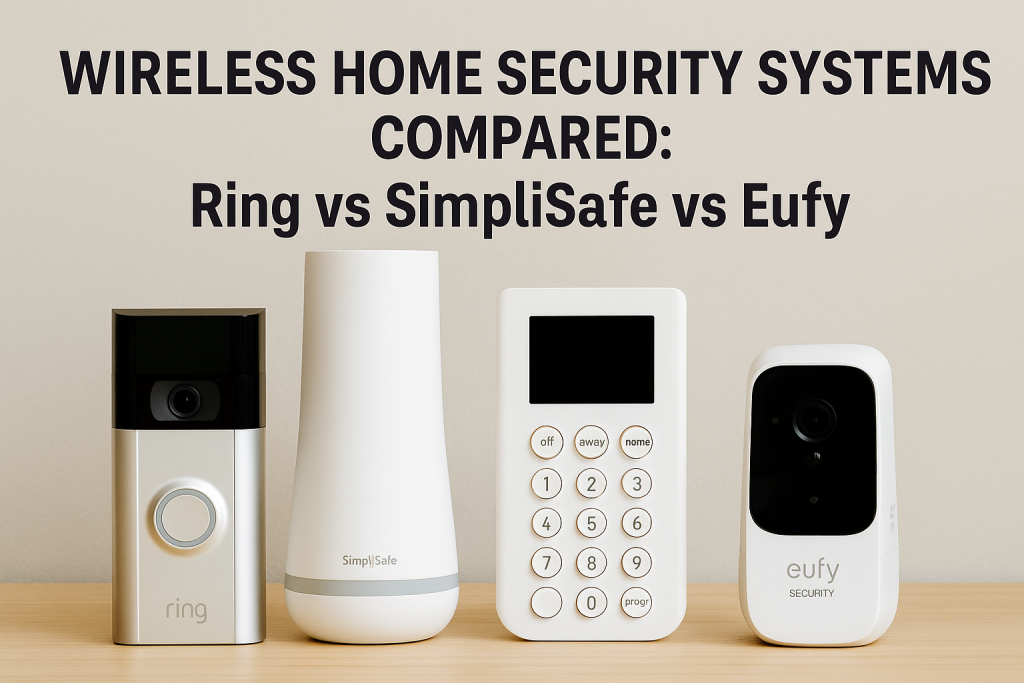
Ring has become synonymous with home security, largely due to their popular video doorbells. Their complete security system builds on this foundation with an ecosystem designed for comprehensive monitoring.
Core Components:
- Ring Alarm base station with backup cellular connection
- Door and window contact sensors
- Motion detectors with adjustable sensitivity
- Range extenders for larger homes
- Keypads for arming and disarming
- Integration with Ring cameras and doorbells
Ring excels at video integration. If you already own Ring doorbells or cameras, adding the alarm system creates a unified security ecosystem controlled through a single app.
Ring Pricing Structure
Ring uses a tiered approach that keeps initial costs low:
Equipment Costs:
- 5-piece kit: $199.99
- 10-piece kit: $259.99
- 14-piece kit: $329.99
- Individual sensors: $19.99-$29.99 each
- Ring cameras: $59.99-$229.99 depending on model
Monthly Monitoring Fees:
- Ring Protect Basic (single camera): $4.99/month
- Ring Protect Plus (unlimited cameras + alarm monitoring): $20/month
- Ring Protect Pro: $10/month per location
The Ring Protect Plus plan includes professional 24/7 monitoring, which dispatches emergency services when needed. Without a subscription, your system still functions but lacks professional monitoring and video storage.
Ring Pros and Cons
Advantages:
- Excellent video doorbell integration
- Affordable equipment costs
- Works with Alexa voice control
- Easy installation process
- Wide selection of compatible devices
Limitations:
- Requires subscription for most valuable features
- Video quality varies by camera model
- Some users report connectivity issues
- Limited compatibility with non-Amazon smart home platforms
SimpliSafe Security System: Detailed Analysis
SimpliSafe Features and Technology
SimpliSafe built its reputation on simplicity and reliability. Their third-generation system offers professional-grade security without complexity or long-term contracts.
Key Components:
- All-in-one base station with 24-hour backup battery
- Smart lock integration capability
- Environmental sensors (smoke, freeze, water)
- Entry, motion, and glass break sensors
- HD security cameras with privacy shutters
- Panic button for emergencies
SimpliSafe stands out for its sensor variety. Beyond basic security, you can monitor for fires, floods, and extreme temperatures—protection most competitors charge extra for.
SimpliSafe Cost Breakdown
SimpliSafe offers flexible pricing with no long-term commitments:
Equipment Packages:
- Foundation kit (4 pieces): $244.96
- Essentials kit (8 pieces): $319.94
- Hearth kit (9 pieces): $389.93
- Haven kit (11 pieces): $489.91
- Custom bundles available
Monthly Monitoring Options:
- Self-monitoring: $0 (free with purchase)
- Standard monitoring: $19.99/month
- Interactive monitoring: $29.99/month
The Interactive plan includes smart home integration, mobile app control, unlimited camera recording, and secret alerts that notify you without triggering the alarm—useful for monitoring children coming home.
SimpliSafe Strengths and Weaknesses
Strengths:
- No contracts required
- Fast police response (average 5 seconds to dispatch)
- Environmental monitoring included
- Works during power and Wi-Fi outages
- 60-day money-back guarantee
Weaknesses:
- Higher upfront equipment costs
- Camera quality inferior to Ring and Eufy
- App interface less intuitive than competitors
- Limited smart home integration options
Eufy Security System: In-Depth Review
Eufy System Capabilities
Eufy, owned by Anker, takes a different approach: local storage and one-time payments instead of ongoing subscriptions. This makes Eufy attractive for users who want to avoid monthly fees.
System Components:
- HomeBase with local video storage
- Wireless sensors for doors and windows
- Motion sensors with pet detection
- Entry sensors with temperature monitoring
- High-resolution wireless cameras
- Keypad entry options
Eufy’s signature feature is local storage. Your HomeBase stores video footage directly, eliminating cloud subscription requirements and reducing privacy concerns.
Eufy Pricing Model
Eufy’s pricing emphasizes value through eliminating subscriptions:
Equipment Costs:
- 5-piece home alarm kit: $199.99
- 7-piece home alarm kit: $249.99
- Individual sensors: $29.99 each
- EufyCam systems: $199.99-$549.99
- Video doorbells: $159.99-$259.99
Monitoring Fees:
- Self-monitoring: Included free forever
- Professional monitoring: Not required (no option available)
- Cloud storage: Optional at $2.99-$9.99/month
This no-subscription model means your only cost is the initial equipment purchase. For users planning to keep their system for years, Eufy offers the lowest total cost of ownership.
Eufy Advantages and Disadvantages
Advantages:
- No required monthly fees
- Local video storage protects privacy
- Excellent camera video quality
- Long battery life on cameras
- Responsive customer support
Disadvantages:
- No professional monitoring option
- Smaller product ecosystem
- Limited third-party integrations
- Some features require internet connection
Head-to-Head Comparison: Ring vs SimpliSafe vs Eufy
Quick Comparison Table
| Feature | Ring | SimpliSafe | Eufy |
|---|---|---|---|
| Starting Price | $199.99 | $244.96 | $199.99 |
| Monthly Fee Required | Yes ($20 for monitoring) | Optional | No |
| Professional Monitoring | Yes | Yes | No |
| Video Quality | Good to Excellent | Fair to Good | Excellent |
| Smart Home Integration | Excellent (Alexa) | Good | Good |
| Contract Required | No | No | No |
| Local Storage | No | No | Yes |
| Battery Backup | Yes | Yes | Yes |
| Installation Time | 30-60 minutes | 45-90 minutes | 30-60 minutes |
| Customer Support | Good | Excellent | Very Good |
Installation and Setup Experience
Ring: Installation takes about 30-45 minutes for a basic system. The app guides you through each sensor with clear instructions. Pairing devices usually works on the first attempt. Most users complete setup without any technical knowledge.
SimpliSafe: Setup requires 45-90 minutes depending on package size. The process is straightforward but involves more steps due to additional sensor types. The base station setup is more involved than Ring’s. Customer support provides excellent guidance if needed.
Eufy: Installation completes in 30-60 minutes. The HomeBase setup is simple, and sensors pair quickly. The app provides visual guides. Users appreciate the clear labeling on each component.
Mobile App Functionality
Ring App: The Ring app provides an intuitive interface with quick access to all devices. Live camera views load quickly. Notifications are customizable and reliable. The timeline view shows all activity at a glance. Integration with other Ring devices creates a seamless experience.
SimpliSafe App: SimpliSafe’s app offers solid functionality but feels less polished than Ring’s. The interface requires more navigation to access certain features. However, it includes unique options like secret alerts and camera privacy shutters that add value.
Eufy App: Eufy’s Security app balances simplicity with powerful features. Local storage means faster access to recordings. The app provides detailed activity zones for cameras. Some users find the menu structure less intuitive initially but appreciate it after learning the layout.
Video Quality and Storage
Ring: Video quality ranges from 1080p to 1536p depending on the camera model. Quality is generally good with clear daytime footage and acceptable night vision. Ring requires a subscription for video storage, with recordings kept for 180 days.
SimpliSafe: SimpliSafe cameras offer 1080p resolution but compression reduces actual clarity. Daytime video is adequate but not exceptional. Night vision performs poorly compared to competitors. Storage requires a subscription with 30-day retention.
Eufy: Eufy delivers the best video quality of the three, with 2K resolution on many cameras. Local storage means no monthly fees, though you’re limited by HomeBase capacity (typically 16GB). Night vision is excellent with clear detail.
Smart Home Integration
Ring: Ring dominates in smart home integration, especially with Alexa. You can view camera feeds on Echo Show devices, control your system with voice commands, and create automation routines. However, Google Assistant integration is limited, and HomeKit isn’t supported.
SimpliSafe: SimpliSafe works with Alexa and Google Assistant for basic voice control. Integration isn’t as deep as Ring’s, but you can arm/disarm your system and check status verbally. Smart lock integration with August locks adds convenience.
Eufy: Eufy supports Alexa and Google Assistant with decent functionality. You can view camera feeds and control basic functions. Apple HomeKit support is available on select cameras. The integration isn’t as polished as Ring but covers essential needs.
Professional Monitoring Quality
Ring: Ring’s monitoring service connects you to trained operators who verify alarms before dispatching emergency services. Response time averages 30-45 seconds from alarm trigger to operator contact. If you don’t respond, police are dispatched automatically.
SimpliSafe: SimpliSafe’s monitoring center is CSAA Five Diamond certified—the highest industry rating. Average response time is remarkably fast at 5 seconds. Operators are professional and efficient. Users consistently praise the monitoring quality in reviews.
Eufy: Eufy doesn’t offer professional monitoring. Your system relies entirely on self-monitoring through smartphone alerts. This means you’re responsible for contacting authorities if something happens. This works fine if you’re always available but creates gaps when you’re unavailable.
Customer Service Experience
Ring: Ring provides support through phone, email, and live chat. Response times vary, with phone support often requiring 10-20 minute wait times. The help center offers extensive articles and videos. Community forums are active but not officially staffed.
SimpliSafe: SimpliSafe excels in customer support. Phone representatives are knowledgeable and helpful. Average wait times are short. The company often goes above and beyond to solve problems, including sending replacement parts quickly. This is a significant advantage.
Eufy: Eufy’s customer service is responsive and helpful. Email support typically responds within 24 hours. Phone support is available during business hours with reasonable wait times. The company actively addresses issues and provides solutions.
Which System is Best for Different Users?
Best for Budget-Conscious Buyers: Eufy
If minimizing long-term costs is your priority, Eufy provides the best value. With no required monthly fees and excellent hardware quality, Eufy costs significantly less over 3-5 years than competitors.
Example Cost Over 5 Years:
- Eufy 5-piece kit: $199.99 (total)
- Ring 5-piece kit + monitoring: $199.99 + ($20 × 60 months) = $1,399.99
- SimpliSafe 4-piece kit + monitoring: $244.96 + ($19.99 × 60 months) = $1,444.36
However, remember that Eufy doesn’t offer professional monitoring. You’re trading ongoing costs for full self-responsibility.
Best for Renters: Ring
Ring’s combination of easy installation, portability, and smart doorbell integration makes it ideal for renters. The ability to take everything with you when moving—including your video doorbell—maximizes your investment.
The month-to-month subscription model also aligns with rental flexibility. You can pause monitoring when you move and restart it at your new location without penalties.
Best for Complete Home Security: SimpliSafe
SimpliSafe offers the most comprehensive security features including environmental monitoring. If you want protection from fires, floods, and temperature extremes along with intrusion detection, SimpliSafe provides everything in one system.
The professional monitoring quality and fast emergency response make SimpliSafe the strongest choice for users who want maximum protection and peace of mind.
Best for Smart Home Enthusiasts: Ring
Ring’s deep integration with Alexa and extensive ecosystem of compatible devices make it perfect for smart home users. If you’re building an automated home with multiple connected devices, Ring works seamlessly within that environment.
The ability to create complex automation routines involving security, lighting, and other smart devices gives Ring a significant advantage for tech-savvy users.
Best for Privacy-Conscious Users: Eufy
Eufy’s local storage approach means your video footage never leaves your home unless you choose cloud backup. This provides maximum privacy and security for your recordings.
If you’re concerned about data breaches, cloud hacking, or companies accessing your security footage, Eufy’s local-first approach offers genuine peace of mind.
Real User Experiences and Reviews
What Ring Users Say
Ring users consistently praise the video quality and smart doorbell functionality. Many appreciate the extensive ecosystem that allows them to add devices over time. The Alexa integration receives particularly positive feedback.
Common complaints focus on the subscription requirement and occasional connectivity issues. Some users report frustration with devices going offline or needing frequent battery changes in cold climates.
What SimpliSafe Users Report
SimpliSafe customers frequently highlight the excellent customer service and monitoring quality. Users feel confident that emergencies will receive rapid response. The environmental sensors provide valued peace of mind.
Criticism typically centers on the camera quality and app interface. Several users wish the cameras matched competitor quality. The higher equipment costs also generate some negative feedback.
What Eufy Users Experience
Eufy users love the no-subscription model and excellent video quality. Many report satisfaction with the value proposition and appreciate saving hundreds of dollars annually on monitoring fees.
The main criticism involves the lack of professional monitoring. Some users wish Eufy offered an optional monitoring service for times when they’re unavailable. A few report occasional connectivity hiccups with the HomeBase.
Making Your Final Decision
Key Questions to Ask Yourself
Before choosing your wireless home security system, consider these essential questions:
Budget Questions:
- What’s your upfront budget for equipment?
- Can you afford $20-30 monthly for professional monitoring?
- How long do you plan to use this system?
Security Needs:
- Do you need professional monitoring or is self-monitoring sufficient?
- What areas of your home require surveillance?
- Do you need environmental monitoring (fire, flood, temperature)?
Lifestyle Factors:
- Do you rent or own your home?
- How often are you available to respond to alerts?
- Are you building a larger smart home system?
Technical Comfort:
- Are you comfortable with DIY installation?
- Do you want local or cloud storage?
- How important is smart home integration?
Decision Framework
Use this framework to narrow your choice:
Choose Ring if:
- You want strong Alexa integration
- Video doorbells are important to you
- You prefer a large ecosystem of devices
- You’re comfortable with subscriptions
- You value brand recognition
Choose SimpliSafe if:
- You want the best professional monitoring
- Environmental sensors matter to you
- You need reliable emergency response
- You can afford higher upfront costs
- Customer service quality is a priority
Choose Eufy if:
- You want to avoid monthly fees
- Privacy and local storage matter most
- Video quality is your top priority
- You’re comfortable with self-monitoring
- You want the lowest long-term cost
Installation Tips and Best Practices
Optimal Sensor Placement
Proper sensor placement maximizes your system’s effectiveness:
Entry Sensors: Place sensors on all first-floor doors and windows. Upper-floor windows are less critical unless easily accessible. Ensure sensors are within wireless range of your base station.
Motion Detectors: Position motion sensors in hallways and common areas. Place them at a height of 6-7 feet, angled downward. Avoid pointing them at windows or heat sources that might trigger false alarms.
Cameras: Install cameras covering main entrances, driveways, and high-value areas. Position them high enough to prevent tampering but low enough for clear facial recognition. Consider lighting conditions throughout the day.
Maximizing Battery Life
Extend battery life with these practices:
- Adjust motion sensitivity to reduce unnecessary activations
- Use activity zones to limit recording areas
- Position devices away from extreme temperatures
- Enable battery-saving modes in app settings
- Keep firmware updated for optimization improvements
Reducing False Alarms
False alarms annoy you and potentially waste emergency resources:
- Allow pets to acclimate before using pet-immune sensors
- Secure loose doors and windows that might trigger sensors
- Adjust motion sensitivity based on your environment
- Create entry/exit delays appropriate for your home layout
- Train household members on proper arming/disarming procedures
Conclusion: Finding Your Perfect Wireless Security Solution
Wireless home security systems have made professional-grade protection accessible and affordable for everyone. Ring, SimpliSafe, and Eufy each offer compelling solutions, but the “best” system depends entirely on your specific needs, budget, and priorities.
Ring delivers the most comprehensive smart home integration and works beautifully if you’re invested in the Amazon ecosystem. SimpliSafe provides the highest quality professional monitoring with excellent customer support and environmental protection. Eufy offers unmatched long-term value with superior video quality and privacy-focused local storage.
Consider your priorities carefully. If professional monitoring and environmental sensors matter most, SimpliSafe justifies its higher costs. If you want maximum value without monthly fees, Eufy can’t be beaten. If smart home integration and ecosystem flexibility are priorities, Ring is your answer.
Remember that any of these systems provides significantly better protection than no system at all. Each company offers free trials or money-back guarantees, so you can test before fully committing.
Ready to protect your home? Start with a basic kit from your chosen brand and expand as needed. Your home security journey begins with a single sensor—take that first step today.
FAQs About Wireless Home Security Systems
Can I use these wireless security systems without internet or Wi-Fi?
Yes, but with significant limitations. Ring and SimpliSafe both use cellular backup connections that maintain professional monitoring during internet outages, though you lose remote access through your smartphone app. Eufy relies entirely on Wi-Fi for remote access, so you’ll only receive alerts when on your local network during outages. All three systems continue functioning locally—sensors still trigger alarms—but remote notifications and monitoring require internet connectivity. If you experience frequent outages, SimpliSafe’s cellular backup provides the most reliable solution.
How difficult is it to move these systems to a new home?
All three systems are designed for easy relocation. Simply peel adhesive-mounted sensors from surfaces, pack everything carefully, and reinstall at your new location. The entire process typically takes 1-2 hours. Ring and SimpliSafe require updating your address in their apps for proper emergency dispatch. Eufy needs Wi-Fi reconfiguration. None require deactivation or reactivation fees. This portability makes wireless systems perfect for renters or anyone planning to move within a few years.
Do these systems work with pets in the home?
Yes, all three brands offer pet-immune motion sensors that ignore animals up to certain weights (typically 25-40 pounds depending on the model). Ring’s motion detectors work well for most households with pets. SimpliSafe offers pet-specific sensors as part of their packages. Eufy’s cameras include AI-powered pet detection that distinguishes between humans and animals. However, proper placement and sensitivity adjustment are crucial—position sensors where pets won’t walk directly underneath them for best results.
What happens if someone cuts my power or internet connection?
These systems include multiple layers of protection against tampering. All three brands feature battery backup in their base stations that maintain operation for 24 hours during power outages. Ring and SimpliSafe use cellular backup connections for professional monitoring, ensuring emergency communications continue even without internet. If someone destroys your base station, Ring and SimpliSafe’s monitoring centers detect the disconnection and contact you immediately. Eufy lacks this professional monitoring layer but still functions locally during outages.
Can I integrate security cameras from other brands with these systems?
Integration options vary by brand. Ring only works with Ring-branded cameras and doorbells within their security ecosystem—third-party cameras won’t integrate. SimpliSafe similarly requires SimpliSafe cameras for full integration, though their system connects with some third-party smart locks. Eufy also keeps its ecosystem closed, requiring Eufy cameras for complete functionality. If you already own quality security cameras from another brand, you’ll likely need to continue managing them separately or consider whether switching entirely to one ecosystem makes sense for your situation.