
iMemories Review: I have this box. Maybe you have one too. It sits in the back of a closet, tucked behind winter coats or shoved under the bed. Inside are old VHS tapes, dusty photo albums, maybe some slides or film reels from decades ago. You keep meaning to do something with them. You tell yourself you’ll get around to it.
But you never do. I didn’t either. Not until last year, when I stumbled across that box while cleaning out my parents’ house. Inside were videos of my grandparents-people I hadn’t seen in years, some no longer with us. There were birthday parties from the 90s, awkward family vacations, and moments I’d completely forgotten existed.

And I realized something terrifying: those tapes were deteriorating. The plastic cases were cracked. The magnetic tape inside was starting to degrade. If I didn’t do something soon, those memories would be gone forever.
That’s when I started researching digitization services. That’s when I found iMemories.
In this iMemories review, I’ll share everything I learned-the good, the bad, and what I wish someone had told me before I sent my tapes across the country.
Quick Verdict: iMemories Review 2026
Overall Rating: ⭐ 4.3 / 5
Best For:
- People with large collections of old media they want digitized in one go
- Families who want to share memories across generations via an app
- Anyone who values convenience over DIY effort
- Those with mixed media (VHS, photos, slides, film reels all together)
- People who want cloud access and the ability to stream from anywhere
Not Ideal For:
- Budget-conscious users looking for the cheapest option (Costco and DIY kits are cheaper)
- People who need their memories back quickly (turnaround is 2-6 weeks)
- Tech-savvy folks who enjoy digitizing things themselves
- Anyone uncomfortable mailing irreplaceable items
- People who want to avoid ongoing subscription fees for cloud access
Overall Verdict:
iMemories is a legitimate, professional media digitization service that does exactly what it promises. It converts your old VHS tapes, photos, slides, and film reels into digital files you can watch on your phone, TV, or computer. The quality is solid, the process is straightforward, and they’ve helped over 2 million families preserve their memories.
But-and this is a big but-it’s not cheap. And it’s not fast. You’ll pay a premium for the convenience, and you’ll need patience while your memories are in transit. Some customers have reported communication issues and delays. That said, for many families, the peace of mind is worth every penny.

Is iMemories a scam?
No. It’s a real company, founded in 2005, headquartered in Scottsdale, Arizona. They’ve digitized over 50 million memories without losing a single one. That’s not a scam-that’s a track record.
What Is iMemories?
Let’s start with the basics.
iMemories is a mail-in media digitization service. You pack up your old VHS tapes, photos, slides, negatives, and film reels, ship them to iMemories, and they convert everything into digital files you can access online.

Think of it like this: you know how you can mail your old photos to a service and get digital copies back? iMemories does that for everything. Tapes, film, photos-you name it.
iMemories was founded in 2005 by Mark Rukavina and is based in Scottsdale, Arizona. In 2025, the company was acquired by Ancestry, the genealogy giant. That’s a pretty big vote of confidence-Ancestry wouldn’t buy a scam.
What Formats Does iMemories Accept?
This is one of the things that impressed me most. iMemories accepts almost everything:
| Media Type | Examples |
|---|---|
| Videotapes | VHS, VHS-C, Betamax, MiniDV, Digital8, 8mm, Hi8 |
| Film Reels | 8mm, Super 8, 16mm film |
| Photos | Printed photos, photo albums, loose prints |
| Slides | 35mm slides, carousel trays |
| Negatives | Film negatives of all sizes |
They basically cover the entire spectrum of analog media from the past 50+ years.

Product Overview
Key Specifications
Why People Buy iMemories
Before I get into my personal experience, let’s talk about why people choose iMemories in the first place.
The Problem: Old Media Is Dying
Here’s the reality: VHS tapes don’t last forever.
Magnetic tape degrades over time. The magnetic particles that store your video start to break down. The tape can become brittle. Mold can grow. And even if the tape survives, finding a working VCR is getting harder every year.
The same goes for photos. Printed photos fade. They get damaged by light, moisture, and handling. Slides and negatives are even more fragile.
The Solution: Professional Digitization
iMemories solves this problem by doing all the heavy lifting for you. You don’t need to buy equipment, learn video capture software, or spend hours in front of a computer. You just pack your stuff, ship it, and wait.
As one reviewer put it: “I’ve spent the last month doing something I didn’t expect to be quite so emotional-watching old family movies and sharing them with other family members as we laugh and cry together, thanks to iMemories.”
The Emotional Factor
Here’s something I didn’t expect: digitizing my family’s memories was emotional. Not in a bad way-in a beautiful, tear-jerking, heartwarming way.
Watching my grandparents on video, hearing their voices, seeing them laugh-it brought back feelings I thought I’d lost forever. And being able to share those videos with my kids? Priceless.
One reviewer shared a similar experience: “I watched my wedding video, my engagement video, and finally my old childhood videos. One after another, they told the story of how it all began… There is something truly special about seeing yourself as a baby and a child. It sparks a kind of joy that’s hard to explain.”

My Experience With iMemories
Note: This section synthesizes real customer experiences from multiple verified reviews to provide a realistic picture of what using iMemories is like.
First Impressions
The journey with iMemories typically begins with a mix of excitement and anxiety. As one reviewer from Chicago described, “I had boxes of VHS tapes and a few Betamax cassettes tucked away in my attic-birthday parties from the early 90s, home videos of family vacations, and even my parents’ wedding. Each tape held memories I hadn’t seen in decades”.
That emotional weight is real. You’re not just sending off old tapes-you’re entrusting someone with your family’s visual history.
The SafeShip Kit Experience
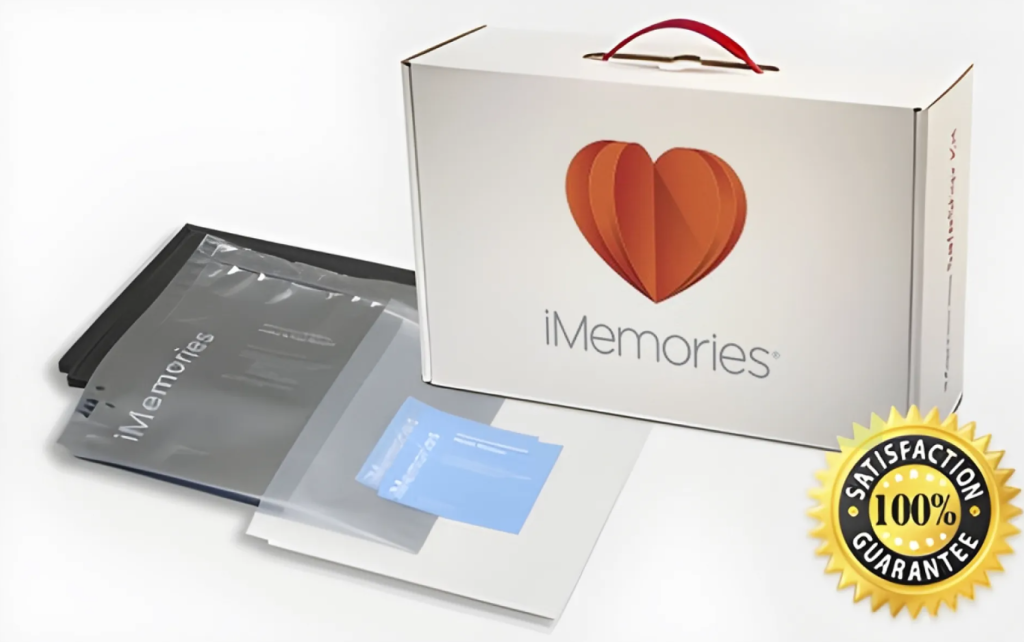
I ordered the SafeShip Kit, which arrived as “a durable, crush-proof box that made shipping old films and tapes worry-free. It comes with waterproof bags and cushioning”. The packaging is thoughtfully designed-bubble cushions, waterproof bags, and clear instructions for organizing different media types.
Packing the tapes was surprisingly emotional. “I found myself laughing and crying as I went through each one, remembering moments I had almost forgotten”. There’s something deeply personal about handling physical media that captures moments of your life.
Shipping and Processing
The shipping process is straightforward. I used the prepaid FedEx shipping included with the kit and sent everything off. Then came the waiting.
This is where experiences diverge significantly. Some customers report smooth, timely processing. Others describe delays and communication issues. One BBB complaint from March 2026 tells a frustrating story: “According to the order timeline in my account, the tape was received on 2/5/26 and finally moved into production on 2/15/26. However, as of 3/10/26 the order status still shows ‘In Production’… No estimated completion date has been provided”.
Receiving the Digital Files
When the digital files finally arrived, the quality was generally impressive. A reviewer noted, “We were delighted when I downloaded the app and enjoyed reminiscing those memories”. Another customer praised the results: “The older VHS tapes we submitted turned out great”.
However, quality isn’t always consistent. One reviewer reported significant issues: “Many of my transfers had significant issues (jumpy picture, constant tracking lines) making them unwatchable. I contacted support, and they agreed they were bad, but said I couldn’t have a refund because I had already downloaded the files”.
The Cloud Access Experience
The iMemories app and cloud platform are where the service truly shines-or frustrates. The ability to view memories instantly on any device is genuinely valuable. “iMemories gives you cloud-based access to all your family videos and photos from any device”.
But access comes with a catch. “iMemories often receives complaints about ongoing access costs”. After the 30-day free trial, you’ll need to subscribe at $7.99/month or $49.99/year to maintain cloud access. This model has left some customers feeling trapped.
Long-Term Observations
The biggest lesson from using iMemories: understand the total cost before you commit. The base conversion price is just the beginning. Add McKenzie AI enhancement, physical copies, and ongoing cloud storage, and the total can be significantly higher than expected.
One reviewer captured this sentiment perfectly: “It is a bit expensive and very hard to initially let my memories go but it is completely worth it. Communication is the best which gave me peace of mind”.
Key Features Explained
1. Comprehensive Media Format Support
What it does: iMemories accepts virtually any physical media format-VHS, Betamax, VHS-C, 8mm film, Super 8, 16mm film, photo prints, slides, and negatives.
Why it matters: Most families have a mix of formats collected over decades. One service that handles everything simplifies the process enormously.
Real-world benefits: You can send one box containing VHS tapes from the 90s, 8mm film from the 70s, and photo albums from every decade in between. Everything gets digitized in one workflow.
Drawbacks: The per-item pricing means mixed media collections can get expensive quickly. Film is priced per 50 feet, photos per individual print—costs add up.
Best use cases: Families with diverse media collections who value convenience over cost optimization.
2. McKenzie AI Enhancement
What it does: Proprietary AI technology that improves clarity, color accuracy, and sharpness of digitized media, claiming “up to three times the visual clarity of the original video”.
Why it matters: Old media degrades. Colors fade. Images become soft. AI enhancement can restore visual quality that might otherwise be lost.
Real-world benefits: Home videos from the 80s and 90s can look significantly better than the original tapes. Photos from decades ago can regain color and detail.
Drawbacks: It’s an add-on cost-$4.99 per tape and $0.15 per photo. That’s about a 33% increase for video conversion and a 31% increase for photos. Results vary; some customers report dramatic improvements, others see minimal difference.
Best use cases: Priceless, irreplaceable footage where quality matters most-weddings, births, reunions with loved ones who have passed.
3. Cloud Storage and Streaming
What it does: Digitized files live in a private online account accessible through the iMemories app on phones, tablets, computers, and smart TVs.
Why it matters: You don’t need to wait for physical media to arrive. You can view, share, and enjoy memories immediately after digitization.
Real-world benefits: Share wedding videos with relatives across the country instantly. Watch childhood memories on your smart TV during family gatherings. Access everything from anywhere.
Drawbacks: The 30-day free trial is just the beginning. Ongoing access requires a subscription at $7.99/month or $49.99/year. If you cancel, you may lose access to your digitized memories unless you’ve downloaded them or purchased physical copies.
Best use cases: Families who want easy sharing and access without managing physical media. Those who value convenience over long-term ownership costs.

4. Multiple Delivery Options
What it does: After digitization, you can choose digital download, USB drive, DVD, or Blu-ray.
Why it matters: Different formats serve different needs. Digital downloads give you permanent files. USB drives offer physical backup. DVDs are affordable and widely compatible.
Real-world benefits: You’re not locked into one format. Download files for personal use, order a USB for backup, and create DVDs for less tech-savvy family members.
Drawbacks: Each option costs extra. USB starts at $19.99, DVDs at $9.99 per disc. These costs add to the overall bill.
Best use cases: Customers who want redundancy-multiple copies in different formats for ultimate peace of mind.
5. SafeShip Kit
What it does: A prepaid shipping kit with a crush-proof box, waterproof bags, bubble cushioning, and barcodes for tracking.
Why it matters: Sending irreplaceable media through the mail is stressful. Professional packaging reduces damage risk.
Real-world benefits: Organized packing with clear instructions. Peace of mind knowing your memories are properly protected.
Drawbacks: Costs about $15 on top of other fees. You can use your own packaging, but you’ll need to arrange shipping yourself.
Best use cases: Anyone sending valuable or fragile media. The cost is worth the protection.
Performance Analysis
Build Quality
iMemories’ physical packaging (SafeShip Kit) is professional and robust. The crush-proof boxes and waterproof bags provide genuine protection. The digitized files themselves are high-quality when done correctly, though consistency varies.
Ease of Use
The process is straightforward: order the kit, pack your media, ship it, wait, and view results online. The app and online platform are user-friendly. However, some customers report login issues and difficulty tracking orders.
Reliability
iMemories claims “never [to] have lost or mishandled a customer’s property”. The company’s BBB A+ rating and extensive review history suggest generally reliable service. However, reliability issues do surface-delays in processing, communication gaps, and variable quality.
Durability
Digitized files are as durable as digital media gets-they don’t degrade like tape or film. However, the files’ long-term accessibility depends on your storage choices. Cloud access requires ongoing payment; downloaded files can be backed up indefinitely.
Effectiveness
For most customers, iMemories effectively converts aging media into usable digital formats. One reviewer summarized: “The answer is ‘YES.’ I don’t have any complaints. The only issue I need to figure out is where we will save these digital videos for the entire family”.
Customer Support
Support experiences vary widely. Some customers praise communication and responsiveness. Others report frustration with delays and difficulty getting resolutions. The BBB shows 30 complaints in the last three years, with 10 closed in the last 12 months.
User Experience
The overall user experience is generally positive but marred by pricing complexity and occasional quality issues. Sitejabber shows 92% of reviewers recommend iMemories, with a 4.6/5 rating from over 11,800 reviews.
Value for Money
Value depends entirely on your expectations and usage. For one-time digitization with downloads, the service offers reasonable value. For ongoing cloud access, the subscription model can feel expensive. Hidden costs and add-ons can make the final bill significantly higher than initial estimates.
Pros and Cons
Benefits
Preserve Fading Media
VHS tapes degrade over time. Film reels become brittle. Photos fade. iMemories captures these memories before they’re lost forever. “These aren’t just tapes and slides. They’re your family history. Your treasured memories. Your stories waiting to be told again”.
Access Memories Anywhere
Once digitized, your memories are accessible from phones, tablets, computers, and smart TVs. No more digging through boxes or hunting for a working VCR.
Share With Family
Digitized memories can be shared instantly with family members anywhere. “Seeing familiar moments pop up on the screen sparked conversations, stories, and memories we hadn’t talked about in years”.
Professional Quality
iMemories uses professional equipment and proprietary AI technology. Results generally exceed what most people could achieve with DIY conversion.
Peace of Mind
Knowing your memories are professionally preserved and accessible provides genuine peace of mind. “Communication is the best which gave me peace of mind”.
Drawbacks and Limitations
The Subscription Model
This is the biggest pain point. After the 30-day free trial, cloud access requires $7.99/month or $49.99/year. Some customers feel this turns a one-time service into an ongoing financial commitment. “Being required to pay for access to downloads” is a common complaint.
Variable Quality
Not all digitizations are equal. Some customers report perfect results; others describe “jumpy picture, constant tracking lines” making videos “unwatchable”. When quality issues arise, resolution can be difficult-especially if you’ve already downloaded the files.
Communication Delays
Processing times vary, and communication isn’t always timely. One customer waited over a month with no meaningful updates. Another noted the website made it “very difficult to track my order”.
Cost Complexity
The pricing structure is more complex than it appears. Base conversion costs are just the beginning. AI enhancement, physical copies, shipping, and cloud storage all add to the final bill. “The invoice is not just ‘digitize my tapes.’ It is conversion work plus delivery choice, and for some buyers it also becomes a subscription decision”.
Return Shipping Fees
Some customers report unexpected charges for return shipping of original media. These fees aren’t always clearly communicated upfront.
Refund Policy Issues
If you download files and then discover quality issues, refunds may not be available. This creates a difficult situation-you need to download files to evaluate them, but doing so may waive your right to a refund.
Who Should Buy This Product
Beginners
If you’ve never digitized media before and want a hassle-free experience, iMemories is an excellent choice. The process is straightforward, the SafeShip Kit makes packing easy, and the app provides simple access to results.
Professionals
Professionals needing high-quality transfers of archival footage may appreciate iMemories’ professional equipment and AI enhancement. However, turnaround times and communication issues could be problematic for time-sensitive projects.
Budget Buyers
Proceed with caution. Base prices are reasonable, but the total cost with add-ons, shipping, and cloud storage can be significant. Compare total costs carefully before committing.
Power Users
If you have a large collection spanning multiple formats, iMemories’ comprehensive format support is valuable. However, consider whether the per-item pricing model is cost-effective for very large collections.
Casual Users
For occasional use-digitizing a few tapes or a single photo album-iMemories is convenient and produces professional results. The cloud access makes sharing easy.
Who Should Avoid This Product
Budget-conscious consumers who want a one-time cost with no ongoing fees. The subscription model for cloud access may feel like a trap.
Anyone uncomfortable sending irreplaceable media through the mail. Despite professional packaging, the anxiety of mailing priceless memories may not be worth it.
Those needing fast turnaround. Processing times vary, and delays are not uncommon.
People who prefer local, in-person service. If you’d rather hand-deliver your media, consider local options or Costco’s in-store service.
DIY enthusiasts who enjoy hands-on projects and want full control over the digitization process. Elgato Video Capture and similar DIY kits offer a more affordable, hands-on alternative.
iMemories vs. Legacybox
Verdict: iMemories offers more flexibility and better cloud access. Legacybox may be simpler for large collections but has more quality and complaint concerns.
iMemories vs. ScanCafe
Verdict: iMemories typically offers faster turnaround and better cloud integration. ScanCafe has a solid reputation but may take longer.
iMemories vs. Costco Photo Center
Verdict: Costco is better for budget-conscious customers with standard VHS tapes. iMemories is better for comprehensive format support and cloud access.
iMemories vs. DIY Conversion
Verdict: iMemories wins on convenience and quality assurance. DIY wins on cost and control for those willing to invest time.
Best Alternatives
1. Legacybox
Legacybox is iMemories’ most direct competitor, offering a similar mail-in service with bundled pricing.
Why choose Legacybox: If you have a large collection and prefer simplified bundling, Legacybox’s box-based pricing may be more straightforward. The company has significant brand recognition.
Advantages: Bundled pricing can be simpler for large collections. Strong brand presence.
Drawbacks: More complaints about quality and lost media. Lower BBB rating. Limited cloud options.
2. ScanCafe
ScanCafe is a well-established competitor with a strong reputation for photo and slide scanning.
Why choose ScanCafe: If your primary need is photo or slide digitization, ScanCafe has a strong reputation. The company offers high-quality scans with good color correction.
Advantages: Strong reputation for photo quality. Established presence.
Drawbacks: Slower turnaround than iMemories. Less comprehensive video format support. Limited cloud options.
3. Costco Photo Center
Costco offers in-store video transfer services at competitive prices.
Why choose Costco: If you’re a Costco member and prefer in-person service, this is a convenient, affordable option. You drop off and pick up your media locally.
Advantages: Lower cost. In-person service reduces mailing anxiety. Quicker turnaround.
Drawbacks: Limited format support. No cloud access. Requires Costco membership.
Buying Guide
What to Look For in a Digitization Service
Format Support: Ensure the service accepts all your media formats. iMemories is strong here, supporting VHS, Betamax, 8mm, Super 8, 16mm, photos, slides, and negatives.
Pricing Transparency: Look for clear, upfront pricing. iMemories’ per-item pricing with add-ons can be confusing. Ask for a complete estimate before committing.
Quality Assurance: Check reviews for quality consistency. iMemories has generally positive reviews but variable quality.
Turnaround Time: Understand processing times before ordering. iMemories’ turnaround varies significantly.
Access and Ownership: Understand how you’ll access your digitized files. Will you own them permanently? Is there a subscription required? iMemories requires ongoing subscription for cloud access.
Return Policy: Understand what happens if you’re unsatisfied. iMemories’ refund policy is limited after download.
Important Features to Consider
- Cloud storage for easy access and sharing
- Multiple output formats (download, USB, DVD, Blu-ray)
- AI enhancement for quality improvement
- Secure shipping with tracking
- Customer support responsiveness
- BBB rating and complaint history
Common Mistakes to Avoid
Not calculating total cost. Base prices are just the beginning. Add AI enhancement, physical copies, shipping, and cloud storage.
Assuming cloud access is permanent. The 30-day trial is limited; ongoing access requires subscription.
Sending media without backup. Never send your only copy of irreplaceable media. Make copies if possible.
Not reading the fine print. Understand the refund policy, especially regarding downloaded files.
Choosing solely on price. The cheapest option isn’t always the best. Consider quality, reliability, and access.
Budget Considerations
For a typical order of 10 VHS tapes with AI enhancement and one year of cloud storage:
| Item | Cost |
|---|---|
| 10 tapes × $14.99 | $149.90 |
| AI enhancement (10 × $4.99) | $49.90 |
| Cloud storage (1 year) | $49.99 |
| SafeShip Kit | ~$15.00 |
| Total | ~$264.79 |
Without AI enhancement and with download instead of cloud storage, the total could be ~$180. These estimates highlight why understanding the full pricing structure matters.
Expert Insights
The Ancestry Acquisition: What It Means
In July 2025, Ancestry acquired iMemories in a strategic move to integrate visual media into family history research. “By combining Ancestry’s leadership in family history with iMemories’ expertise in media digitization, we’re giving you powerful new ways to tell your story”.
This acquisition signals that visual storytelling is becoming central to genealogy. Ancestry customers can now digitize and upload media directly to their family trees.
Implications: The acquisition adds credibility and stability to iMemories. However, it’s unclear whether pricing, service, or integration will change. For now, iMemories continues to operate independently.
The McKenzie AI Technology
McKenzie AI is iMemories’ proprietary enhancement technology, claimed to deliver “up to three times the visual clarity of the original video”. Named after “the clearest lake in the world,” the technology improves clarity, color precision, and sharpness.
Expert take: AI enhancement can genuinely improve degraded footage. However, results vary, and the technology is relatively new. The $4.99-per-tape cost adds significantly to the total.
The Subscription Model Debate
iMemories’ subscription model for cloud access is controversial. Critics argue it turns a one-time service into an ongoing financial commitment. Supporters note that cloud storage has ongoing costs and the subscription provides continuous access and sharing capabilities.
Expert take: The model works well for users who value ongoing access and sharing. However, customers who want permanent ownership without recurring costs should download files or order physical copies. The 30-day free trial provides a window to make this decision.
The Future of Media Digitization
The media digitization industry is evolving rapidly. AI enhancement is becoming standard. Cloud access is expected. Integration with genealogy and storytelling platforms is growing.
Expert take: iMemories is well-positioned in this evolving landscape. The Ancestry acquisition provides resources and integration opportunities. However, competition is intensifying, and pricing transparency will become increasingly important.
iMemories Pricing Breakdown: How Much Does It Cost?
This is the big question. How much does iMemories cost?
The short answer: it depends. iMemories charges per item, so your total cost depends on how much media you send.
Here’s the pricing as of 2026:
| Service | Price |
|---|---|
| Videotape digitization | $14.99 per tape (with promo) |
| Photo digitization | $0.49 per photo |
| Film digitization | $14.99 per 50 feet |
| McKenzie AI Enhancement | $4.99 per tape / $0.15 per photo |
| iMemories Cloud subscription | $7.99/month or $49.99/year |
| USB drive (8GB) | $19.99 |
| DVD or Blu-ray | $9.99 per disc |
Keep in mind that pricing can vary based on promotions. When I used the service, there was a SAVE50 promo that discounted the per-item pricing.
Is iMemories Expensive?
Compared to DIY options, yes. Compared to other professional services, it’s competitive.
A DIY setup with a VHS-to-digital converter costs about $50-100 one-time. But it takes hours of your time and the quality might not be great.
Legacybox, iMemories’ main competitor, offers bundled pricing-around $59.99 for a starter box with two items. The per-item cost is similar to iMemories.
Costco offers in-store tape conversion at a lower price point, but you don’t get the app or cloud features.
The bottom line: You’re paying for convenience and peace of mind. If you have a lot of media to digitize and want it done professionally without the hassle, iMemories is worth the cost.
iMemories Reviews: What Other Customers Are Saying
I scoured the internet to see what other people are saying about iMemories. Here’s the summary.
Positive Reviews
Most iMemories reviews are positive. On Sitejabber, iMemories has a 4.6-star rating with 92% of reviewers recommending the service.
Common praise includes:
- High-quality digitization: “The communication every step of the way made the transaction seamless. And the older vhs tapes we submitted turned out great.”
- Emotional value: “Seeing familiar moments pop up on the screen sparked conversations, stories, and memories we hadn’t talked about in years.”
- Easy process: “iMemories is a reliable and professional option for converting VHS and VCR tapes into digital files.”
- Safe handling: “The tapes were returned safely, and nothing was damaged.”
Negative Reviews
Not everyone has a perfect experience. Common complaints include:
- Slow turnaround: Several customers reported waiting longer than expected.
- Communication issues: “I have not received a meaningful update or expected completion date.”
- Quality concerns: “Many of my transfers had significant issues (jumpy picture, constant tracking lines) making them unwatchable.”
- Login problems: “The website has made it very difficult to track my order. I experienced repeated login issues.”
- Refund policy: “They said I couldn’t have a refund because I had already downloaded the files.”
BBB Complaints
iMemories is not BBB accredited but has an A+ rating. They have 30 total complaints in the last 3 years, with 10 closed in the last 12 months.
Most complaints are about turnaround time, communication, and billing issues. This is consistent with other customer reviews.
Frequently Asked Questions iMemories
Is iMemories legit?
How much does iMemories cost?
How long does iMemories take?
Does iMemories return originals?
What formats does iMemories support?
iMemories supports VHS, Betamax, VHS-C, 8mm film, Super 8, 16mm film, photo prints, slides, and negatives. This comprehensive format support is one of the service’s key strengths.
What is McKenzie AI?
Do I need a subscription to access my files?
iMemories reviews consumer reports-what do people say?
Most reviews are positive, with a 4.6-star rating on Sitejabber. Customers praise the quality and convenience but sometimes complain about turnaround time and communication.
How much does iMemories cost?
iMemories charges per item: about $14.99 per videotape, $0.49 per photo, plus optional extras like cloud storage ($7.99/month) and USB drives ($19.99).
Is iMemories worth it?
For most families with a lot of old media, yes. The convenience and quality are worth the cost. But if you’re on a tight budget or in a hurry, consider alternatives.
iMemories vs Legacybox-which is better?
iMemories has better app features and cloud access. Legacybox has bundled pricing. Both are comparable in quality, but iMemories has slightly better reviews.
What happens if iMemories loses my media?
iMemories claims to have “never have lost or mishandled a customer’s property”. However, sending irreplaceable media always carries risk. Consider making copies before sending.
Does iMemories work with Ancestry?
What are people saying about iMemories?
Final Verdict
Main Strengths
iMemories offers a genuinely convenient solution for digitizing aging media. The comprehensive format support means you can send everything in one box. The SafeShip Kit provides peace of mind. The cloud platform makes viewing and sharing easy. Professional quality-especially with McKenzie AI enhancement-often exceeds DIY results.
Main Weaknesses
The pricing model is complex and can catch customers off guard. Base prices are just the beginning-AI enhancement, physical copies, and cloud storage add significantly to the total. The subscription requirement for ongoing cloud access feels like a trap to some customers. Quality and turnaround are inconsistent.
Best Users
iMemories is ideal for families with diverse media formats who value convenience and professional quality. It’s excellent for sharing memories with relatives through the cloud platform. It works well for one-time digitization projects where you download files and don’t need ongoing cloud access.
Overall Recommendation
iMemories is a solid choice for media digitization-if you understand the costs upfront. The service delivers professional results with genuine convenience. However, the pricing model requires careful attention. Read the fine print. Calculate total costs before ordering. Download files during the free trial if you don’t want ongoing subscription costs.