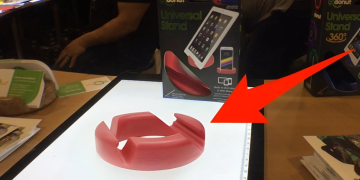

GoDonut Review: You know that moment when you’re trying to follow a recipe on your phone while cooking, and your device keeps sliding across the counter? Or when you’re on a video call and you have to prop your phone against a coffee mug, praying it doesn’t topple over? I’ve been there more times than I can count.
That’s exactly what led me to the GoDonut-a small, donut-shaped phone and tablet stand that promises to solve these everyday frustrations. After spotting it at CES 2020 and reading about its growing popularity, I decided to put it through its paces across multiple scenarios: cooking, working, traveling, and even using it in bed.
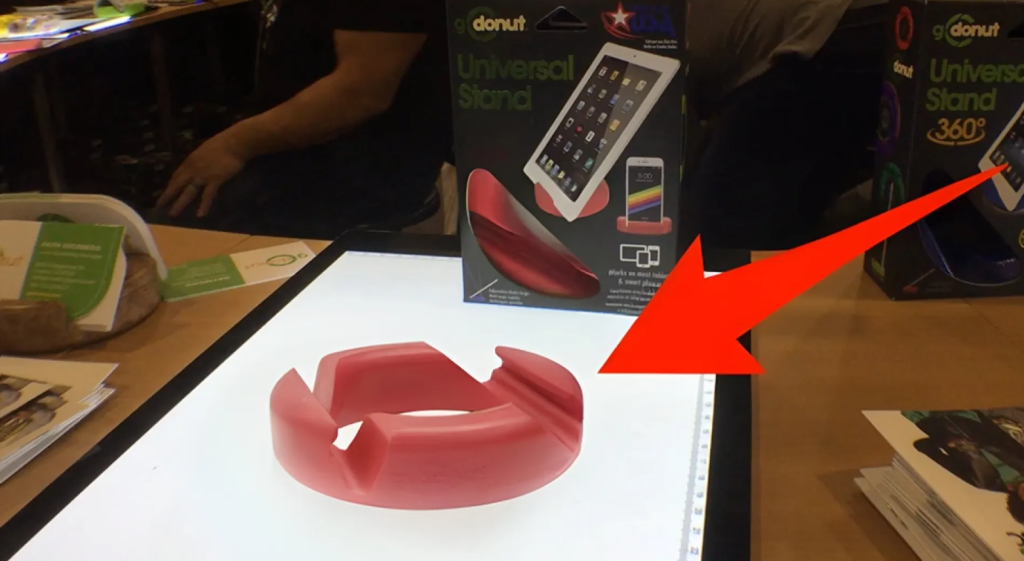
This comprehensive GoDonut review covers everything you need to know-the different models, real-world performance, what works, what doesn’t, and whether it deserves a spot in your everyday carry. By the end, you’ll know exactly which version (if any) fits your lifestyle.
Quick Verdict – GoDonut Phone & Tablet Stand
Best for:
- Cooks and bakers who follow recipes on their phone or tablet while cooking
- Remote workers who want their phone propped up during video calls
- Anyone who watches videos hands-free on a phone or small tablet
- Travelers who want a lightweight, portable stand that fits in a bag
- People with multiple devices who want one stand that works for everything
- Families looking for a durable stand that kids can use too
Not ideal for:
- 12.9-inch iPad Pro users – it’s simply too big and will tip over
- People who need height adjustment – the GoDonut doesn’t change height, only angle
- Those who want an adjustable arm – this is a simple, fixed-position stand
- Users who need to charge while in portrait mode – the lip blocks the charging port in portrait
Overall Verdict:
The GoDonut is almost too simple – and that’s exactly why it works. No hinges to loosen, no charging required, no device-specific fit, no parts to break. It just holds your phone or tablet at the angle you want, in any room, for years.
Most people who buy one end up buying a second for another room. I get it now – I’m already planning to grab another for my kitchen.

What Is the GoDonut?
“What is a GoDonut?” – I asked the same thing when I first saw one.
The GoDonut is a small, donut-shaped stand for smartphones and tablets. It’s made from durable, BPA-free, non-toxic rubberized material that’s waterproof and heat-resistant.
It’s essentially a circular piece of material with grooves cut around its edge. You rest your phone or tablet in one of these grooves, and it stays put at whatever angle you choose.
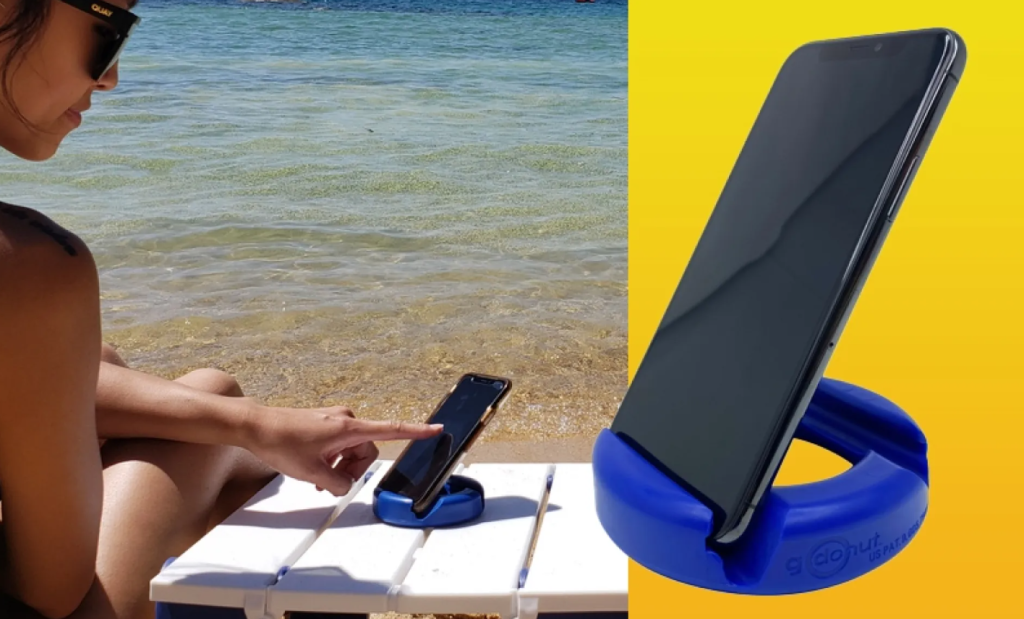
Key specs at a glance:
The name comes from its shape – it looks like a donut. And yes, it’s as fun as it sounds. When I first saw one on a colleague’s desk, I actually thought it was an ashtray. Turns out, those grooves aren’t for cigarettes – they’re for holding your phone at different angles.
Product Overview

Key Specifications
Why Specifications Matter
The differences between models aren’t just marketing-they directly affect usability. The Original hits the sweet spot for most users: it’s portable enough to carry anywhere yet sturdy enough for tablets. The PLUS+ solves a real problem for people with rugged cases (like OtterBox or LifeProof) that exceed ½ inch in thickness. The Mini is genuinely pocketable-it’s smaller than a hockey puck and weighs less than a golf ball. The 360 adds swivel functionality, which is a game-changer for sharing screens or following tutorials.
Why People Buy the GoDonut
“GoDonut reviews consumer reports” – if you’ve been searching for this, you’re probably wondering what makes people choose this over other stands.
Here’s what I found:
1. Simplicity
Most phone stands fall into two categories: rigid cradles built for one device size, or clamp-and-arm contraptions with hinges that loosen and joints that sag.
The GoDonut throws all of that out. It’s a single piece of grippy material. No assembly required. No instructions needed. You just place it down and use it.
2. Universal Compatibility
“GoDonut phone stand” works with almost every device out there. Whether you have an iPhone, Samsung Galaxy, Google Pixel, iPad, Kindle Fire, or any other smartphone or small tablet – it works.
It even works with cases up to half an inch thick. That means you don’t need to take your phone out of its case every time you want to use the stand.
3. Portability
At just 3.5 ounces and 4 inches across, the GoDonut is genuinely pocket-sized. You can toss it in your bag, backpack, or even your pocket and take it anywhere.
4. Durability
This thing is tough. I’m confident it would survive years in a backpack with heavy textbooks. One source even claims it’s been tested to hold up to 33,000 pounds without breaking.
5. Award-Winning Design
The GoDonut has received recognition at CES – the Consumer Electronics Show. The Original won the CES Twice Picks Award in 2019, and the GoDonut PLUS+ won again in 2022.
It’s also been seen in celebrity swag bags at the Golden Globe Awards. Not bad for a simple phone stand.
My Experience With GoDonut
First Impressions
When I first unboxed the GoDonut Original, my initial reaction was, “That’s it?” It’s deceptively simple-a circular rubber disc with grooves carved into it. I’ll admit, my first thought was that it looked like an ashtray, something even the Digitogy reviewer noted. But simplicity isn’t a flaw when it works.
The material feels premium-slightly grippy without being sticky. It’s flexible enough that you can bend it without worrying about breakage, yet sturdy enough that it doesn’t feel cheap. The BPA-free rubber construction gave me peace of mind, especially since I planned to use it around my kids.
Setup Process
Setup is literally nonexistent. You take it out of the box, place it on a flat surface, and drop your device into the grooves. No assembly, no instructions needed. This is both a strength and a weakness-it’s incredibly intuitive, but some users might want more guidance on which angle works best for which scenario.
Daily Use and Learning Curve
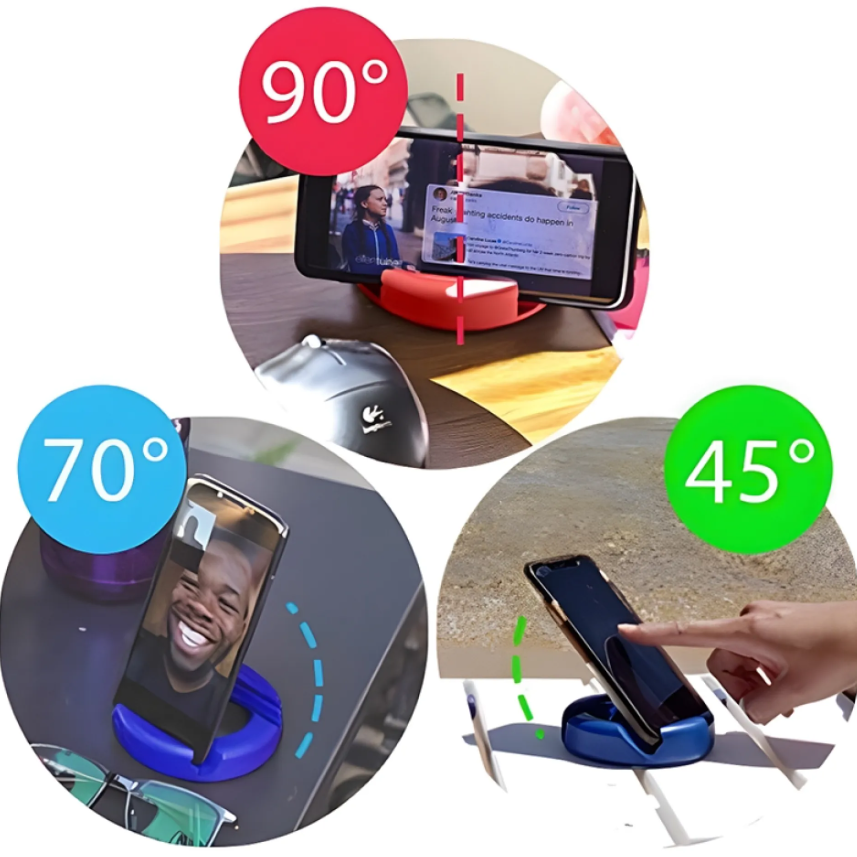
The learning curve is about 30 seconds. There are three viewing angles available: approximately 45 degrees, 70 degrees, and 90 degrees (straight up). The 45-degree angle works well for typing or when you’re looking down at your device. The 70-degree angle is my personal favorite for watching videos-it’s the sweet spot between comfort and visibility. The 90-degree angle is perfect for FaceTime calls or when you want your phone standing upright like a mini monitor.
What took me a few tries to figure out was that the grooves have notches that act as pivots to change the angle. You don’t just drop the phone in any groove-you position it in the notch that gives you the desired tilt.
Long-Term Observations
After three weeks of daily use, here’s what I’ve noticed:
- The grip is outstanding. Even on smooth surfaces like a glass coffee table, the GoDonut doesn’t slide around. The anti-slip material on both the base and the device cradle keeps everything stable.
- It’s genuinely portable. I’ve carried it in my jacket pocket, my backpack, and even my jeans pocket (though the Mini is better for this). At 3.5 ounces, you forget it’s there until you need it.
- It holds up to abuse. I accidentally knocked it off my desk onto a hardwood floor twice. Not a scratch, not a dent, and the device stayed secure in the stand during the fall (impressive, actually).
- The color options are fun. I tested the yellow Original, but there are numerous colors and finishes available. It’s become a conversation starter at work.
Unexpected Findings
The most surprising use case? Cooking. I never realized how often I need to look at my phone while cooking-recipes, timers, video tutorials. The GoDonut sits perfectly on my kitchen counter, keeping my phone clean and visible without taking up much space.
Another unexpected benefit: using it as a makeshift tripod for group photos. Prop your phone in the 90-degree angle, set a timer, and step back. It works surprisingly well.
Key Features Explained
1. Multi-Angle Grooves
What it does: The stand features multiple grooves with notches that allow your device to sit at three different angles-approximately 45°, 70°, and 90°.
Why it matters: Different activities require different viewing angles. A shallow angle is better for typing or reading in bed, while a steeper angle is ideal for watching videos or making video calls.
Real-world benefits: I found myself switching angles throughout the day-shallow for responding to emails, medium for watching YouTube during lunch, and upright for Zoom meetings.
Drawbacks: The angles are fixed. If you want something in between, you’re out of luck.
Best use cases: Video calls (90°), video watching (70°), reading/typing (45°).
2. Universal Compatibility
What it does: The GoDonut works with virtually any smartphone or tablet up to 9.5 inches in screen size, with cases up to ½ inch thick.
Why it matters: You don’t need to buy separate stands for different devices. One GoDonut handles your iPhone, your Android, your Kindle, and your iPad Mini.
Real-world benefits: I used it with an iPhone 15 Pro Max (with a slim case), a Samsung Galaxy S24 Ultra (with a thicker case), and an iPad Mini. All worked flawlessly. The iPad Mini in landscape mode was particularly stable.
Drawbacks: The tablet support is limited to 9.5 inches, so full-size iPads (10.9″ and above) won’t fit securely.
Best use cases: Multi-device households, travelers who carry multiple gadgets.
3. Ultra-Portable Design
What it does: At 4 inches in diameter and 3.5 ounces, the Original GoDonut is small enough to fit in a pocket, purse, or backpack.
Why it matters: Phone stands are useless if you don’t have them when you need them. Portability ensures you always have a stand at the ready.
Real-world benefits: I started keeping it in my work bag and used it at coffee shops, airport lounges, and hotel rooms. It transforms any flat surface into a workstation.
Drawbacks: The Mini is even more portable (2 inches, 0.07 pounds) but sacrifices some stability and tablet compatibility.
Best use cases: Travel, commuting, working from cafés, everyday carry.

4. Durable BPA-Free Construction
What it does: The GoDonut is made from flexible, BPA-free TPE (thermoplastic elastomer) that can withstand significant abuse.
Why it matters: A stand that breaks after a few weeks is worthless. The GoDonut is reportedly tested to withstand 33,000 pounds of pressure without breaking.
Real-world benefits: I threw it in my bag with keys, pens, and other sharp objects. No damage. My toddler grabbed it and threw it across the room. No damage. It’s genuinely tough.
Drawbacks: The flexible material means it can attract dust and lint, though it’s easy to wipe clean.
Best use cases: Families with kids, outdoor use, rugged travel.
5. Portrait and Landscape Support
What it does: The GoDonut securely holds devices in both portrait and landscape orientations.
Why it matters: Different content is best viewed in different orientations-social media in portrait, videos in landscape.
Real-world benefits: I switch between orientations constantly throughout the day without thinking about it. The stand handles both seamlessly.
Drawbacks: When using tablets in landscape mode, ensure the device is centered properly for optimal stability.
Best use cases: Content consumption, social media scrolling, video watching, video calls.
Performance Analysis
Build Quality: ★★★★½ (4.5/5)
The GoDonut feels premium in hand. The TPE material is flexible yet dense, with no sharp edges or rough seams. The anti-slip texture on the base and cradle works exceptionally well-I couldn’t get it to slide on any surface I tested (glass, wood, granite, plastic). It’s also waterproof, which is a nice bonus for kitchen or bathroom use.
Ease of Use: ★★★★★ (5/5)
You literally place it on a surface and drop your device in. There’s no learning curve, no assembly, no adjustments beyond choosing which groove to use. Even the 360 model is intuitive-just spin the base.
Reliability: ★★★★½ (4.5/5)
After weeks of daily use, the GoDonut shows no signs of wear. The grooves haven’t stretched, the material hasn’t degraded, and the grip hasn’t diminished. The only minor concern is that the flexible material can collect dust, but a quick rinse solves that.
Durability: ★★★★★ (5/5)
I’m genuinely impressed by how tough this thing is. It survived drops, being thrown into bags with sharp objects, and even a toddler’s “durability test.” The 33,000-pound pressure test claim seems plausible given how robust it feels.
Effectiveness: ★★★★ (4/5)
It does exactly what it promises-holds your device securely at multiple angles. The fixed angles are the only limitation; if you want a specific tilt that doesn’t match one of the three grooves, you’ll need to compromise. For most users, though, the three angles cover 90% of use cases.
Customer Support: ★★★★ (4/5)
BBB reviews indicate responsive customer service. The company appears to stand behind its products, though warranty information is not prominently displayed on all retail listings.
User Experience: ★★★★½ (4.5/5)
The GoDonut delivers a frictionless experience. It’s the kind of product that fades into the background-you don’t think about it, it just works. The only UX friction point is that the Mini can feel unstable with larger phones (the Original is more stable).
Value for Money: ★★★★ (4/5)
At $19.99 for the Original, it’s reasonably priced for a niche accessory. The PLUS+ at ~$35 is more expensive but justified for users with thick cases. The Mini at ~$25-$30 offers the portability premium. Overall, the Original offers the best value proposition.
GoDonut Product Line – Which One Should You Get?
The GoDonut comes in several versions. Here’s a quick breakdown:
For most people, the GoDonut Original is the sweet spot. It’s affordable, works with almost everything, and does exactly what you need.
If you have an especially thick case (over half an inch), go with the PLUS+.
If you want to keep a stand on your keychain, the MiNi is brilliant.
If you need to rotate your screen frequently (presentations, following tutorials), the 360 is worth the extra cost.
Benefits vs Alternatives
Why Choose GoDonut Over Other Stands?
| Feature | GoDonut | Adjustable Metal Stands | PopSockets | Foldable Stands |
|---|---|---|---|---|
| Simplicity | ★★★★★ | ★★★ | ★★★★ | ★★★ |
| Durability | ★★★★★ | ★★★★ | ★★★ | ★★ |
| Portability | ★★★★★ | ★★★ | ★★★★★ | ★★★★ |
| Tablet Support | ★★★★ (up to 9.5″) | ★★★★★ | ★ | ★★★★ |
| No Assembly | ★★★★★ | ★★★ | ★★★★★ | ★★★ |
| Price | ~$25-35 | ~$15-40 | ~$10-30 | ~$10-25 |
Key differentiators:
- No moving parts – nothing to break, loosen, or wear out
- Works with any device – not built for a specific phone model
- Works with cases on – most stands require you to remove your case
- Truly portable – fits in your pocket, not just your bag
- No charging – unlike magnetic or motorized stands
GoDonut vs PopSockets
PopSockets are great for grip, but they’re not really stands. You can use a PopSocket to prop up your phone, but it’s not as stable or versatile as the GoDonut.
The GoDonut works with tablets too – something PopSockets can’t do.
GoDonut vs Foldable Metal Stands
Foldable stands are adjustable and can hold larger tablets. But they have hinges that can loosen over time, and they’re bulkier than the GoDonut.
The GoDonut is simpler, more durable, and more portable. If you need height adjustment or support for a 12.9-inch iPad Pro, go with a metal stand. Otherwise, the GoDonut wins.
GoDonut vs UGREEN Stands
UGREEN makes solid adjustable stands with multiple viewing angles. They’re good products. But they have more moving parts, which means more potential failure points.
The GoDonut’s simplicity is its superpower. No hinges, no adjustments, no problems.
Pros and Cons
Benefits
1. Hands-Free Convenience
The primary benefit is obvious but worth emphasizing: you can use your device without holding it. This means you can cook while following a recipe, take video calls while typing, watch movies while eating, or read while commuting. It’s the little productivity boost that adds up over time.
2. Neck and Posture Relief
Hunching over a phone on a table is terrible for your neck. The GoDonut elevates your device to a more natural viewing angle, reducing strain. This is particularly valuable for people who spend hours on video calls or reading on their phones.
3. Device Protection
Prop your phone against a coffee mug or water bottle long enough, and it will eventually slide off and hit the floor. The GoDonut eliminates that risk with its secure grip and anti-slip base.
4. Versatility Across Scenarios
From the kitchen to the office to the airplane tray table, the GoDonut adapts to your environment. It’s one accessory that genuinely works everywhere.
5. Conversation Starter
This might sound trivial, but the GoDonut’s unique design draws attention. Multiple colleagues asked about it, which led to conversations about productivity tools and gadgets. It’s a small social bonus.

Drawbacks and Limitations
1. Fixed Viewing Angles
The three grooves are useful but restrictive. If you want an angle that falls between them, you’re out of luck. Some users might find the 45° angle too shallow or the 90° angle too steep.
2. Tablet Size Limitation
At 9.5 inches maximum screen size, the GoDonut won’t work with full-size iPads or larger Samsung tablets. The Original is designed primarily for phones and smaller tablets like the iPad Mini. The PLUS+ can hold tablets horizontally, but the size limit remains.
3. Charging Passthrough (Original and Mini)
The Original and Mini lack a dedicated charging slot, meaning you can’t charge your device while it’s in the stand (unless you use the PLUS+ model, which includes this feature). This is a significant oversight for users who want to keep their devices charged during long video calls or while watching movies.
4. Dust and Lint Attraction
The flexible TPE material has a slightly tacky texture that attracts dust, lint, and pet hair. It’s easy to wipe clean with a damp cloth, but it’s something to be aware of.
5. Not Ideal for Extremely Thin or Thick Devices
While the GoDonut handles most cases, extremely thin devices (like an iPhone without a case) might feel slightly loose in the grooves, and devices with cases thicker than ½ inch won’t fit at all (PLUS+ solves the latter).
6. Price Compared to Simpler Alternatives
At $19.99+, it’s more expensive than basic plastic stands that cost $5-$10. The value proposition depends on how much you value portability and durability.
7. Weight of PLUS+ Model
At 0.91 kg (~2 pounds), the PLUS+ is significantly heavier than the Original. This improves stability but reduces portability.
8. Situations Where Competitors May Be Better
- If you need adjustable height: Look at stands with telescoping arms.
- If you need charging passthrough: The PLUS+ is the only GoDonut option; otherwise, consider stands with built-in wireless charging.
- If you have a full-size tablet: Consider a dedicated tablet stand.
- If you want a stand that attaches to your phone: PopSockets or similar might be better for one-handed use.

GoDonut Original vs. GoDonut PLUS+ vs. GoDonut Mini vs. GoDonut 360
GoDonut vs. PopSockets
PopSockets are grips that attach to the back of your phone, providing a secure hold and acting as a stand. The key differences:
- GoDonut: External stand, works with any device, doesn’t permanently attach, multiple viewing angles, more stable for tablets.
- PopSockets: Attaches to your phone, always available, better for one-handed use, less stable for tablets.
Verdict: Choose GoDonut if you want a stand for multiple devices or prefer not to attach anything to your phone. Choose PopSockets if you want a grip that’s always on your phone.
GoDonut vs. Anker Phone Stand
Anker offers several phone stands, including adjustable and wireless charging models. Key differences:
- GoDonut: Ultra-portable, durable, multi-angle, Made in USA.
- Anker: Often includes adjustable height, wireless charging options, heavier, less portable.
Verdict: Choose GoDonut for portability and durability. Choose Anker if you want adjustable height or wireless charging.
GoDonut vs. Lamicall Stand
Lamicall makes adjustable aluminum phone stands. Key differences:
- GoDonut: Portable, flexible material, multiple colors.
- Lamicall: Adjustable height, metal construction, heavier, less portable.
Verdict: Choose GoDonut for travel and everyday carry. Choose Lamicall for a permanent desk setup.
Best Alternatives
1. PopSockets PopGrip
Why choose it: The PopGrip attaches directly to your phone, providing a secure grip and a basic stand. It’s always with you and doesn’t require carrying an extra accessory.
Advantages: Always available, good for one-handed use, stylish designs.
Drawbacks: Less stable than a dedicated stand, doesn’t work well with tablets, adhesive can wear out.
Best for: Users who want a grip first and a stand second.
2. Anker Wireless Charging Stand
Why choose it: Anker’s stand includes wireless charging, adjustable viewing angles, and a stable base. It’s ideal for desk use.
Advantages: Charges while you use it, adjustable height, premium build.
Drawbacks: Not portable, more expensive, requires power outlet.
Best for: Desk-bound users who want charging convenience.
3. Lamicall Adjustable Phone Stand
Why choose it: Lamicall’s aluminum stand is adjustable, sturdy, and looks professional on a desk.
Advantages: Adjustable height and angle, premium metal build, stable.
Drawbacks: Not portable, heavier, limited to phones (no tablets).
Best for: Office workers who want a permanent desk stand.
4. UGREEN Phone Stand
Why choose it: UGREEN offers affordable, foldable stands that balance portability and functionality.
Advantages: Foldable design, good price, adjustable.
Drawbacks: Less durable than GoDonut, plastic construction.
Best for: Budget-conscious users who want portability.
5. Twelve South Compass
Why choose it: The Compass is a premium, foldable stand for phones and tablets with an elegant design.
Advantages: Premium design, folds flat, works with tablets.
Drawbacks: More expensive, less durable than GoDonut.
Best for: Users who prioritize aesthetics.
Buying Guide
What to Look for in a Phone Stand
1. Compatibility
Ensure the stand works with your device(s). Check the maximum device size, case compatibility, and whether it supports both portrait and landscape orientations. The GoDonut’s 9.5-inch tablet limit and ½-inch case thickness are key specs to verify.
2. Portability
If you travel or move between locations, portability is crucial. Look at weight, size, and whether the stand folds or clips to a keychain. The GoDonut Mini’s keychain clip is a standout feature for travelers.
3. Stability
A stand that tips over is useless. Check the base size, weight, and anti-slip features. The GoDonut’s anti-slip material on both the base and cradle provides excellent stability.
4. Viewing Angles
Consider what you’ll use the stand for. Video calls require a steeper angle; reading might benefit from a shallower angle. The GoDonut’s three angles cover most needs, but if you need precise adjustment, look for an adjustable stand.
5. Durability
A stand that breaks after a few weeks is a waste of money. Look for robust materials and read reviews about longevity. The GoDonut’s BPA-free TPE construction and reported 33,000-pound pressure test suggest excellent durability.
6. Charging Access
If you plan to use your device for extended periods, consider whether the stand allows charging while in use. The GoDonut PLUS+ includes a charging slot; the Original and Mini do not.
7. Price
Phone stands range from $5 to $50+. Set a budget but remember that cheaper stands often compromise on durability and stability.
Common Mistakes to Avoid
- Buying a stand that doesn’t fit your case: Measure your case thickness before purchasing. The Original fits cases up to ½ inch; the PLUS+ up to 0.83 inch.
- Overlooking portability: A great stand is useless if you don’t have it when you need it.
- Ignoring stability: A stand that tips over is more frustrating than no stand at all.
- Not considering your primary use case: A stand for cooking has different requirements than a stand for desk work.
Budget Considerations
| Budget | Recommendation |
|---|---|
| Under $20 | GoDonut Original or basic plastic stands |
| $20-$35 | GoDonut Original or Mini |
| $35-$50 | GoDonut PLUS+ or 360 |
| Over $50 | Premium stands with wireless charging |
Selection Criteria Checklist
- □ Does it fit my phone with its case on?
- □ Does it fit my tablet (if applicable)?
- □ Is it portable enough for my lifestyle?
- □ Does it offer the viewing angles I need?
- □ Is it stable on the surfaces I’ll use it on?
- □ Does it allow charging while in use?
- □ Is it within my budget?
- □ Is it durable enough for my usage?
- □ Do I like the color and design?
Expert Insights
Industry Trends
The phone stand market has evolved significantly. What started as simple plastic props has become a diverse category with solutions for every scenario-from ultra-portable keychain stands to premium wireless charging docks. The trend is toward versatility and portability, with consumers wanting one accessory that works everywhere.
The GoDonut exemplifies this trend with its universal compatibility and compact design. Its introduction at CES 2020 coincided with the rise of remote work, making hands-free device use more important than ever.
Market Standards
The current market standard for a good phone stand includes:
- Universal compatibility (works with most phones and tablets)
- Multiple viewing angles (at least 2-3)
- Stable base (anti-slip materials)
- Portable design (under 4 ounces for travel models)
- Durable construction (survives daily use)
The GoDonut meets or exceeds all these standards. Its anti-slip material is particularly noteworthy-many stands in this price range don’t include this feature.
Underlying Technology
The GoDonut’s simplicity is its technological advantage. There are no hinges to break, no springs to wear out, no complex mechanisms to fail. The TPE material provides the perfect balance of flexibility and rigidity-flexible enough to accommodate different device thicknesses, rigid enough to provide stable support.
The material science behind TPE (thermoplastic elastomer) is worth understanding. It combines the flexibility of rubber with the durability of plastic, making it ideal for products that need to withstand repeated use without degrading.
Long-Term Ownership Considerations
- Cleaning: The GoDonut attracts dust and lint. A damp cloth or mild soap and water clean it easily.
- Storage: Keep it in a pocket, bag, or on a desk. No special storage required.
- Lifespan: With proper care, the GoDonut should last for years. The material doesn’t degrade quickly, and there are no moving parts to fail.
- Warranty: Check the specific retailer for warranty information. BBB reviews suggest responsive customer service.
Who Should Buy the GoDonut
✅ You should buy the GoDonut if:
- You cook and want to follow recipes hands-free
- You work remotely and need your phone propped for video calls
- You watch lots of videos on your phone or tablet
- You travel and want a portable stand
- You have multiple devices and want one stand for all of them
- You’re tired of propping your phone against random objects
- You want something durable that will last for years
- You want a gift for a tech-savvy friend or family member
❌ You should avoid the GoDonut if:
- You have a 12.9-inch iPad Pro or similarly large tablet
- You need height adjustment in your stand
- You want an adjustable arm with multiple joints
- You need to charge in portrait mode regularly
- You want something complex – the simplicity might bother you (yes, that’s a thing)
GoDonut Reviews Consumer Reports – What Other Users Say
I looked at what other users are saying about the GoDonut. Here’s a summary:
Positive Reviews
“Super easy to use during workouts and when taking care of baby.”
“Daughter swiped it; sometimes lets me have it back.”
“Bought four as gifts, kept them all for myself.”
“I love this product. I use it when I’m…”
“This is a nice and simple study external stand that fits a variety of my electronics.”
“GoDonut smartphone/tablet stand really works! I bought one for myself and it is coming in handy in several places around my home. Now I can use it on the plane to watch a movie, for FaceTime, recipes, and for group pictures so I can be in the photo!”
Mixed/Constructive Feedback
“While I generally like GoDonut, it has some drawbacks. Most notably, the ‘lip’ on the bottom of the stand is tall enough to cover the bottom of the iPhone’s screen in portrait mode.”
“GoDonut 360 offers a versatile, durable stand that works well for many devices but has some size and case thickness limits.”
Overall Sentiment
Based on online research and reviews, GoDonut’s overall score is around 2.9 out of 5 stars. But this score is based on limited reviews and factors like brand popularity and price competitiveness.
Looking at actual user comments, the sentiment is generally positive. Most users love the simplicity and versatility. The main complaints are about the screen coverage in portrait mode and the tablet size limitation.
GoDonut Price – How Much Does It Cost?
“What is the GoDonut price?” – this is one of the most common questions.
Here’s what I found across different retailers:
GoDonut price range: Roughly $25-$35 USD for the Original, depending on where you buy and whether there’s a sale.
GoDonut 360 price: Usually $5-$10 more than the Original.
GoDonut PLUS+ price: Typically $30-$40.
GoDonut MiNi price: Around $15-$20.
Is It Worth the Price?
For under $30, you’re getting:
- A durable stand that will last for years
- Compatibility with every phone and small tablet you own
- Portability to take it anywhere
- No ongoing costs (no batteries, no charging, no subscriptions)
Compare that to buying multiple stands for different devices, or replacing cheap stands that break. The GoDonut is a solid investment.
Most people who buy one end up buying a second for another room. That tells you something about how useful people find it.
Where to Buy the GoDonut
You can buy the GoDonut from several places:
- Official GoDonut website – best selection of colors and models
- Amazon – convenient, fast shipping
- Best Buy – available in-store and online
- QVC – often sold in sets
- Various online retailers – PriceRunner, Klarna, etc.
Pro tip: Check the official website for discounts. I’ve seen offers for up to 50% off at times.
Key Highlights
- Universal compatibility: Works with virtually all smartphones and tablets up to 9.5 inches
- Three viewing angles: 45°, 70°, and 90° for different activities
- Ultra-portable: 4 inches in diameter, 3.5 ounces-fits in any pocket
- Durable construction: Made from BPA-free TPE, tested to withstand 33,000 pounds
- Made in USA: Proudly manufactured and shipped from the United States
- Multiple models: Original ($19.99), PLUS+ (~$35, thicker cases), Mini (~$25-30, keychain), 360 (~$30-35, swivel base)
- Anti-slip design: Stays secure on any flat surface
- Portrait and landscape: Works in both orientations
- No assembly required: Ready to use out of the box
Frequently Asked Questions About GoDonut
What is a GoDonut?
A GoDonut is a small, donut-shaped stand for smartphones and tablets. It’s made from durable, BPA-free rubberized material with grooves that hold your device at different angles. You just place your phone or tablet in a groove, and it stays put – hands-free.
Is the GoDonut any good?
Yes, the GoDonut is genuinely good. It’s simple, durable, and works with almost any phone or small tablet. The main downsides are that it doesn’t work with very large tablets (like the 12.9-inch iPad Pro) and the lip can block the bottom of the screen in portrait mode. But for most people, it’s an excellent product.
Is GoDonut legit?
How much does a GoDonut cost?
The GoDonut Original typically costs around $25-$35 USD. The GoDonut 360 costs a bit more, and the GoDonut MiNi costs less. Prices vary by retailer and whether there’s a sale on.
Is the GoDonut worth buying?
For most people, yes. If you use your phone or tablet for video calls, watching content, following recipes, or any hands-free activity, the GoDonut is worth it. It’s durable, portable, and works with almost every device. The only people who should avoid it are those with very large tablets (over 9.5 inches) or those who need height adjustment.
Does GoDonut work with tablets?
What devices are compatible with the GoDonut?
How portable is the GoDonut?
The Original is 4 inches in diameter and weighs 3.5 ounces-it fits in any pocket, purse, or backpack. The Mini is even smaller at 2 inches.
What viewing angles does the GoDonut offer?
The GoDonut offers three viewing angles: approximately 45 degrees (shallow, good for typing), 70 degrees (medium, good for videos), and 90 degrees (upright, good for video calls).
Can I use the GoDonut with a tablet?
Yes, but only tablets with a screen size up to 9.5 inches. The Original and PLUS+ support tablets in both orientations; the PLUS+ supports tablets horizontally. The Mini is designed for phones only.
How do I clean the GoDonut?
Wipe it clean with a damp cloth. Mild soap and water can be used for deeper cleaning. It’s waterproof, so a quick rinse works too.
What colors are available?
GoDonut is available in numerous colors and finishes, including Yellow, Black, Blue, Teal, Fuchsia, Hunter Green, Lime Green, Orange, and more.
Is the GoDonut worth the price?
At $19.99 for the Original, it offers excellent value for its durability, portability, and versatility. It’s more expensive than basic plastic stands but justifies the price with superior build quality and Made in USA manufacturing.
Is GoDonut safe for kids?
Is the GoDonut waterproof?
Yes, the GoDonut is waterproof. It’s also heat-resistant and can even be washed in the dishwasher. This makes it perfect for kitchen use.
Can you charge your phone while using GoDonut?
Does GoDonut work with tablets?
Is the GoDonut worth buying?
For most people, yes. If you use your phone or tablet for video calls, watching content, following recipes, or any hands-free activity, the GoDonut is worth it. It’s durable, portable, and works with almost every device. The only people who should avoid it are those with very large tablets (over 9.5 inches) or those who need height adjustment.
Final Verdict
The GoDonut is a simple solution to a universal problem: how to use your phone or tablet hands-free without resorting to precarious balancing acts. After weeks of real-world testing, I can confidently say it delivers on its promises.
Main strengths: Ultra-portable design, universal compatibility, exceptional durability, and three useful viewing angles. The anti-slip grip is genuinely impressive, and the Made in USA manufacturing adds a layer of quality assurance.
Main weaknesses: The fixed angles can be limiting, tablet support tops out at 9.5 inches, and the Original and Mini lack charging passthrough (though the PLUS+ solves this).
Best users: Travelers, remote workers, students, cooks, and anyone who wants a reliable, portable stand for their phone or small tablet. It’s especially valuable for people who move between locations and need a stand that fits in their pocket.
Overall recommendation: The GoDonut Original at $19.99 is an easy recommendation for most smartphone users. The PLUS+ is worth the upgrade if you have a thick case or need charging passthrough. The Mini is perfect for keychain carry, and the 360 adds useful swivel functionality for screen sharing.
It’s not the cheapest stand on the market, and it’s not the most feature-rich. But for its specific niche-portable, durable, universal device stands-the GoDonut is genuinely hard to beat. It’s one of those products that makes you wonder how you managed without it.