
RYSE SmartShade Review: I’ve spent the better part of my adult life manually pulling window shades up and down every single morning and evening. It doesn’t sound like a big deal, right? But when you’ve got six windows across three rooms, each with its own stubborn bead chain, it gets old fast. Really fast.
So when I first heard about RYSE SmartShade – a device that promises to automate your existing shades without replacing them, without hiring an electrician, and without spending thousands of dollars – I was genuinely curious. Skeptical, sure. But curious.
I ordered a couple of units, tested them across different windows in my home, and lived with them for weeks before writing a single word of this review. What follows is my honest, no-hype take on whether RYSE SmartShade lives up to its promises in 2026.
Spoiler: it mostly does. But there are things you need to know before buying.
⚡ Quick Verdict – RYSE SmartShade
| Overall Rating | ⭐⭐⭐⭐ (4/5) |
| Ease of Installation | ⭐⭐⭐⭐⭐ (5/5) |
| App Experience | ⭐⭐⭐⭐ (4/5) |
| Voice Control | ⭐⭐⭐⭐ (4/5 — requires SmartBridge) |
| Value for Money | ⭐⭐⭐⭐ (4/5) |
| Battery Life | ⭐⭐⭐⭐⭐ (5/5) |
Best for:
- Homeowners who have custom-fitted, high-quality existing shades they don’t want to replace
- Renters who need a portable smart home upgrade they can take when they move
- People who want smart shade automation without a $1,000+ price tag per window
- Anyone who wants a DIY smart home setup without professional installation
Not ideal for:
- Anyone whose shades don’t use a beaded chain (incompatible cord or motorized shades)
- People who want true plug-and-play voice control out of the box without buying extras
- Homeowners with a large number of windows who want to automate everything on a tight budget (costs add up)
Overall Verdict: RYSE SmartShade is one of the smartest retrofit solutions available in 2026 for anyone who wants motorized, app-controlled, voice-activated window shades — without ripping out perfectly good blinds or hiring expensive installers. The technology is clever, the installation is genuinely fast, and the smart features work well once set up. The add-on costs for battery packs and the SmartBridge are worth being aware of upfront, but even with those included, it’s still a fraction of the price of custom smart blinds.

What Is RYSE SmartShade?
Let me explain this clearly, because the concept itself is the product’s best selling point.
Traditional smart shades – the kind you see in luxury showrooms and home automation ads — require you to completely replace your existing window coverings. You throw away your old shades, pay a professional installer, and spend anywhere from $800 to $1,500 per window. For a typical home, that’s $10,000 or more just to automate your windows. That’s not smart. That’s just expensive.
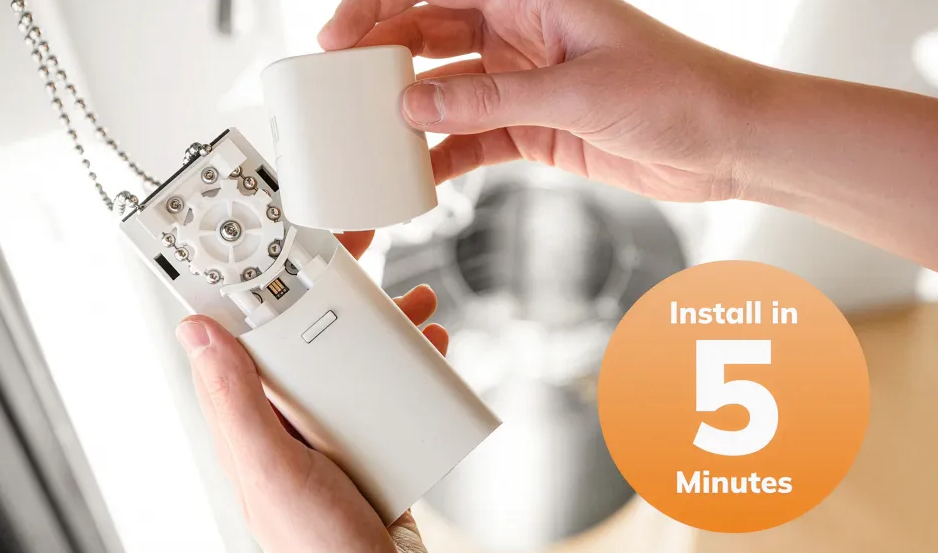
RYSE SmartShade takes a completely different approach. Instead of replacing anything, it’s a small, battery-powered motorized device that clips directly onto your existing shade’s bead chain and does all the pulling for you. The shades you already own – the ones you love, the ones that fit your windows perfectly – get a smart upgrade without being touched.
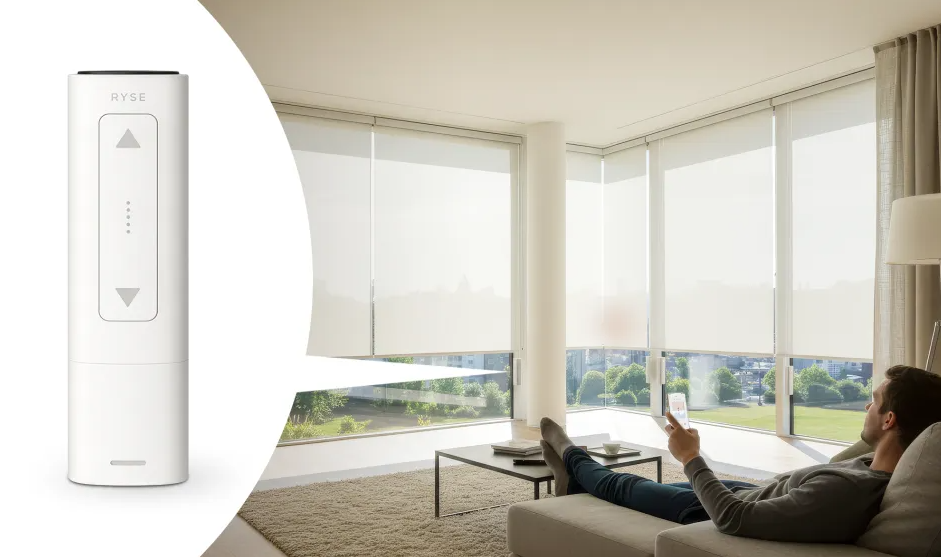
The device itself is compact and sits neatly at the top of your window frame. It has a built-in motor, physical up/down buttons on the unit, Bluetooth connectivity for smartphone control, and compatibility with voice assistants (with the optional SmartBridge hub). The RYSE app is free with no subscription fees, and once it’s set up, you can open and close your shades from anywhere, set schedules, and group multiple shades together.
In simple terms: RYSE turns your dumb shades into smart shades. And it does it in about five minutes. Sondur Travel Cushion Review 2026 – Is This Pain Relief Cushion Worth It?
Why People Are Buying RYSE SmartShade in 2026
People don’t just stumble into buying something like this. Usually there’s a clear reason. From my own experience and the reviews I’ve read across multiple platforms, here are the most common reasons people choose RYSE:
They don’t want to replace perfectly good shades. This is probably the number one reason. A lot of homeowners have custom-fitted, high-quality roller shades or Roman blinds that cost them a lot of money. Throwing those away just to add a motor feels wasteful and expensive. RYSE lets you keep what you have.
They’re renters who can’t make permanent changes. If you’re renting, traditional motorized blinds are a non-starter. You can’t drill into walls, you can’t install permanent fixtures, and even if you could, you’d have to leave them behind when you move. RYSE installs with two small screws and can be removed in under two minutes. You can take it to your next place.
They want smart home features without the contractor bill. Professional smart shade installation typically costs $200–$400 per window in labor alone — on top of the product cost. RYSE eliminates that entirely. The app walks you through installation step by step, and anyone can do it.
They want to wake up to natural light. One of the most popular use cases I’ve seen is scheduling shades to open automatically in the morning. Instead of an alarm blasting you awake, natural sunlight gradually fills the room. It’s a genuinely nicer way to start the day.
They love voice control. “Alexa, close the bedroom shades” is just a satisfying thing to say. With RYSE and the SmartBridge, it works.
My Real Experience With RYSE SmartShade
I want to be upfront about how I tested this. I installed RYSE SmartShades on two windows in my living room and one in my home office. Two of these windows had standard roller shades, and one had Roman blinds. All three used bead chains.
Installation Day
The RYSE website promises installation in under five minutes. I timed myself on the first unit: it took me about 11 minutes, including the time to read the app instructions and fiddle with the chain tension a bit. By the second and third units, I was down to around 6–7 minutes each.
The key thing the instructions hammer on — and they’re right — is to make sure the chain is taut when you install the device. My first attempt had the chain a little loose, which caused a bit of stutter when the motor ran. Once I got the tension right, it operated smoothly and quietly.
The app guide is genuinely helpful. It walks you through each step with clear images, and the process of setting your shade’s top and bottom positions (so the motor knows when to stop) is intuitive. Don’t skip this step — it’s important for preventing the shade from over-running in either direction.
I went with the optional BatteryPack on all three units, which means there are no cords dangling from any of my windowsills. That’s a big quality-of-life upgrade. The cord management on traditional motorized shades is often terrible; with RYSE and the battery pack, everything is clean.
Day-to-Day Use
After about a week of daily use, I had set up the following:
- Morning schedule: All three shades open automatically at 7:15 AM on weekdays
- Evening schedule: Shades close at 7:30 PM in winter (adjustable)
- Voice control: “Alexa, open living room shades” and “Alexa, close office shade” both work reliably
- Remote control: I can check and adjust shades from anywhere through the RYSE app
The voice control, for the record, requires the SmartBridge. I’ll talk more about that in the pricing section, but the short version is: buy the SmartBridge. Without it, you’re limited to Bluetooth range, which means you need to be relatively close to the shade to control it via the app. The SmartBridge connects via ethernet to your router and opens up remote access, voice control, and scheduling.
Noise level is surprisingly good. The specs say 40 decibels, which is roughly whisper-quiet. Running the shade while someone is sleeping in the same room wasn’t an issue. It makes a soft mechanical hum as it operates, but nothing disruptive.
Battery life has been excellent. The company claims up to six months per charge, and based on my usage (two operations per day on each unit), that seems realistic. You charge via USB, and there’s even an option to leave it permanently plugged in if that’s more convenient.
The One Hiccup I Had
During the first week, the chain on my Roman blinds partially jammed. I traced this back to the chain tension issue I mentioned earlier. Once I re-adjusted the installation and pulled the chain taut, the problem went away completely. This isn’t a flaw in the product — it’s a known quirk of retrofit mechanisms. The chain needs to be taut for smooth operation, and the instructions do tell you this. I just didn’t pay close enough attention the first time.
After the correction, all three units have run without any issues.
RYSE SmartShade Key Features – Detailed Breakdown
1. Retrofit Design — Works With Your Existing Shades
This is the core feature and the reason RYSE exists. It’s compatible with virtually any shade or blind that uses a looped, beaded chain — including:
- Roller shades
- Roman shades/blinds
- Chain-pull cellular shades
- Patio blinds
The motor handles shades up to 108 inches wide (9 feet) and up to 10 pounds in weight. That covers the vast majority of residential windows, including large picture windows and oversized blinds.
If your shades use a continuous cord loop or a spring-loaded roller, RYSE won’t work. But if your existing shades use a bead chain — the small ball-chain that you typically pull to raise and lower — you’re good to go.
2. Five-Minute DIY Installation
RYSE uses what they call “snap-in” technology. The device mounts at the top of your window frame using two small screws, and the bead chain feeds directly through the motor mechanism. No rewiring, no drilling into drywall, no scheduling an appointment with an installer.
The RYSE app provides a visual step-by-step installation guide that makes the whole process approachable even if you’ve never installed a smart device before. You set the top and bottom limits through the app, and you’re done.
3. Free App — No Subscription Required
The RYSE app is free to download and free to use. There are no monthly fees, no subscription tiers, and no hidden charges. The app lets you:
- Open and close individual shades on demand
- Group multiple shades together for simultaneous control
- Set daily or weekly schedules
- Check the current position of your shades
- Adjust top and bottom limit positions
The app works on both iOS and Android. It’s not the most beautifully designed app I’ve ever used, but it’s clean, it loads quickly, and it works reliably.
4. Physical Buttons — No Phone Required
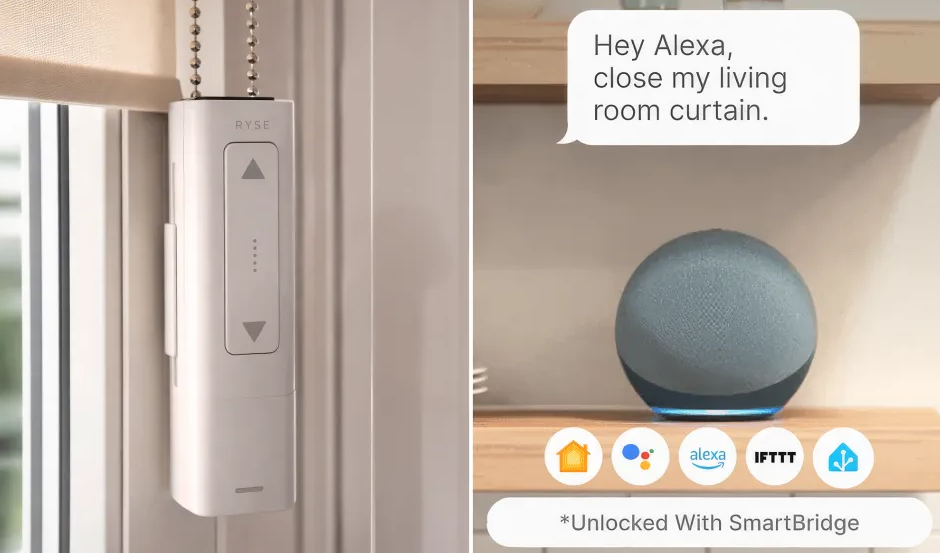
One thing I really appreciate: RYSE has physical up and down buttons directly on the unit. So if your phone dies, your internet goes out, or a guest needs to use the shades without downloading an app, they can just press the button. This sounds small, but smart devices that fail without internet access are genuinely frustrating. RYSE doesn’t have that problem.
5. Voice Control (With SmartBridge)
RYSE works with:
- Amazon Alexa
- Google Home / Google Assistant
- Apple HomeKit (Siri)
Voice control requires the SmartBridge, which I’ll discuss in the pricing section. Once set up, the voice commands work exactly as you’d expect. Simple phrases like “Hey Google, open the bedroom shades” or “Alexa, set the living room shades to 50%” work reliably.
6. Six-Month Battery Life
The optional BatteryPack ($69 per unit) eliminates power cords entirely. It’s rechargeable via USB and lasts up to six months per charge with typical use (a few operations per day). Once a charge, the app notifies you when the battery is getting low.
The base SmartShade unit runs on AC power — meaning there’s a power cord that needs to be plugged into a nearby outlet. If cord management isn’t a concern for you, you can skip the BatteryPack. But in my experience, the cord-free setup looks significantly better.
7. Whisper-Quiet Operation
At 40 decibels, RYSE is genuinely quiet. For context, 40 dB is roughly equivalent to a quiet library or soft rain. You can run it in the early morning without disturbing anyone sleeping nearby.
8. Portable and Renter-Friendly
Because RYSE installs with just two screws and leaves no permanent modifications, it’s ideal for renters. When you move, you unscrew the mount, pack RYSE with your belongings, and reinstall at your new place. Your smart shade investment travels with you.
RYSE SmartShade Pricing – What Does It Actually Cost?
This is where I want to be fully transparent, because the pricing structure has a few layers.
Base Unit: $169 per window
This gets you the SmartShade motor, AC power cord, Bluetooth control via the RYSE app, and the physical buttons on the device. No voice control, no scheduling, no remote access beyond Bluetooth range.
Optional BatteryPack: $69 per window
Eliminates the power cord. Rechargeable via USB. Lasts up to 6 months per charge. I’d consider this a near-essential add-on if you want a clean, cord-free installation.
Optional SmartBridge: $69 (one per household)
Enables voice control (Alexa, Google Home, Apple HomeKit), scheduling, remote access from anywhere, and grouping of up to 10 shades. You only need one per home. I’d call this essentially required if you want the full smart shade experience.
Real-World Cost Per Window
| Setup | Cost Per Window |
|---|---|
| Base unit only (AC powered, Bluetooth only) | $169 |
| Base + BatteryPack (wireless, Bluetooth only) | $238 |
| Base + BatteryPack + SmartBridge* | $307 |
| Base + SmartBridge (corded, with voice/scheduling) | $238 |
SmartBridge is a one-time cost shared across all windows.
So for a fully wireless, voice-controlled setup on one window, you’re looking at roughly $307 for the first window and $238 for each additional window (since you’ve already bought the SmartBridge).
Is that expensive? Compared to custom smart shades, which typically run $800–$1,500 per window installed, RYSE is significantly cheaper. Compared to buying budget off-the-shelf smart shades (which you can find for $100–$200 on Amazon), it’s more expensive per window — but those off-the-shelf options rarely fit as well or look as good as custom shades.
The value proposition is strongest if you already have custom-fitted, high-quality shades that you’d hate to replace.
Current Deal: RYSE is currently offering 40% off through their official website. That’s a meaningful discount, so it’s worth buying direct rather than through third-party retailers.
RYSE SmartShade vs. Alternatives
How does RYSE stack up against other options in 2026?
RYSE SmartShade vs. Lutron Serena
Lutron Serena is a premium smart shade brand with a strong reputation. The shades are beautifully designed and the integration with Lutron’s Caséta ecosystem is excellent. However, Serena requires full replacement of your existing shades and typically costs $400–$700+ per window before installation. If your existing shades are custom-fitted and high quality, Serena’s requirement to replace them entirely is a significant downside. RYSE wins on cost and flexibility for existing shade owners.
RYSE SmartShade vs. IKEA FYRTUR
IKEA FYRTUR is probably the most affordable ready-made smart blind option on the market, often available for under $200 per window. They look decent and integrate with the IKEA Home Smart system. The catch: they only come in limited sizes and colors, and they may not fit windows that need custom dimensions. RYSE is a better choice if your windows have non-standard sizing or if you love the shades you already have.
RYSE SmartShade vs. Soma Smart Shades
Soma Smart Shades is a direct competitor in the retrofit space and probably RYSE’s closest rival. Soma also motorizes existing bead-chain shades and connects to a similar hub. Pricing is comparable. RYSE has better battery life and a slightly more polished installation experience, but it’s worth checking Soma’s current offerings before making a decision. Either could work for you.
RYSE SmartShade vs. Budget Amazon Options
You can find various motorized blind motors on Amazon for $50–$80. These sometimes work, but the app experience is often clunky, compatibility is hit-or-miss, and voice control integration is unreliable or missing entirely. RYSE has patented technology, real customer support, a 30-day return policy, and a 1-year warranty. The peace of mind is worth the extra cost for most buyers.
Pros and Cons – RYSE SmartShade
✅ Pros
- Works with existing shades — no need to throw away custom or well-fitted blinds
- Genuinely fast installation — typically under 15 minutes for most people, no professional needed
- No subscription fees — the app is completely free to use forever
- Voice assistant compatible — works with Alexa, Google Home, and Apple HomeKit (with SmartBridge)
- Long battery life — up to 6 months per charge is exceptional
- Whisper-quiet operation — 40 dB is genuinely quiet enough for early morning use
- Physical buttons on the unit — works even when your phone or internet isn’t available
- Portable — renters can take it when they move
- 30-day money-back guarantee — low financial risk to try
- 1-year warranty — solid coverage for hardware
- Free shipping within the US
- Handles large and heavy shades — up to 108 inches and 10 lbs

❌ Cons
- Only works with bead-chain shades — cord-loop, spring-loaded, or other mechanisms aren’t compatible
- Voice control and scheduling require the SmartBridge — not included in the base price
- Wireless operation requires an extra purchase — the battery pack is $69 per unit, not included
- SmartBridge requires an ethernet connection — no Wi-Fi setup option for the hub, which can be inconvenient depending on your router location
- Costs add up with multiple windows — not the cheapest option if you’re automating an entire home
- Chain tension is critical — if the chain isn’t taut, you may experience stuttering or jamming (user error, but worth knowing)
- App design is functional but not exceptional — it works well, just not the most polished interface
Who Should Buy RYSE SmartShade?
Buy RYSE if you:
- Have existing roller shades, Roman blinds, or chain-pull blinds that you love and don’t want to replace
- Are a renter who wants smart home upgrades you can take with you
- Want voice assistant control of your shades without spending thousands per window
- Like the idea of waking up to natural light on a schedule
- Have large or custom-fitted windows where off-the-shelf smart shades won’t fit
- Want a DIY installation you can do in an afternoon
Who Should Avoid RYSE SmartShade?
Skip RYSE if you:
- Have shades that don’t use a bead chain (check this first before purchasing)
- Are looking for the absolute cheapest motorized blind option (budget Amazon alternatives exist)
- Need a fully featured voice-control setup right out of the box without buying extras
- Have many windows to automate and are working with a very tight budget (the costs accumulate)
- Prefer buying from major retailers like Amazon or Best Buy for return convenience (RYSE is sold primarily direct)
FAQ’s About RYSE SmartShade
What is RYSE SmartShade?
RYSE SmartShade is a small motorized device that clips onto the bead chain of your existing window shades or blinds and automates them. Instead of buying new smart blinds, you keep your current shades and add a motor to them. It connects to a smartphone app and, with an optional hub called the SmartBridge, works with Alexa, Google Home, and Apple HomeKit for voice control.
Is RYSE SmartShade worth buying?
Yes, for most people — especially if you have custom-fitted shades you don’t want to replace, or if you’re a renter who needs a portable upgrade. At around $199.99 per unit (plus optional battery pack and hub), it’s significantly cheaper than custom smart shades, which typically cost $800 to $1,500 per window. The installation is genuinely easy, and the smart features work well once everything is set up.
How much does RYSE SmartShade cost?
The base unit costs $169 per window. The optional BatteryPack (to make it fully wireless) is $69 per window. The SmartBridge (required for voice control and advanced scheduling) is $69 and you only need one per home. So, for a fully wireless, voice-controlled setup on one window, you’re looking at around $307. Each additional window costs about $238 after the SmartBridge is already purchased.
Is RYSE SmartShade legit?
Yes. RYSE is a real company with patented technology that has been covered by CNET, TechCrunch, CBS, and FOX. They have over 60,000 customers, offer a 30-day money-back guarantee, and a 1-year product warranty. Independent tech publications like TechHive have also reviewed the product and confirmed it works as advertised. It’s a legitimate product from a real company.
RYSE SmartShade reviews consumer reports — what are customers saying?
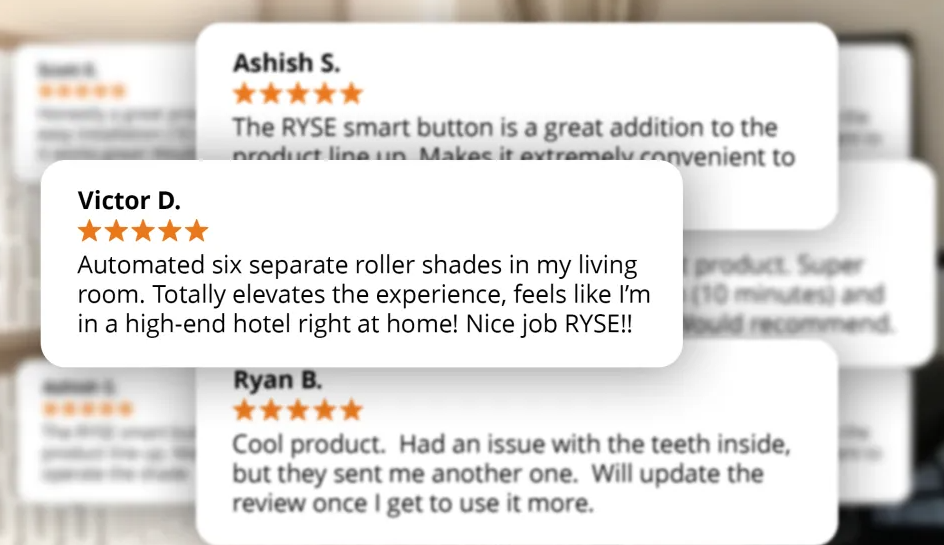
Customer feedback is generally positive, particularly around ease of installation and the quality of the motor. Most users are impressed that setup really does take under 15 minutes. The most common complaint is the cost of add-ons — specifically needing to buy the SmartBridge and BatteryPack separately to get the full experience. Some users note the chain tension setup requires care, but after that initial setup, the majority report smooth, reliable operation. The product has satisfied over 60,000 customers as of 2026.
Does RYSE SmartShade work with Alexa?
Yes, RYSE SmartShade works with Amazon Alexa — but only if you also purchase the RYSE SmartBridge ($69). The SmartBridge connects via ethernet to your router and enables voice control through Alexa, Google Home, and Apple HomeKit. Without it, the SmartShade only has Bluetooth control via the RYSE app.
Does RYSE SmartShade work with Google Home?
Yes. Like Alexa integration, Google Home compatibility requires the SmartBridge. Once set up, you can use commands like “Hey Google, open the living room shades” or “Hey Google, set the bedroom shades to 50%.”
Is RYSE SmartShade good for renters?
It’s one of the best smart shade options for renters specifically because it’s portable. It installs with two small screws and can be completely removed in under two minutes. When you move to a new apartment or house, you take RYSE with you and reinstall it on your new shades. You’re not leaving behind a $300 smart home investment every time you move.
What shades are compatible with RYSE SmartShade?
RYSE works with any shade or blind that uses a looped bead chain. This includes roller shades, Roman shades, chain-pull cellular shades, and patio blinds. The motor handles shades up to 108 inches wide (9 feet) and up to 10 pounds in weight. It does NOT work with cord-loop shades, spring-loaded rollers, or motorized shades that don’t have a bead chain.
How long does the RYSE SmartShade battery last?
With the optional BatteryPack ($69 per unit), the battery lasts up to six months per charge under typical use (a few open/close cycles per day). You charge it via USB. The app notifies you when the battery is getting low so you’re never caught off guard. If you prefer, you can also leave it permanently plugged in via the USB charger.
How hard is it to install RYSE SmartShade?
It’s genuinely easy. The RYSE app provides a step-by-step visual guide, and most people complete the installation in under 15 minutes. You’ll need a screwdriver to mount the bracket (two screws), and you’ll need to thread the bead chain through the motor mechanism and set the top and bottom limits through the app. The one thing to be careful about is making sure the chain is pulled taut — a loose chain can cause stuttering.
Is there a monthly fee for RYSE SmartShade?
No. The RYSE app is completely free with no subscription fees or monthly charges. You pay for the hardware, and that’s it. All app features — remote control, scheduling, grouping — are included at no additional cost.
Can RYSE SmartShade work without WiFi?
Yes, partially. The SmartShade has physical buttons on the unit itself, so you can always open and close your shades manually even without any internet connection. Bluetooth control via the app works within Bluetooth range without WiFi. Full smart features (voice control, remote access, scheduling) do require the SmartBridge and an internet connection.
What is the best alternative to RYSE SmartShade?
The closest competitor in the same retrofit category is Soma Smart Shades, which also motorizes existing bead-chain blinds. For those willing to replace their existing shades, Lutron Serena is a premium option with excellent smart home integration. For budget buyers, IKEA FYRTUR is the most affordable ready-made smart blind, though it only comes in standard sizes.
Is RYSE SmartShade a good gift for a smart home lover?
Yes, honestly. It’s one of those products that feels genuinely clever and useful — not just another gadget. The “wow, I can’t believe this was so easy” reaction when someone first uses voice control to open their shades is pretty satisfying. It’s a particularly great gift for homeowners or renters who’ve been curious about smart home automation but haven’t taken the plunge.
Final Verdict – RYSE SmartShade Review 2026
After weeks of real-world use across three windows in my home, I can say without hesitation that RYSE SmartShade delivers on its core promise. It turns ordinary bead-chain shades into smart, motorized, voice-controlled window coverings without requiring you to replace anything, hire anyone, or spend thousands of dollars.
The installation experience is genuinely straightforward. The motor is quiet, reliable, and powerful enough to handle full-sized shades. The app is functional and free. Voice control with Alexa and Google Home works well with the SmartBridge. Battery life is excellent. And the fact that it’s portable makes it a rare smart home investment that actually follows you when you move.
The main caveats are honest ones: you’ll want the BatteryPack for a clean cord-free look, and you’ll want the SmartBridge for the full smart home experience. Both are add-on costs you need to factor in upfront. And if your shades don’t use bead chains, RYSE simply won’t work for you — that’s a non-negotiable compatibility requirement.
But if your shades are compatible? RYSE SmartShade is one of the most sensible smart home purchases you can make in 2026. It’s practical, it’s clever, and it genuinely makes daily life a little more comfortable. That’s what good technology is supposed to do.
Ready to Try RYSE SmartShade?
RYSE is currently available directly through their official website with 40% off and free shipping for US orders. They offer a 30-day money-back guarantee, so you can try it risk-free. If it doesn’t work for your shades, you can return it – no drama.
If you’re on the fence, my honest advice is this: check whether your existing shades use a bead chain. If they do, there’s a very good chance RYSE will work, and there’s a good chance you’ll love it.