

Are you tired of high energy bills and uncomfortable home temperatures? You’re not alone. The average American household spends over $900 annually on heating and cooling, and traditional thermostats waste up to 30% of that energy.
Smart thermostats have revolutionized home climate control by learning your preferences, adapting to your schedule, and cutting energy costs by up to 23%. But with so many options available, choosing between top brands like Google Nest, Ecobee, and Wyze can feel overwhelming.
In this comprehensive guide, we’ll compare the three most popular smart thermostat brands in 2026. You’ll discover which device offers the best features for your needs, budget, and home setup. Whether you’re looking for advanced automation, budget-friendly options, or seamless smart home integration, we’ve got you covered.
By the end of this article, you’ll know exactly which smart thermostat deserves a spot on your wall.
What Is a Smart Thermostat and Why Do You Need One?
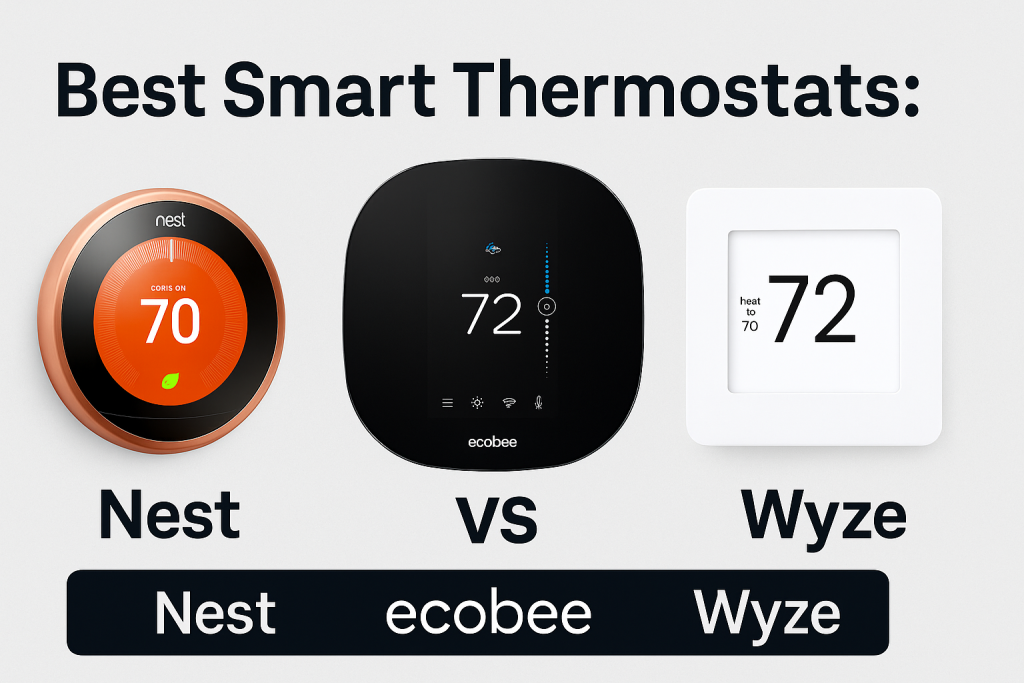
A smart thermostat is a WiFi-enabled device that controls your home’s heating and cooling system while offering intelligent features like remote access, learning capabilities, and energy usage reports.
Key Benefits of Smart Thermostats
Smart thermostats offer several advantages over traditional programmable thermostats:
- Energy Savings: Reduce heating and cooling costs by 10-23% annually
- Remote Control: Adjust temperature from anywhere using your smartphone
- Learning Capabilities: Automatically adapt to your schedule and preferences
- Smart Home Integration: Work with Alexa, Google Assistant, Apple HomeKit, and more
- Usage Reports: Track energy consumption and identify savings opportunities
- Maintenance Alerts: Receive notifications for filter changes and system issues
How Smart Thermostats Save Money
Smart thermostats optimize your HVAC system’s performance through features like geofencing, which detects when you leave home and adjusts temperatures accordingly. They also provide detailed energy reports showing exactly where you can cut costs.
According to Energy Star, households that properly use programmable thermostats can save approximately $180 annually. Smart thermostats amplify these savings through automation and intelligent learning.
Google Nest Thermostat: Premium Features and Sleek Design
Google Nest offers three main thermostat models: the Nest Learning Thermostat (4th Gen), Nest Thermostat, and the budget-friendly Nest Thermostat (2020).
Nest Learning Thermostat (4th Gen) Features
The flagship Nest Learning Thermostat represents the premium tier of smart home climate control.
Key Features:
- Auto-learning technology that programs itself within one week
- Farsight display that lights up when you enter the room
- Works with 95% of heating and cooling systems
- Metal design with multiple color options
- Built-in motion sensor and humidity sensor
- Energy history and usage reports
- Compatible with Google Assistant, Alexa, and IFTTT
Nest Thermostat (Budget Model)
The 2020 Nest Thermostat offers essential smart features at a more accessible price point.
What You Get:
- Simplified interface with touch-sensitive controls
- Energy-saving scheduling features
- HVAC system monitoring
- Compatible with most 24V systems
- Requires C-wire for installation
- Works with Google Home ecosystem
Pros and Cons of Nest Thermostats
Advantages:
- Intuitive user interface and attractive design
- Excellent learning algorithm
- Strong Google Home integration
- Reliable performance and build quality
- Professional installation available through Nest
Disadvantages:
- Higher price point compared to competitors
- Limited third-party integrations
- C-wire often required for installation
- No remote sensors included with base model
Nest Thermostat Pricing
- Nest Learning Thermostat (4th Gen): $249-$279
- Nest Thermostat (2020): $129-$149
- Professional installation: $100-$200 additional
Ecobee Smart Thermostat: Room Sensors and Advanced Control
Ecobee has built a reputation for offering professional-grade features with exceptional value, particularly through their room sensor technology.
Ecobee SmartThermostat Premium Features
The Ecobee SmartThermostat Premium is the company’s flagship model with comprehensive smart home capabilities.
Core Features:
- SmartSensor included for multi-room temperature monitoring
- Built-in air quality monitor measures VOCs and CO2
- Integrated Alexa voice assistant with speaker
- Supports up to 32 additional SmartSensors
- Advanced scheduling and occupancy detection
- Compatible with HomeKit, Alexa, Google Assistant, and SmartThings
- Intuitive touchscreen display
Ecobee3 Lite: Budget-Friendly Option
The Ecobee3 Lite delivers core smart thermostat functionality without premium features.
What’s Included:
- Basic scheduling and remote control
- Compatible with room sensors (sold separately)
- Works with major smart home platforms
- Energy reports and insights
- Straightforward installation process
Understanding Ecobee’s Room Sensor Technology
Ecobee’s standout feature is the SmartSensor system, which monitors temperature and occupancy in multiple rooms. This solves the common problem of uneven heating and cooling throughout your home.
The sensors communicate with the main thermostat to average temperatures across rooms or prioritize specific areas based on occupancy. This ensures comfort where it matters most while avoiding energy waste in empty rooms.
Pros and Cons of Ecobee Thermostats
Advantages:
- Excellent room sensor system
- Strong third-party integration support
- Built-in Alexa voice control
- Comprehensive scheduling options
- Great value for features offered
Disadvantages:
- Interface can feel cluttered for some users
- Occasional connectivity issues reported
- Learning features less sophisticated than Nest
- Premium model is relatively expensive
Ecobee Thermostat Pricing
- Ecobee SmartThermostat Premium: $219-$249
- Ecobee SmartThermostat Enhanced: $189-$209
- Ecobee3 Lite: $149-$169
- Additional SmartSensors: $79 for 2-pack
Wyze Thermostat: Best Budget Smart Thermostat
Wyze has disrupted the smart home market with incredibly affordable products, and their thermostat continues this tradition.
Wyze Thermostat Features
Despite its budget price, the Wyze Thermostat includes impressive features.
What You Get:
- Seven-day scheduling with multiple periods
- Geofencing for automatic temperature adjustments
- Energy usage reports with cost estimates
- Compatible with Alexa and Google Assistant
- Mobile app control from anywhere
- Auto-comfort feature learns your preferences
- Includes C-wire adapter in the box
Wyze Installation and Compatibility
One of Wyze’s biggest advantages is the included C-wire adapter, eliminating a common installation headache. The thermostat works with most 24V HVAC systems including:
- Gas, oil, and electric furnaces
- Central air conditioning
- Heat pumps (with auxiliary heat)
- Boilers and radiant heating systems
Pros and Cons of Wyze Thermostat
Advantages:
- Extremely affordable pricing
- C-wire adapter included
- Simple, straightforward interface
- Good energy-saving features
- No subscription required
Disadvantages:
- No room sensor support
- Limited smart home integration
- Plastic construction feels less premium
- Smaller display than competitors
- No humidity sensor
Wyze Thermostat Pricing
- Wyze Thermostat: $59-$69
- No additional sensors or accessories available
- DIY installation (professional installation not offered by Wyze)
Head-to-Head Comparison: Nest vs Ecobee vs Wyze
Feature Comparison Table
| Feature | Nest Learning | Nest Budget | Ecobee Premium | Ecobee3 Lite | Wyze |
|---|---|---|---|---|---|
| Price | $249-279 | $129-149 | $219-249 | $149-169 | $59-69 |
| Auto-Learning | Yes | Limited | Limited | No | Limited |
| Room Sensors | Optional | Optional | Included | Optional | No |
| Voice Assistant | Alexa | None | None | ||
| Display Type | LCD Color | LCD Color | Touchscreen | Basic LCD | LCD Color |
| Smart Home | Good | Good | Excellent | Good | Basic |
| C-Wire Adapter | No | No | No | No | Yes |
| Energy Reports | Yes | Yes | Yes | Yes | Yes |
| Geofencing | Yes | Yes | Yes | Yes | Yes |
Installation Complexity Comparison
Easiest to Install: Wyze Thermostat (includes C-wire adapter and clear instructions)
Moderate Difficulty: Ecobee models (straightforward but may require C-wire)
Most Complex: Nest thermostats (often require professional installation for C-wire)
Smart Home Ecosystem Compatibility
Google Home Users: Nest thermostats offer seamless integration with Google Assistant and other Google smart home devices.
Amazon Alexa Users: Ecobee Premium includes built-in Alexa, making it ideal for Amazon ecosystem users.
Apple HomeKit Users: Ecobee provides native HomeKit support, while Nest requires third-party bridges.
Multi-Platform Users: Ecobee offers the broadest compatibility across different smart home platforms.
Energy Savings Potential
All three brands can deliver significant energy savings, but the method differs:
Nest relies on machine learning to automatically optimize your schedule based on behavior patterns.
Ecobee uses room sensors to ensure balanced temperature distribution and avoid heating or cooling empty spaces.
Wyze provides geofencing and scheduling tools but requires more manual configuration for optimal savings.
Which Smart Thermostat Is Right for You?
Choose Nest Learning Thermostat If You Want:
- Premium design and build quality
- Hands-off automation that learns your preferences
- Seamless Google Home integration
- The most intuitive user experience
- Professional installation support
Best For: Google ecosystem users, homeowners who value design, those seeking true set-it-and-forget-it automation.
Choose Ecobee SmartThermostat If You Want:
- Room sensor technology for balanced comfort
- Built-in Alexa voice control
- Comprehensive smart home compatibility
- Professional-grade features
- Air quality monitoring
Best For: Homes with temperature inconsistencies, Apple HomeKit users, multi-platform smart home setups, voice control enthusiasts.
Choose Wyze Thermostat If You Want:
- Maximum value for money
- Simple, straightforward features
- Included C-wire adapter
- Easy DIY installation
- No subscription fees
Best For: Budget-conscious buyers, renters, first-time smart thermostat users, those with simple HVAC systems.
Smart Thermostat Installation Guide
Before You Start
Before installing any smart thermostat, take these preparatory steps:
- Check your HVAC system compatibility using the manufacturer’s online tool
- Take a photo of your existing thermostat wiring
- Turn off power to your HVAC system at the breaker
- Gather tools: screwdriver, wire labels, level
- Ensure WiFi coverage in your thermostat location
Do You Need a C-Wire?
The C-wire (common wire) provides continuous power to smart thermostats. Most modern HVAC systems include this wire, but older homes may not.
Solutions if you don’t have a C-wire:
- Use Wyze Thermostat (includes adapter)
- Purchase a separate C-wire adapter ($20-40)
- Run a new wire from your HVAC system
- Hire a professional installer
DIY vs Professional Installation
DIY Installation works well if you’re comfortable with basic electrical work and your system has standard wiring. Budget 1-2 hours for installation.
Professional Installation is recommended if you have complex wiring, lack a C-wire, or want warranty protection. Cost ranges from $100-200.
Most manufacturers offer online installation guides and phone support to help with DIY installation.
Maximizing Your Smart Thermostat’s Energy Savings
Optimization Tips for All Brands
To get the most energy savings from your smart thermostat:
Set Seasonal Schedules: Program different temperatures for heating and cooling seasons. The Department of Energy recommends 68°F for heating and 78°F for cooling.
Use Geofencing: Enable location-based automation to adjust temperatures when you leave and return home.
Review Energy Reports: Check monthly reports to identify usage patterns and savings opportunities.
Maintain Temperature Setbacks: Allow at least 7-10 degree differences between home and away temperatures for maximum savings.
Replace HVAC Filters Regularly: Dirty filters reduce efficiency and increase energy consumption.
Advanced Automation Strategies
Create Comfort Profiles: Set different temperature preferences for various activities like sleeping, working from home, or entertaining.
Integrate with Other Smart Devices: Connect your thermostat with smart blinds, ceiling fans, and window sensors for enhanced efficiency.
Use Vacation Mode: When away for extended periods, set aggressive temperature setbacks to minimize energy waste.
Monitor Real-Time Adjustments: Pay attention to how often your system runs and adjust schedules accordingly.
Common Smart Thermostat Problems and Solutions
Connectivity Issues
If your smart thermostat loses WiFi connection:
- Check router signal strength at thermostat location
- Restart your router and thermostat
- Move router closer or add a WiFi extender
- Update thermostat firmware
- Check for interference from other devices
Incorrect Temperature Readings
For inaccurate temperature displays:
- Ensure thermostat isn’t in direct sunlight
- Keep thermostat away from drafts and heat sources
- Add room sensors for more accurate readings
- Calibrate temperature offset in settings
- Check for air leaks around thermostat mounting
HVAC System Not Responding
When your heating or cooling doesn’t activate:
- Verify power at the breaker
- Check all wire connections
- Ensure HVAC system itself is functioning
- Review thermostat settings and schedules
- Contact professional if wiring issues suspected
Smart Thermostat Rebates and Incentives
Utility Company Rebates
Many utility companies offer rebates for installing Energy Star certified smart thermostats. Typical rebates range from $50-100.
How to Find Rebates:
- Check your utility company’s website
- Visit EnergyStar.gov’s rebate finder
- Ask during thermostat purchase
- Review local energy efficiency programs
Tax Credits and Incentives
Under the Inflation Reduction Act, homeowners may qualify for tax credits when installing energy-efficient HVAC equipment. While smart thermostats alone typically don’t qualify, they may be part of a larger home energy upgrade.
Manufacturer Promotions
Watch for seasonal sales and promotions:
- Black Friday and Cyber Monday deals
- Spring and fall HVAC season sales
- Bundle discounts with other smart home devices
- Utility partnership programs
The Future of Smart Thermostats
Emerging Technologies
The smart thermostat market continues evolving with new features:
AI-Powered Optimization: Advanced machine learning that predicts weather impacts and adjusts heating/cooling preemptively.
Enhanced Air Quality Monitoring: More sophisticated sensors detecting pollutants, allergens, and humidity levels.
Predictive Maintenance: Systems that diagnose HVAC problems before they cause failures.
Demand Response Integration: Automatic participation in utility grid balancing programs for additional savings and incentives.
Industry Trends
Smart thermostat manufacturers are focusing on:
- Improved interoperability between brands
- Matter protocol support for universal compatibility
- Sustainability features highlighting carbon footprint reduction
- Integration with renewable energy systems like solar panels
- Enhanced privacy and data security measures
Conclusion: Making Your Smart Thermostat Decision
Choosing between Nest, Ecobee, and Wyze ultimately depends on your priorities, budget, and smart home ecosystem.
Google Nest excels at automated learning and offers the most refined user experience, making it ideal for those who want premium features and hands-off operation.
Ecobee provides the best balance of features and value, especially for homes needing room sensors and broad smart home compatibility.
Wyze delivers exceptional value for budget-conscious buyers who want smart features without premium pricing.
All three brands can significantly reduce your energy bills while improving home comfort. The key is matching the thermostat’s strengths to your specific needs.
Ready to start saving on your energy bills? Choose the smart thermostat that fits your home, install it properly, and optimize your settings. Your wallet and the environment will thank you.
Take Action Today: Use your utility company’s compatibility checker, explore available rebates, and make the switch to intelligent climate control.
FAQs About Best Smart Thermostats
Can smart thermostats work without WiFi?
Yes, smart thermostats can control your HVAC system without WiFi, but you’ll lose remote access, automatic updates, energy reports, and smart home integrations. Basic scheduling and temperature control will still function. For occasional WiFi outages, your programmed schedule continues running normally.
How long does it take for a smart thermostat to pay for itself?
Most smart thermostats pay for themselves within 2-3 years through energy savings. If you save 15% on annual heating and cooling costs of $900, that’s $135 saved per year. A $180 thermostat would pay for itself in approximately 16 months, while a $250 model would break even in about 22 months.
Will a smart thermostat work with my old HVAC system?
Smart thermostats work with most systems made after 2000, including gas furnaces, electric heat, central air, and heat pumps. Systems requiring special compatibility include millivolt systems, proprietary systems, and some high-voltage equipment. Always check the manufacturer’s compatibility checker before purchasing.
Do smart thermostats need batteries, and how often should they be replaced?
Most smart thermostats receive power through your HVAC wiring (C-wire) and don’t need battery replacements. Some models include backup batteries that last 5-10 years. Battery-powered models like some Nest versions require AA batteries changed every 1-2 years, but you’ll receive low battery alerts well in advance.
Can I install multiple smart thermostats in a large home with zoned heating?
Yes, homes with zoned HVAC systems can install a separate smart thermostat for each zone. This allows independent control of different areas. Most manufacturers support multi-thermostat setups, though you may need professional installation to ensure proper configuration. Ecobee offers particularly good multi-zone support with its sensor system working across multiple thermostats.