
Coming home with arms full of groceries and fumbling for your keys is frustrating. Worrying about whether you locked the front door after leaving for work is stressful. These everyday problems explain why smart door locks have become essential home security devices in 2026.
Smart locks offer keyless entry through fingerprints, smartphone apps, PIN codes, or voice commands. They provide remote access control, activity tracking, and seamless integration with smart home systems. But with dozens of brands competing for attention, choosing the right smart lock can feel overwhelming.
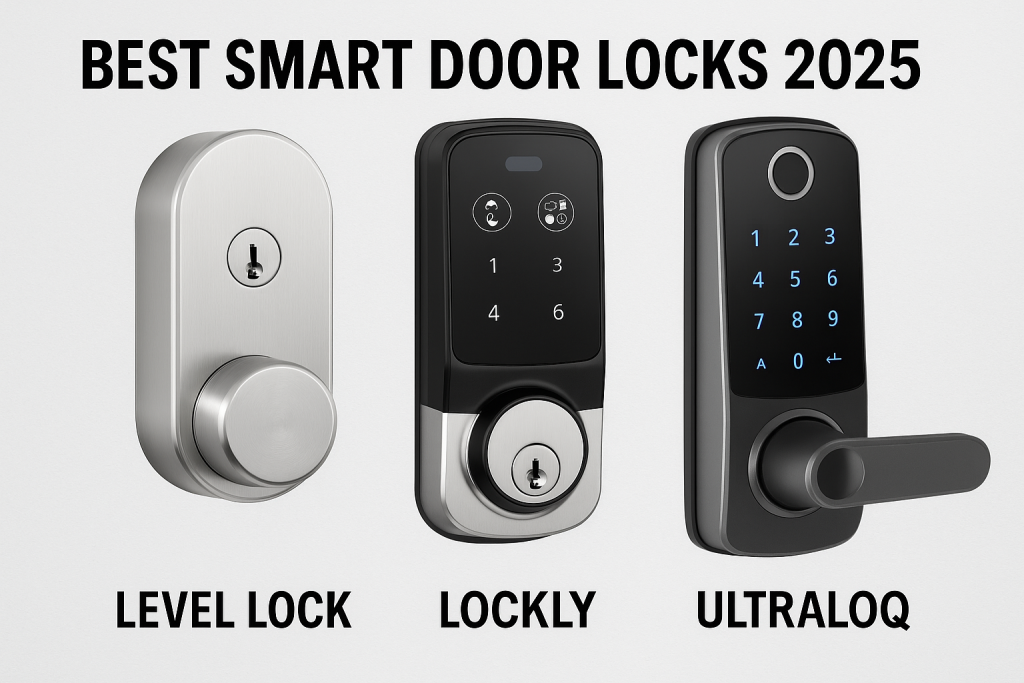
This comprehensive guide compares three leading smart lock brands: Level Lock, Lockly, and Ultraloq. We’ll examine their features, security capabilities, pricing, installation requirements, and real-world performance. By the end, you’ll know exactly which smart lock fits your home security needs and budget.
What You’ll Learn:
- Detailed feature comparisons between Level, Lockly, and Ultraloq
- Security ratings and encryption standards
- Installation difficulty and compatibility
- Pricing analysis and value for money
- Smart home integration options
- Battery life and maintenance requirements
- Real user experiences and expert recommendations
Let’s dive into the smart lock revolution and find your perfect match.
Understanding Smart Door Locks: The Basics
What Is a Smart Door Lock?
A smart door lock replaces or retrofits your traditional deadbolt with electronic locking mechanisms controlled through wireless technology. Instead of metal keys, you unlock your door using digital credentials like fingerprints, smartphone apps, PIN codes, or NFC tags.
Modern smart locks connect to your home WiFi network or use Bluetooth connectivity. This connection enables remote access, real-time notifications, and integration with platforms like Apple Home, Google Home, and Amazon Alexa.
How Smart Locks Improve Home Security
Smart locks enhance security in several ways:
Access Control: Generate temporary codes for guests, service providers, or delivery personnel. Revoke access instantly when no longer needed.
Activity Monitoring: Track who enters and exits your home with timestamped entry logs. Know exactly when your kids arrive home from school or when the dog walker visits.
Remote Management: Lock or unlock your door from anywhere using your smartphone. Let in a family member who forgot their key while you’re at work.
No Hidden Keys: Eliminate risky hiding spots under doormats or fake rocks. Digital keys can’t be copied at the hardware store.
Integration Benefits: Connect with video doorbells to see visitors before granting access. Create automation routines that trigger lights or adjust thermostats when you arrive home.
Key Features to Consider
When comparing smart locks, evaluate these essential features:
- Entry Methods: Fingerprint, keypad, smartphone app, voice control, physical key backup
- Connectivity: WiFi, Bluetooth, Matter over Thread, Z-Wave, Zigbee
- Smart Home Compatibility: Apple Home, Google Home, Amazon Alexa, SmartThings
- Security Rating: ANSI/BHMA Grade certification (Grade 1 is highest)
- Battery Life: Duration between battery replacements
- Installation: DIY-friendly or professional installation required
- Weatherproofing: IP rating for outdoor use
- Access Codes: Maximum number of users and codes supported
Level Lock: The Invisible Smart Lock Revolution
Overview and Design Philosophy
Level Lock takes a radically different approach to smart lock design. While most smart locks add bulky hardware to your door’s exterior and interior, Level Lock hides entirely inside your door’s existing deadbolt space.
The Level Lock Pro represents the company’s flagship model for 2026. It measures 62% smaller than traditional smart locks and maintains your door’s original aesthetic. From the outside, your door looks exactly as it did before—just a standard deadbolt in brushed nickel or matte black finish.
This invisible design appeals to homeowners who prioritize minimalist aesthetics and don’t want technology announcing itself on their front door.
Level Lock Pro Features and Technology
Advanced Hardware Platform:
- Dual-core microprocessor for faster response times
- Precision-geared motor drive train (smallest ever used in smart locks)
- Engineered sound design for quiet operation
- 10 distinct electro-mechanical patents
Smart Connectivity:
- Matter over Thread protocol for reliable connection
- Bluetooth 4.0 and 5.0 support
- Near-instantaneous response times
- Works with Apple Home, Google Home, Alexa, SmartThings
Apple Home Key Integration: Level Lock Pro offers exceptional Apple Home Key support. Simply tap your iPhone (XS or later) or Apple Watch (Series 4 or later) against the lock to enter. The lock’s advanced sensors detect your approach, making entry feel effortless.
Door Status Detection: Integrated sensors invisibly monitor whether your door is open, closed, or ajar. This feature is exclusive to Level Lock Pro and provides ultimate confidence that your home is secure.
Installation and Setup
Level Lock Pro installs exactly like a standard deadbolt. Unlike retrofit smart locks that attach over existing hardware, you completely remove your old deadbolt and install the Level Lock in its place.
Installation Time: 10-15 minutes
Tools Required: Phillips screwdriver
Technical Requirements:
- Standard 2.125″ bore hole diameter
- Door thickness: 1.75″ – 2″
- Backset lengths: 2.375″ or 2.75″
The installation process is straightforward enough for most homeowners to complete independently. Level provides detailed instructions and the Level Home app guides you through setup.
Battery Life and Maintenance
Level Lock Pro uses CR2 batteries hidden inside the lock mechanism. Battery life typically exceeds one year under normal use conditions. The lock alerts you through the app when battery levels run low.
Important Note: Door alignment significantly affects battery performance. If your door rubs against the frame or doesn’t close smoothly, the motor works harder and drains batteries faster. Always ensure proper door alignment before installation.
Pricing and Value Proposition
Level Lock Pro: $349
Additional Accessories:
- Level Connect WiFi Bridge: Adds remote access and real-time notifications
- Level Keypad: Enables PIN code entry for family members who prefer traditional methods
- NFC Touch-to-Unlock Accessories: Additional unlock options
The Level Lock Pro represents premium pricing in the smart lock market. You’re paying for minimalist design, Apple ecosystem integration, and cutting-edge technology that fits invisibly inside your door.
Pros and Cons
Strengths:
- Completely invisible design maintains door aesthetics
- Exceptional Apple Home Key performance
- Premium build quality with precision engineering
- Smallest footprint in the smart lock industry
- Matter over Thread for reliable connectivity
- Door status detection (Lock Pro exclusive)
Limitations:
- Premium pricing ($349)
- Best suited for Apple ecosystem users
- No built-in keypad (requires separate purchase)
- No fingerprint reader option
- Battery life affected by door alignment issues
- Limited appeal for Android users
Who Should Choose Level Lock?
Level Lock Pro is ideal for:
- Apple Home users who want seamless integration
- Homeowners prioritizing minimalist aesthetics
- Tech enthusiasts who appreciate invisible technology
- People wanting their door to look traditional from outside
- Those willing to pay premium prices for premium design
Not Recommended For:
- Android users seeking full feature access
- Budget-conscious shoppers
- People wanting built-in keypads or fingerprint readers
- Renters (requires full deadbolt replacement)
Lockly: Security-First Smart Locks with Advanced Features
Overview and Security Philosophy
Lockly positions itself as the security-focused smart lock brand. Founded with cybersecurity in mind, Lockly incorporates patented anti-hacking features that distinguish it from competitors.
The brand’s signature feature is the PIN Genie keypad—a unique touchscreen where numbers randomly shuffle after every use. This prevents observers from memorizing your code by watching which buttons you press or identifying worn fingerprints on specific numbers.
Lockly Secure Pro 2025: Flagship Model
The Lockly Secure Pro represents the company’s most advanced offering for 2026. This latest version includes significant upgrades over previous models.
Core Features:
Built-in WiFi: Unlike earlier Lockly models requiring a separate bridge, the 2025 Secure Pro includes WiFi connectivity. This enables 98% faster remote access compared to previous versions.
New-Generation Fingerprint Scanner:
- 0.2-second recognition speed (upgraded from 0.3 seconds)
- 3D biometric sensor with AI learning
- Stores up to 99 fingerprints
- 99.9% accuracy rate
- Improves recognition over time through machine learning
PIN Genie Keypad:
- Numbers randomly shuffle after each use
- Four virtual buttons with three numbers per button
- Creates 6-8 digit codes
- Supports up to 49 unique PIN codes
- Anti-peep technology prevents code guessing
Smart Connectivity:
- Built-in WiFi (no hub required)
- Compatible with Alexa and Google Assistant
- Smartphone app control (iOS and Android)
- QR code unlocking capability
- Voice command support
Access Management:
- Create permanent codes for family members
- Generate temporary codes for guests
- Set recurring codes for regular visitors (dog walkers, cleaners)
- Up to 3 free offline access codes per month
- Activity log tracking with video recording (Vision models)
Lockly Product Line Overview
Lockly offers several models catering to different needs:
Secure Pro 2025: $299 (with $50 instant discount often available)
- Built-in WiFi, fingerprint + keypad + app + voice + keys
- Best for comprehensive access options
Secure Plus: $179-199
- Bluetooth connectivity (WiFi bridge sold separately)
- Fingerprint + keypad + app + keys
- Budget-friendly option without WiFi
Vision Elite: $399+
- Includes HD video camera with night vision
- Two-way audio intercom
- Motion detection and recording
- Solar charging capability
- Complete video doorbell + smart lock combination
Vision Zeno Series:
- Apple Home Key compatible
- 2K video camera
- Tap-to-unlock with iPhone/Apple Watch
- Premium video smart lock option
Installation Process
Lockly locks are designed for DIY installation but require more time than simpler models.
Installation Time: 30-45 minutes
Complexity: Moderate
Tools Required: Phillips screwdriver
Some users report that screw holes don’t always align perfectly with standard doors, requiring minor adjustments. The lock’s exterior assembly is noticeably larger than competitors, which may look bulky on modern, minimalist doors.
Battery Performance
Lockly Secure Pro operates on 4 AA batteries.
Expected Battery Life: 8 months with normal use
Low Battery Alerts: Tri-color LED indicator flashes red with three beeps when battery is low. App notifications provide advance warning.
The touchscreen display and WiFi connectivity consume more power than basic smart locks. However, battery performance remains reasonable for typical household use.
Security Features and Certifications
Lockly emphasizes security across all products:
Physical Security:
- Tested to withstand over 1 million uses
- Commercial-grade durability standards
- Tamper-resistant construction
Digital Security:
- Bank-level encryption for data transmission
- Secure cloud-based access management
- PIN Genie technology prevents code theft
- Regular firmware security updates
Certifications:
- Meets industry-standard security requirements
- Compliant with smart home security protocols
Pricing and Value Analysis
Secure Pro 2025: $299 (often $249 with promotions)
Additional Features Included:
- Touchscreen protective cover (new for 2025)
- Built-in WiFi (no extra bridge needed)
- Wired door sensor
- Comprehensive warranty coverage
Optional Subscription:
- LocklyOS Premium: Unlocks advanced features
- Manage multiple properties
- Additional offline access codes
- Enhanced profile management
The pricing positions Lockly in the mid-to-premium range, offering substantial features for the investment.
Pros and Cons
Strengths:
- Unique PIN Genie security prevents code guessing
- Fast 0.2-second fingerprint recognition
- Built-in WiFi eliminates hub purchase
- Extensive access options (7+ ways to unlock)
- Detailed activity logging
- Vision models combine doorbell + lock
- 5-year mechanical warranty
Limitations:
- Bulkier exterior design than competitors
- Installation slightly more complex
- Touchscreen can be sensitive to weather extremes
- Limited Apple Home integration (Vision Zeno only)
- Shorter battery life than some competitors
- Subscription required for advanced features
Who Should Choose Lockly?
Lockly is perfect for:
- Security-conscious homeowners
- Rental property owners managing Airbnb/VRBO
- Families wanting multiple access methods
- People concerned about code security
- Those managing frequent guest access
- Homeowners wanting video doorbell integration (Vision models)
Not Recommended For:
- Minimalist design enthusiasts
- Apple Home Key priority users (except Zeno)
- Those wanting smallest possible footprint
- Budget-focused buyers
Ultraloq: The Versatile All-Around Smart Lock
Overview and Market Position
Ultraloq has established itself as the versatile middle-ground option in smart lock markets. The company pioneered biometric smart locks in 2016 with the world’s first fingerprint scanner integration.
With over 1 million customers in the United States, Ultraloq balances features, security, and affordability. The brand offers extensive smart home compatibility across both Apple and Android ecosystems.
Ultraloq U-Bolt Pro WiFi: Popular Choice
The U-Bolt Pro WiFi represents Ultraloq’s best-selling model, combining comprehensive features with accessible pricing.
Key Features:
8-in-1 Keyless Entry:
- AI-powered fingerprint ID (360° recognition)
- Anti-peep keypad
- Smartphone app control
- Auto-unlock with geofencing
- Auto-lock timer
- Voice control (Alexa, Google Assistant)
- eKey sharing for remote access
- Physical backup keys
Fingerprint Technology:
- 360° live fingerprint scanner
- 0.3-second recognition speed
- 99.9% accuracy
- Stores up to 100 fingerprints
- AI learning improves recognition over time
Built-in WiFi Connectivity: Recent models include integrated WiFi, eliminating the need for separate bridge purchases. Direct connection enables:
- Remote lock/unlock from anywhere
- Real-time status monitoring
- Access log viewing
- Guest access management
- Integration with smart home platforms
Anti-Peep Keypad: Enter random numbers before and after your actual PIN code to prevent shoulder surfing. If your code is 1234, you could enter 99123478 and the lock still opens, preventing observers from identifying your real code.
Ultraloq Bolt Series: Premium Options
For homeowners wanting cutting-edge technology, Ultraloq offers the Bolt series with Matter over Thread support.
Bolt Fingerprint WiFi:
- Works with Apple Home
- Built-in WiFi
- Matter over Thread compatible
- 8-in-1 keyless entry
- Price: $179-199
Bolt Mission (2026 Launch):
- World’s first UWB (Ultra-Wideband) smart lock
- Centimeter-level spatial awareness
- Prevents accidental unlocking from inside home
- Detects authorized device approach with precision
- Price: $299
Bolt NFC:
- Apple Home Key compatible
- Tap iPhone or Apple Watch to unlock
- Siri voice control integration
- Price: $199
Installation and Setup
Ultraloq emphasizes DIY-friendly installation across all models.
Installation Time: 10-15 minutes
Tools Required: Phillips screwdriver only
Compatibility: Fits US standard doors with 2-1/8″ diameter borehole
Thick Door Kit: Available for doors between 1-3/4″ to 2-1/4″ thickness
The straightforward installation process makes Ultraloq accessible for homeowners without technical expertise. Clear instructions and installation videos guide users through each step.
Battery Life and Power Management
U-Bolt Pro WiFi: 8 AA batteries
Expected Duration: 8-12 months depending on usage
Bolt Series: 8 AA batteries (or optional lithium battery pack)
Lithium Option: Rechargeable battery pack lasts up to 1.5 years (3x longer than AA batteries)
Low Battery Alerts:
- App notifications
- Lock indicator warnings
- Emergency 9V external power option if batteries die
The efficient power design extends battery life even with WiFi connectivity active. Lithium battery packs offer convenient rechargeable solutions.
Smart Home Integration
Ultraloq provides extensive smart home compatibility:
Apple Ecosystem:
- Apple Home (Bolt Fingerprint, Bolt NFC models)
- HomeKit integration
- Siri voice control
- Apple Watch support
- iPhone Home Key (Bolt NFC)
Google Platform:
- Google Home
- Google Assistant voice commands
- Android smartphone control
Amazon:
- Alexa voice control
- Routine automation
Other Platforms:
- SmartThings
- IFTTT for custom automations
This broad compatibility ensures Ultraloq works regardless of your preferred smart home ecosystem.
Security Certifications
Ultraloq locks meet rigorous industry standards:
ANSI/BHMA Grade 1 Certification: The U-Bolt Pro WiFi holds Grade 1 certification—the highest security rating available for residential locks. This certification indicates:
- Tested to 800,000+ operation cycles
- Withstands 10 door strikes
- Meets commercial-grade durability standards
Additional Security:
- Two-layer 128-bit AES encryption
- AWS cloud integration
- IP65 weatherproof rating
- Tamper-resistant construction
- Emergency backup power option
Pricing Strategy
Ultraloq positions itself as the value-focused premium brand:
U-Bolt Pro: $180-220 (varies by retailer)
U-Bolt Pro WiFi: $220-250
Bolt Fingerprint WiFi: $179-199
Bolt NFC: $199
Bolt Mission: $299
Latch 5 Series: $169-249
The pricing makes Ultraloq accessible while maintaining comprehensive features and high security ratings.
Access Management Features
User Capacity:
- 50 user profiles maximum
- 100 fingerprint storage
- 50 access codes
eKey Sharing:
- Send digital keys through app
- Set expiration dates
- Create single-use codes
- Schedule recurring access
- Revoke access anytime
Access Logs:
- Timestamped entry records
- User identification
- Bluetooth sync when nearby
- Up to 50 recent entries stored locally
Pros and Cons
Strengths:
- ANSI Grade 1 security certification
- Comprehensive 8-in-1 entry methods
- Excellent value for features provided
- Built-in WiFi (newer models)
- Extensive smart home compatibility
- Fast fingerprint recognition
- Anti-peep keypad feature
- Long battery life (especially with lithium pack)
- Matter over Thread support (Bolt series)
Limitations:
- Less refined aesthetics than Level Lock
- Slightly bulkier exterior assembly
- Fingerprint reader ergonomics could improve
- Door sensor sold separately on some models
- No video camera options
- App interface less polished than competitors
Who Should Choose Ultraloq?
Ultraloq suits:
- Budget-conscious buyers wanting premium features
- Homeowners needing multiple entry methods
- Families with diverse technology preferences
- Security-focused buyers (Grade 1 certification)
- Both Apple and Android ecosystem users
- Rental property owners
- First-time smart lock buyers
Not Recommended For:
- Design-first minimalists
- Those wanting invisible smart locks
- Premium aesthetic preferences
- Users wanting integrated video features
Head-to-Head Comparison: Level vs Lockly vs Ultraloq
Feature Comparison Table
| Feature | Level Lock Pro | Lockly Secure Pro | Ultraloq U-Bolt Pro WiFi |
|---|---|---|---|
| Price | $349 | $299 ($249 on sale) | $180-220 |
| Design | Invisible, minimalist | Traditional with touchscreen | Traditional with keypad |
| Fingerprint | No | Yes (0.2s, AI-powered) | Yes (0.3s, 360°) |
| Keypad | Separate purchase | Built-in PIN Genie | Built-in anti-peep |
| WiFi | Requires Bridge | Built-in | Built-in |
| Battery Life | 12+ months (CR2) | 8 months (4 AA) | 8-12 months (8 AA) |
| Security Rating | Not disclosed | Industry standard | ANSI Grade 1 |
| Apple Home Key | Yes (excellent) | No (except Zeno) | Yes (Bolt NFC only) |
| Matter/Thread | Yes | No | Yes (Bolt series) |
| Installation | Easy (10 min) | Moderate (30-45 min) | Easy (10-15 min) |
| Door Sensor | Integrated | Included | Separate purchase |
| Voice Control | All platforms | Alexa, Google | All platforms |
| Max Users | App dependent | 99 fingerprints, 49 codes | 100 fingerprints, 50 codes |
| Warranty | Standard | 5-year mechanical | Lifetime mechanical, 18-mo electronics |
Entry Methods Comparison
Level Lock Pro:
- Smartphone app
- Apple Home Key (tap iPhone/Apple Watch)
- Voice commands (Siri, Alexa, Google)
- Physical key backup
- Optional: NFC touch accessories, keypad
Lockly Secure Pro:
- Fingerprint scanner
- PIN Genie keypad
- Smartphone app
- Voice commands (Alexa, Google)
- QR code scanning
- Physical key backup
- Offline access codes
Ultraloq U-Bolt Pro WiFi:
- 360° fingerprint scanner
- Anti-peep keypad
- Smartphone app
- Auto-unlock (geofencing)
- Voice commands (all platforms)
- Physical key backup
- eKey sharing
Winner: Ultraloq offers the most comprehensive entry methods out of the box, with Lockly close behind. Level requires additional purchases for keypad access.
Design and Aesthetics
Level Lock Pro: Clear winner for design purists. The completely invisible installation preserves your door’s original appearance. Premium materials include stainless steel, brass, and bronze components.
Lockly Secure Pro: Traditional smart lock appearance with noticeable exterior touchscreen assembly. The design is functional but adds bulk to your door’s exterior. New 2025 models include protective touchscreen covers.
Ultraloq U-Bolt Pro WiFi: Standard smart lock design with keypad and fingerprint reader visible on exterior. Solid zinc alloy construction but not as refined as Level’s minimalist approach.
Winner: Level Lock for those prioritizing aesthetics; Ultraloq for balanced function and form.
Smart Home Integration
Level Lock Pro:
- Excellent Apple Home integration
- Matter over Thread support
- Works with Google Home, Alexa, SmartThings
- Best for Apple ecosystem users
Lockly Secure Pro:
- Alexa and Google Assistant only
- No HomeKit or Matter support (except Vision Zeno)
- Limited platform compatibility
- Best for Alexa/Google users
Ultraloq U-Bolt Pro WiFi:
- Broad compatibility across all platforms
- Matter over Thread (Bolt series)
- Apple Home Key (Bolt NFC)
- Works with HomeKit, Alexa, Google, SmartThings, IFTTT
- Best for mixed ecosystem households
Winner: Ultraloq for maximum compatibility across all platforms.
Security Analysis
Level Lock Pro:
- 10 electro-mechanical patents
- Precision engineering with quality materials
- Matter over Thread encrypted protocol
- No specific security rating published
Lockly Secure Pro:
- PIN Genie prevents code observation
- Bank-level encryption
- Tested to 1 million uses
- 3D biometric fingerprint security
- Advanced anti-hacking features
Ultraloq U-Bolt Pro WiFi:
- ANSI/BHMA Grade 1 certification (highest rating)
- 128-bit AES encryption
- IP65 weatherproof rating
- Anti-peep keypad feature
- Tested to 800,000+ cycles
Winner: Ultraloq with verified Grade 1 certification and proven durability testing.
Installation Difficulty
Easiest: Level Lock Pro and Ultraloq (10-15 minutes, single screwdriver)
Moderate: Lockly Secure Pro (30-45 minutes, occasional alignment issues)
All three support DIY installation, but Level and Ultraloq offer more straightforward processes.
Battery Life and Maintenance
Level Lock Pro: 12+ months (CR2 batteries, but door alignment critical)
Lockly Secure Pro: 8 months (4 AA batteries)
Ultraloq U-Bolt Pro WiFi: 8-12 months (8 AA batteries; up to 18 months with lithium pack)
Winner: Level Lock for longest standard battery life, with Ultraloq’s lithium option offering competitive performance.
Price and Value
Best Value: Ultraloq U-Bolt Pro WiFi ($180-220)
- Grade 1 security certification
- 8-in-1 entry methods
- Built-in WiFi
- Extensive features at accessible price
Premium Option: Level Lock Pro ($349)
- Unique invisible design
- Premium materials and engineering
- Best Apple integration
- Design-focused buyers
Mid-Range: Lockly Secure Pro ($249-299)
- Advanced security features
- PIN Genie technology
- Multiple access methods
- Security-focused option
Real-World Performance
Level Lock Pro: Users consistently praise the invisible design and Apple Home Key performance. The main complaints involve door alignment sensitivity affecting battery life and motor noise. Cold weather can exacerbate alignment issues.
Lockly Secure Pro: Users appreciate the comprehensive access options and PIN Genie security. Some find the exterior assembly bulky. Battery life meets expectations, and the fingerprint scanner performs reliably.
Ultraloq U-Bolt Pro WiFi: Users value the balance of features and pricing. The Grade 1 certification provides confidence in durability. Fingerprint reader ergonomics receive mixed feedback, and some prefer more refined aesthetics.
Installation Guide: What to Expect
Before You Begin
Check Door Compatibility:
- Measure door thickness (most locks fit 1-3/4″ to 2″ doors)
- Verify bore hole diameter (standard is 2-1/8″)
- Check backset measurement (2-3/8″ or 2-3/4″)
- Ensure door closes and latches properly
Gather Tools:
- Phillips screwdriver (primary tool)
- Measuring tape
- Pencil for marking
- Masking tape (optional)
Prepare Your Home:
- Confirm WiFi network name and password
- Charge smartphone fully
- Download manufacturer’s app
- Remove old lock completely
Level Lock Pro Installation
- Remove existing deadbolt completely
- Install Level Lock exactly like a standard deadbolt
- Secure interior and exterior assemblies
- Download Level Home app
- Follow in-app setup wizard
- Test lock operation manually
- Configure Apple Home Key or other access methods
- Test all features before finishing
Time Required: 10-15 minutes
Difficulty: Easy
Lockly Secure Pro Installation
- Remove old deadbolt and strike plate
- Install new strike plate
- Position exterior assembly with touchscreen
- Connect wired door sensor
- Secure interior assembly
- Install protective touchscreen cover
- Download Lockly Home app
- Connect to WiFi network
- Register fingerprints
- Program PIN codes
- Test all entry methods
Time Required: 30-45 minutes
Difficulty: Moderate (screw alignment may require adjustment)
Ultraloq U-Bolt Pro WiFi Installation
- Remove existing deadbolt completely
- Install Ultraloq following standard deadbolt procedure
- Ensure proper exterior/interior assembly alignment
- Secure all mounting screws
- Install batteries
- Download U-home app
- Connect to WiFi
- Register fingerprints
- Program access codes
- Test fingerprint, keypad, and app access
Time Required: 10-15 minutes
Difficulty: Easy
Common Installation Challenges
Door Alignment Issues: If your door doesn’t close smoothly or rubs against the frame, fix these issues before installing your smart lock. Misaligned doors cause motor strain, increased battery drain, and potential lock failure.
WiFi Connectivity: Place your router within reasonable range of your front door. Metal doors or thick walls can interfere with wireless signals. Consider WiFi extenders if signal strength is weak.
Strike Plate Compatibility: Some smart locks require specific strike plate configurations. Check manufacturer specifications and ensure your door frame accommodates the required setup.
Battery Life and Maintenance Tips
Maximizing Battery Performance
Optimize Door Alignment: Properly aligned doors reduce motor strain. Adjust hinges and strike plates so your door closes smoothly without resistance.
Temperature Considerations: Cold weather significantly impacts battery performance. Metal locks are especially susceptible. Expect 25-40% shorter battery life during winter months.
Usage Patterns: Frequent locking/unlocking cycles drain batteries faster. Homes with high traffic (multiple family members, rental properties) need more frequent battery changes.
Battery Quality Matters: Use high-quality alkaline or lithium batteries. Generic bargain batteries die faster and may leak, damaging your smart lock.
Maintenance Schedule
Monthly:
- Clean exterior keypad/fingerprint reader with soft cloth
- Check door alignment and latch operation
- Verify app connectivity and firmware updates
Quarterly:
- Test backup physical keys
- Review and update access codes
- Check strike plate screws for tightness
- Verify guest access permissions
Annually:
- Deep clean lock mechanism
- Inspect battery compartment for corrosion
- Review and delete unused access codes
- Test all entry methods
- Update emergency contact information
Winter Weather Preparation
Before Cold Weather:
- Install fresh batteries (lithium perform better in cold)
- Apply silicone-based lubricant to moving parts
- Check door weatherstripping
- Verify strike plate alignment
During Winter:
- Monitor battery levels more frequently
- Keep backup batteries in warm location
- Clear ice and snow from door immediately
- Test lock daily during extreme cold
Security Best Practices
Creating Secure Access Codes
PIN Code Guidelines:
- Avoid obvious patterns (1234, 0000, birth years)
- Don’t use significant dates easily found on social media
- Change codes periodically
- Use different codes for different family members
- Revoke temporary codes promptly after use
Fingerprint Registration Tips:
- Register multiple fingers per user
- Update fingerprints annually (skin changes affect recognition)
- Clean fingerprint sensor regularly
- Consider registering fingerprints in various conditions (wet, dry, cold)
Guest Access Management
Temporary Access:
- Create unique codes for each guest
- Set specific expiration dates
- Send codes directly through app (never via text message)
- Delete immediately after visit ends
Service Providers:
- Use scheduled access for regular services (cleaning, dog walking)
- Create activity logs to verify service completion
- Revoke access if provider changes
- Never share permanent family codes
Airbnb/Vacation Rentals:
- Generate unique codes per booking
- Automate code expiration with booking dates
- Enable activity monitoring
- Consider subscription services for advanced rental management
Digital Security Measures
App Security:
- Use strong passwords for smart lock apps
- Enable two-factor authentication when available
- Keep apps updated with latest security patches
- Don’t share app login credentials
Network Security:
- Secure home WiFi with WPA3 encryption
- Use strong, unique WiFi password
- Create separate guest network for visitors
- Update router firmware regularly
- Consider network-level security monitoring
Privacy Considerations:
- Review what data manufacturers collect
- Understand cloud storage policies
- Configure notification preferences
- Limit third-party integrations to trusted platforms
Smart Home Integration Scenarios
Apple Home Ecosystem
Best Choice: Level Lock Pro or Ultraloq Bolt NFC
Automation Examples:
“Good Morning” Scene:
- Unlock front door automatically
- Turn on entryway lights
- Adjust thermostat to daytime temperature
- Start coffee maker
“Leaving Home” Scene:
- Lock all doors
- Turn off lights
- Arm security system
- Adjust thermostat to away mode
- Close garage door
“Arriving Home” Scene:
- Auto-unlock when iPhone detected nearby
- Turn on pathway lights
- Disable security system
- Play welcome music
Siri Voice Commands:
- “Hey Siri, lock the front door”
- “Hey Siri, is my front door locked?”
- “Hey Siri, unlock the front door”
Google Home Ecosystem
Best Choice: Ultraloq U-Bolt Pro WiFi or Lockly Secure Pro
Automation Examples:
“Bedtime” Routine:
- “Hey Google, goodnight”
- Locks all smart locks
- Turns off all lights
- Adjusts thermostat
- Enables security cameras
Delivery Management:
- Receive doorbell notification
- View video feed (if integrated)
- Unlock door remotely for package delivery
- Lock door after confirmation
Google Assistant Commands:
- “Hey Google, lock the front door”
- “Hey Google, is the front door locked?”
- Check lock status on Google Nest Hub display
Amazon Alexa Integration
Best Choice: All three brands support Alexa
Alexa Routines:
Custom Arrival Routine:
- Motion detected at front door
- Alexa announces arrival
- Lights turn on
- Door unlocks automatically (with voice confirmation)
Voice Commands:
- “Alexa, lock the front door”
- “Alexa, unlock the front door” (requires voice PIN)
- “Alexa, is the front door locked?”
Smart Display Integration:
- View lock status on Echo Show
- Control locks from touchscreen
- Receive visual notifications
Advanced Automation Ideas
Package Delivery:
- Delivery driver scans QR code (Lockly)
- Temporary access granted automatically
- Door locks after 5 minutes
- Notification sent with timestamp
Pet Care Management:
- Dog walker arrives at scheduled time
- Door unlocks automatically via geofencing
- Smart camera begins recording
- Door auto-locks 15 minutes after entry
Elderly Care Coordination:
- Caregiver granted scheduled access
- Entry logged with notification to family
- Integration with medication reminders
- Emergency contact alerts if irregular patterns
Troubleshooting Common Issues
Connection Problems
WiFi Connectivity Issues:
Problem: Lock won’t connect to WiFi network
Solutions:
- Verify router is within range
- Restart router and lock
- Check WiFi password accuracy
- Ensure 2.4GHz network available (many locks don’t support 5GHz)
- Update lock firmware through app
- Reset network settings on lock
Bluetooth Pairing Failures:
Problem: Smartphone won’t pair with lock
Solutions:
- Enable Bluetooth on smartphone
- Close and reopen app
- Restart smartphone
- Remove old pairing data
- Move closer to lock during setup
- Check for app updates
Mechanical Issues
Lock Won’t Turn or Jams:
Problem: Motor struggles or lock mechanism sticks
Solutions:
- Check door alignment (most common cause)
- Adjust strike plate position
- Lubricate lock mechanism with graphite powder
- Verify bolt extends and retracts fully
- Check for obstructions in bolt path
- Replace worn batteries
Motor Noise or Grinding:
Problem: Lock operates loudly or makes grinding sounds
Solutions:
- Realign door and frame
- Check that deadbolt hole in frame is properly sized
- Tighten loose screws on interior assembly
- Verify proper installation depth
- Contact manufacturer if noise persists (may indicate defect)
Recognition Problems
Fingerprint Not Recognized:
Problem: Registered fingerprint fails to unlock
Solutions:
- Clean fingerprint sensor with soft cloth
- Dry fingers before scanning
- Re-register fingerprint in app
- Try alternate finger
- Update lock firmware
- Register fingerprints in various conditions
Keypad Unresponsive:
Problem: Touchscreen or buttons don’t register input
Solutions:
- Clean screen/keypad surface
- Remove protective cover temporarily (Lockly)
- Check battery level
- Restart lock by removing and reinstalling batteries
- Update firmware
- Test in different weather conditions
Battery and Power Issues
Rapid Battery Drain:
Problem: Batteries die much faster than expected
Solutions:
- Improve door alignment to reduce motor strain
- Use high-quality alkaline or lithium batteries
- Reduce frequency of automatic lock/unlock features
- Check for firmware updates improving efficiency
- Consider ambient temperature effects
- Disable unnecessary features (voice alerts, lights)
Dead Battery Emergency:
Problem: Lock won’t respond due to dead batteries
Solutions:
- Use 9V external power port (Ultraloq, Lockly)
- Use backup physical key
- Replace batteries immediately
- Set recurring reminders to check battery levels
- Keep spare batteries near door
App and Software Issues
Can’t Control Lock Remotely:
Problem: Remote access doesn’t work
Solutions:
- Verify WiFi bridge connected (Level Lock)
- Check lock WiFi connection status
- Restart home internet
- Ensure phone has internet connection
- Update app to latest version
- Verify account login credentials
Firmware Update Failed:
Problem: Lock firmware won’t update
Solutions:
- Ensure fresh batteries installed
- Keep phone near lock during entire update
- Don’t lock/unlock during update process
- Restart update after failure
- Contact customer support if repeated failures
Privacy and Data Security
What Data Do Smart Locks Collect?
Smart lock manufacturers collect various data types:
Usage Information:
- Lock/unlock timestamps
- Entry method used
- User identification
- Failed access attempts
- Battery status
- Firmware version
Account Data:
- Email address
- Phone number
- Home address
- User names for access codes
- WiFi network details
Device Information:
- IP address
- Smartphone model and OS
- App version
- Location data (for geofencing features)
How Manufacturers Use Your Data
Level Lock (Yandex):
- Operates lock functions and app features
- Analyzes usage patterns for product improvements
- Provides customer support
- Sends firmware updates
- Shares data with Apple Home, Google, Alexa when integrated
Lockly:
- Processes access management through cloud
- Stores video recordings (Vision models)
- Analyzes security events
- Provides technical support
- May share with third-party analytics platforms
Ultraloq (U-tec):
- Manages access credentials
- Logs entry history
- Enables remote access features
- Provides app notifications
- Integrates with smart home platforms
Protecting Your Privacy
Minimize Data Collection:
- Disable geofencing if not needed
- Opt out of analytics when possible
- Limit third-party integrations
- Review privacy settings regularly
Secure Your Account:
- Use unique, strong passwords
- Enable two-factor authentication
- Don’t share login credentials
- Log out on shared devices
Network Security:
- Secure home WiFi network
- Use VPN for remote access when possible
- Separate smart home devices on guest network
- Monitor connected devices regularly
Regular Reviews:
- Check access logs monthly
- Remove unused user accounts
- Delete expired temporary codes
- Update app permissions
Compliance and Regulations
GDPR Compliance (European Users): Smart lock companies serving European customers must comply with General Data Protection Regulation standards, including:
- Right to access personal data
- Right to deletion
- Right to data portability
- Clear privacy policies
CCPA (California Users): California Consumer Privacy Act provides rights including:
- Know what data is collected
- Delete personal information
- Opt out of data sales
- Non-discrimination for privacy choices
Review Privacy Policies: Read manufacturer privacy policies before purchase to understand:
- Data collection practices
- Storage duration
- Third-party sharing
- Your rights and options
- Contact information for privacy questions
Cost of Ownership Analysis
Initial Investment Breakdown
Level Lock Pro:
- Lock: $349
- Level Connect (WiFi Bridge): $50-70
- Level Keypad: $99
- NFC accessories: $10-30
- Total Potential: $508-548
Lockly Secure Pro:
- Lock: $299 ($249 on sale)
- WiFi built-in: $0
- All features included
- Optional LocklyOS subscription: $2.99/month
- Total Initial: $249-299
- Annual subscription: $36 (optional)
Ultraloq U-Bolt Pro WiFi:
- Lock: $180-220
- WiFi built-in: $0
- All features included
- Optional lithium battery pack: $30
- Door sensor (if separate): $20
- Total Potential: $230-270
Annual Operating Costs
Batteries:
- Level Lock: $10-15/year (CR2 batteries)
- Lockly Secure Pro: $8-12/year (4 AA batteries)
- Ultraloq U-Bolt Pro: $12-18/year (8 AA batteries, or $20 for rechargeable lithium)
Subscriptions:
- Level Lock: None required
- Lockly: $36/year for LocklyOS Premium (optional)
- Ultraloq: None required
Maintenance:
- Minimal costs for all brands
- Occasional lubricant: $5-10
- Replacement parts: Rarely needed
Five-Year Total Cost of Ownership
Level Lock Pro:
- Initial: $419 (lock + bridge)
- Batteries (5 years): $50-75
- Maintenance: $20
- Total: $489-514
Lockly Secure Pro:
- Initial: $249 (sale price)
- Batteries (5 years): $40-60
- Subscription (optional): $180
- Maintenance: $20
- Total: $289-509 (depending on subscription)
Ultraloq U-Bolt Pro WiFi:
- Initial: $200 (average)
- Batteries (5 years): $60-90
- Maintenance: $20
- Total: $280-310
Winner: Ultraloq offers the lowest five-year total cost while maintaining comprehensive features and Grade 1 security.
Warranty and Customer Support
Level Lock Warranty Coverage
Standard Warranty:
- Limited 1-year warranty on materials and workmanship
- Covers manufacturing defects
- Does not cover improper installation, damage, or battery issues
Customer Support:
- Email support
- Phone support during business hours
- Online knowledge base
- Installation videos
- Community forum
Return Policy:
- 30-day return window from purchase
- Must be in new condition with original packaging
- Refund minus shipping costs
Lockly Warranty Coverage
Comprehensive Protection:
- 5-year mechanical warranty (lock mechanism)
- 18-month electrical component warranty
- Covers manufacturing defects
- Does not cover misuse, improper installation, or weather damage
Customer Support:
- 24/7 email support
- Phone support business hours
- Video installation assistance
- Extensive FAQ database
- Active social media support
Return Policy:
- 30-day satisfaction guarantee
- Full refund if returned in original condition
- Prepaid return shipping label provided
Ultraloq Warranty Coverage
Industry-Leading Warranty:
- Lifetime mechanical warranty (lock mechanism)
- 18-month electronics and battery warranty
- Covers manufacturing defects
- Exceptional warranty terms compared to competitors
Customer Support:
- Email support with 24-hour response goal
- Phone support available
- Comprehensive online resources
- Video installation guides
- Active community forum
Return Policy:
- 30-day money-back guarantee
- Returns accepted through retailer or direct
- Original packaging required for full refund
Extended Protection Plans
Retailer Options: Many retailers (Best Buy, Home Depot, Amazon) offer extended protection plans:
- Additional 2-4 years of coverage
- Accident and damage protection
- Replacement options
- Costs typically $20-50 depending on lock price
Homeowner’s Insurance: Smart locks may be covered under homeowner’s or renter’s insurance policies for:
- Theft or vandalism damage
- Weather-related damage
- Fire or water damage Check policy details and consider adding rider if valuable smart home equipment installed.
Environmental Impact and Sustainability
Manufacturing and Materials
Level Lock:
- Premium materials (stainless steel, brass, bronze)
- Precision manufacturing processes
- Smaller size reduces material usage
- US-designed with overseas manufacturing
Lockly:
- Zinc alloy and plastic composite construction
- Touchscreen requires specific materials
- Standard manufacturing processes
- Mixed material assembly
Ultraloq:
- Zinc alloy primary construction
- Durable materials built for longevity
- Efficient manufacturing
- Designed for extended product life
Battery Considerations
Environmental Impact: Single-use alkaline batteries create waste and require mining of metals. Consider these alternatives:
Rechargeable Options:
- Ultraloq offers rechargeable lithium battery packs
- Reduces annual battery waste by 100%
- Higher upfront cost but lower environmental impact
- Lasts 3x longer than disposable batteries
Proper Disposal:
- Never throw batteries in regular trash
- Use battery recycling programs at retailers
- Check local hazardous waste collection
- Some manufacturers offer battery recycling programs
Product Longevity
Design for Durability: Smart locks built to last reduce electronic waste:
- Level Lock: Premium materials suggest 10+ year lifespan with proper care
- Lockly: Tested to 1 million uses; mechanical warranty reflects durability
- Ultraloq: Grade 1 certification and lifetime mechanical warranty indicate long-term reliability
Software Support: Long-term firmware updates extend product usability. All three brands actively support older models with security patches and feature improvements.
Packaging and Shipping
Sustainable Packaging:
- Minimal plastic use in packaging
- Recyclable cardboard boxes
- Reduced packaging size compared to earlier models
- Digital manuals reduce paper waste
Carbon Footprint: Consider purchasing from local retailers to reduce shipping emissions, or combine orders to minimize individual shipments.
Future of Smart Lock Technology
Emerging Technologies
Ultra-Wideband (UWB): Ultraloq’s Bolt Mission introduces UWB technology providing centimeter-level accuracy for spatial awareness. This prevents accidental unlocking when you’re inside your home near the door and enables precise auto-unlock as you approach from outside.
Matter Over Thread: The Matter standard aims to unify smart home devices across platforms. Level Lock and Ultraloq Bolt series already support Matter, ensuring long-term compatibility and reliability.
AI and Machine Learning: Future smart locks will learn behavior patterns:
- Predict when you typically arrive home
- Identify unusual access attempts
- Optimize battery usage based on usage patterns
- Improve fingerprint recognition over time
Biometric Advances: Next-generation biometric authentication may include:
- Palm vein recognition
- 3D facial recognition
- Voice authentication
- Multi-modal biometric fusion
Integration Trends
Comprehensive Security Ecosystems: Smart locks increasingly integrate with broader security systems:
- Video doorbells and cameras
- Motion sensors and flood lights
- Alarm systems
- Whole-home security platforms
Health and Safety Features: Potential future features include:
- Temperature screening at entry
- Air quality monitoring triggers
- Emergency exit protocols during fires
- Accessibility features for elderly or disabled
Sustainability Innovations: Upcoming developments may feature:
- Solar charging capabilities
- Kinetic energy harvesting (powered by door motion)
- Biodegradable materials
- Modular, repairable designs
Market Predictions for 2026-2030
Increased Adoption: Smart lock penetration in US homes will likely grow from current 15% to 35-40% by 2030 as:
- Prices decrease due to competition
- Installation becomes simpler
- Smart home ecosystems mature
- Security concerns increase
Standardization: The Matter standard will drive compatibility improvements, reducing fragmentation and improving consumer confidence.
Feature Convergence: Expect more locks combining multiple functions:
- Integrated video cameras standard
- Built-in voice assistants
- Package detection and management
- Two-way audio communication
Expert Recommendations
Best Overall: Ultraloq U-Bolt Pro WiFi
For most homeowners, the Ultraloq U-Bolt Pro WiFi offers the best balance of features, security, and value.
Why It Wins:
- ANSI Grade 1 certification provides verified security
- 8-in-1 entry methods accommodate all preferences
- Built-in WiFi eliminates extra hub purchases
- Excellent compatibility across Apple, Google, and Amazon ecosystems
- Affordable pricing ($180-220) without sacrificing quality
- Lifetime mechanical warranty demonstrates manufacturer confidence
Best For:
- First-time smart lock buyers
- Budget-conscious homeowners
- Families with mixed technology preferences
- Rental property owners
- Security-focused buyers
Best for Apple Users: Level Lock Pro
Apple ecosystem enthusiasts will appreciate Level Lock Pro’s seamless integration and invisible design.
Why It Excels:
- Exceptional Apple Home Key performance
- Matter over Thread ensures future-proof connectivity
- Completely invisible design preserves door aesthetics
- Premium materials and precision engineering
- Integrated door sensor (Pro model only)
- Fastest response times for unlocking
Best For:
- iPhone and Apple Watch users
- Design-conscious homeowners
- Minimalist aesthetic preferences
- Those valuing invisible smart technology
- Buyers willing to invest in premium products
Best Security Features: Lockly Secure Pro
Security-conscious buyers should consider Lockly Secure Pro’s advanced protection features.
Why It’s Secure:
- PIN Genie prevents code observation
- 0.2-second fingerprint recognition with AI learning
- Built-in WiFi eliminates hub vulnerability
- Comprehensive access logging
- Video integration available (Vision models)
- 5-year mechanical warranty
Best For:
- Security-focused homeowners
- Rental property owners managing Airbnb/VRBO
- Those wanting video doorbell integration
- Families requiring detailed access logs
- Buyers prioritizing anti-hacking features
Best Value: Ultraloq Bolt Series
For cutting-edge features at reasonable prices, Ultraloq Bolt series delivers exceptional value.
Why It’s Great Value:
- Matter over Thread support at under $200
- Apple Home Key compatibility (Bolt NFC)
- Grade 1 security certification
- Rechargeable lithium battery option
- Lifetime mechanical warranty
- Future-proof technology
Best For:
- Tech enthusiasts wanting latest standards
- Budget-conscious Apple Home users
- Early adopters of Matter/Thread
- Those wanting rechargeable power options
Buying Guide: Choosing Your Perfect Smart Lock
Decision Framework
Ask yourself these key questions:
1. What’s Your Budget?
- Under $200: Ultraloq U-Bolt Pro or Bolt series
- $200-300: Lockly Secure Pro, Ultraloq premium models
- $300+: Level Lock Pro with accessories
2. Which Smart Home Ecosystem Do You Use?
- Apple Home priority: Level Lock Pro or Ultraloq Bolt NFC
- Google Home/Alexa: Any brand works well
- Mixed or undecided: Ultraloq offers broadest compatibility
3. What Entry Methods Do You Prefer?
- Fingerprint essential: Lockly or Ultraloq
- Keypad required: Lockly or Ultraloq (Level requires separate purchase)
- Smartphone only: All brands work
- Invisible design: Level Lock Pro exclusively
4. How Important Is Design?
- Minimalist/invisible: Level Lock Pro
- Traditional with features: Ultraloq or Lockly
- Video integration needed: Lockly Vision series
5. What’s Your Security Priority?
- Verified certification: Ultraloq (Grade 1)
- Advanced anti-hacking: Lockly (PIN Genie)
- Premium engineering: Level Lock Pro
Where to Buy
Official Manufacturer Websites:
- Often best prices and latest models
- Direct customer support
- Full warranty coverage
- Occasional exclusive promotions
Amazon:
- Competitive pricing
- Fast shipping with Prime
- Extensive customer reviews
- Easy returns
- Watch for deals during Prime Day and Black Friday
Home Improvement Retailers:
- Best Buy, Home Depot, Lowe’s
- In-person expert assistance
- Installation services available
- Extended protection plans
- Immediate pickup options
Considerations:
- Compare prices across platforms
- Check for bundle deals (lock + accessories)
- Read recent customer reviews
- Verify warranty coverage applies to all sellers
- Consider return policies
Installation Options
DIY Installation: Best for Level and Ultraloq locks (10-15 minutes)
- Save $50-150 on professional installation
- Follow video tutorials carefully
- Ensure door alignment before starting
- Budget extra time for troubleshooting
Professional Installation: Consider professional help if:
- Door requires modifications
- Unfamiliar with basic tools
- Multiple locks being installed
- Commercial-grade security needed
- Time constraints
Professional Services:
- Locksmith services: $75-150 per lock
- Home Depot/Lowe’s installation: $100-200
- Smart home installation companies: $150-300
- Includes alignment check and testing
Conclusion: Making Your Smart Lock Decision
Smart locks represent a significant upgrade in home security and convenience. The three brands we’ve examined—Level Lock, Lockly, and Ultraloq—each bring unique strengths to the market.
Level Lock Pro redefines smart lock design with its invisible installation and premium engineering. If you’re deeply invested in the Apple ecosystem and prioritize minimalist aesthetics, the $349 investment delivers an unmatched user experience. The completely hidden design preserves your door’s original appearance while providing cutting-edge access control.
Lockly Secure Pro targets security-conscious homeowners with its PIN Genie technology and comprehensive feature set. The $249-299 price point (with promotions) offers excellent value for families managing multiple users or rental property owners. The Vision series adds video doorbell functionality for those wanting an all-in-one security solution.
Ultraloq U-Bolt Pro WiFi emerges as the best overall choice for most homeowners. Its ANSI Grade 1 certification, 8-in-1 entry methods, and $180-220 price point deliver exceptional value. Broad smart home compatibility ensures it works regardless of your preferred ecosystem, while the lifetime mechanical warranty demonstrates long-term reliability.
Final Recommendations
Choose Level Lock Pro if you:
- Use Apple Home as primary smart home platform
- Value invisible, minimalist design above all
- Want premium materials and engineering
- Can invest $350+ for cutting-edge technology
Choose Lockly Secure Pro if you:
- Prioritize advanced security features
- Manage rental properties or frequent guests
- Want video doorbell integration
- Need detailed access logging
- Prefer touchscreen convenience
Choose Ultraloq U-Bolt Pro WiFi if you:
- Want best value for comprehensive features
- Need verified Grade 1 security certification
- Use mixed smart home ecosystems
- Prefer multiple entry method options
- Want lifetime mechanical warranty
Taking Action
Ready to upgrade your home security? Follow these steps:
- Measure your door to verify compatibility
- Check your smart home ecosystem for best integration
- Compare prices across retailers for current promotions
- Read recent reviews to confirm product performance
- Purchase from reputable sellers ensuring warranty coverage
- Plan installation time or schedule professional service
- Set up properly following manufacturer guidelines
- Configure security settings and user access
- Test thoroughly before daily use
Smart locks eliminate the frustration of traditional keys while enhancing your home’s security. Whether you choose Level, Lockly, or Ultraloq, you’re investing in modern home protection that brings convenience, peace of mind, and seamless integration with your digital lifestyle.
The future of home access is here—unlock it today.
FAQs About Best Smart Door Locks
Q1: Can smart locks be hacked, and how secure are they compared to traditional locks?
Smart locks incorporate bank-level encryption and secure wireless protocols that make remote hacking extremely difficult. Modern smart locks use 128-bit or 256-bit AES encryption, the same standard used by financial institutions. While any technology carries theoretical vulnerabilities, smart locks eliminate common physical security weaknesses like hidden keys, lock picking, and copied keys. The biggest security risks come from weak passwords, shared access codes, or unsecured WiFi networks rather than the locks themselves. Traditional locks remain vulnerable to bump keys, lock picking, and key copying—attacks that are faster and more common than digital hacking attempts. Overall, properly configured smart locks with strong passwords provide equal or superior security compared to traditional deadbolts.
Q2: What happens if my smart lock battery dies and I’m locked out?
All smart locks include multiple backup access methods to prevent lockouts from dead batteries. First, most locks provide low battery warnings through the app 3-4 weeks before complete failure, giving ample replacement time. If batteries die unexpectedly, Ultraloq and Lockly offer external 9V battery ports—simply touch a 9V battery to the port to power the lock temporarily while you unlock the door. Level Lock requires battery replacement from inside, but batteries typically last 12+ months. Additionally, all three brands include physical key backups that work regardless of battery status. Keep a backup key with a trusted neighbor or in a secure location away from your home. Smart lock batteries rarely fail suddenly, and warnings combined with backup access methods make lockouts highly unlikely.
Q3: Do smart locks work during WiFi or power outages?
Yes, smart locks continue functioning during WiFi and power outages because they operate on battery power, not home electricity. The lock mechanism itself never depends on WiFi or internet connectivity to physically lock and unlock. During outages, you’ll lose remote access features (controlling the lock from outside your home) and real-time notifications, but all local access methods continue working perfectly—fingerprints, keypads, physical keys, and Bluetooth connections from nearby smartphones remain operational. When WiFi returns, the lock reconnects automatically and syncs any missed activity logs. This battery-powered independence ensures your home security isn’t compromised by internet or electrical disruptions. The lock’s core function—physically securing your door—never requires connectivity.
Q4: Can I install a smart lock on any door, including apartments?
Most smart locks work with standard residential doors, but several factors determine compatibility. Your door must have a standard 2-1/8 inch diameter bore hole and be 1-3/4 to 2 inches thick (some locks accommodate thicker doors with extension kits). The door should close properly without rubbing or resistance. For apartments and rentals, Level Lock and similar retrofit options that replace the existing deadbolt are ideal since you can reinstall the original hardware when moving out. Some landlords prohibit modifications, so always check your lease agreement before installation. French doors, sliding doors, and metal security doors may require specialized smart locks. Measure your door’s specifications and confirm compatibility with the manufacturer before purchasing. Door alignment significantly affects smart lock performance, so ensure your door closes smoothly.
Q5: How many people can access my smart lock, and how do I manage access for guests?
Smart locks support extensive user management with different capabilities per brand. Ultraloq accommodates 100 fingerprints and 50 access codes, Lockly stores 99 fingerprints and 49 codes, and Level Lock capacity depends on your smartphone app. For guest access, all three brands offer multiple flexible options: create temporary access codes with specific start/end dates perfect for Airbnb guests or service providers; share digital eKeys through the app that can be revoked instantly; generate one-time codes for single-use access; and set recurring schedules for regular visitors like dog walkers or cleaners. You can also create permanent codes for family members. The smartphone app displays who accessed the lock and when, providing complete visibility. Guest access management takes seconds through the app—generate a code, send it via text or email, then delete it after use. This flexibility makes smart locks ideal for households with frequent guests, service providers, or rental properties.